

- Part 1. Why Cutting-Edge Merging Is More Than Just a Joiner
- Part 2. The Winners' Circle: Best Video Mergers at a Glance
- Part 3. Side-by-Side Comparison of 20 Video Mergers
- Part 4. Top 5 Best Video Mergers on Windows and Mac
- Part 5. Top 5 Video Mergers on iPhone and iPad
- Part 6. Top 5 Video Mergers for Android
- Part 7. Top 5 Video Mergers Free Online
- Part 8. FAQs of Video Merger
Key Takeaways
We've tested 41 video combiner apps and programs on Windows, Mac, iPhone, and Android. Tipard Video Converter Ultimate stands out as the top desktop choice for offering the best definition and fluency. InShot is the best mobile choice for upscaling the video quality. Clideo Video Merger stands out as the best online tool due to its fast processing speed.
It is important to find a proper video merger program if you want to make excellent movies or video stories with the filmed clips. Also, editing a video can be surprisingly complex or very easy. What makes the difference is that a professional video editor can make it easy to combine your videos. Therefore, a proper video merger plays a great role. However, what is the best video combiner for you? You need to consider many things, like ease to use, extensive input and output formats, various video settings, output quality, etc. This post will identify and share the top 5 video joiner applications available to Windows, Mac, and other 15 excellent video mergers on iOS and Android. So, you can produce video stories with your video clips quickly.

- Part 1. Why Cutting-Edge Merging Is More Than Just a Joiner
- Part 2. The Winners' Circle: Best Video Mergers at a Glance
- Part 3. Side-by-Side Comparison of 20 Video Mergers
- Part 4. Top 5 Best Video Mergers on Windows and Mac
- Part 5. Top 5 Video Mergers on iPhone and iPad
- Part 6. Top 5 Video Mergers for Android
- Part 7. Top 5 Video Mergers Free Online
- Part 8. FAQs of Video Merger
Part 1. Why Cutting-Edge Merging Is More Than Just a Joiner
Merging is often mistaken for a simple digital glue, but professional-grade merging is a complex technical process. It ensures your final video is a single, optimized masterpiece rather than a collection of mismatched clips.
- Lossless Stream Joining: Unlike basic video joiners that re-encode and degrade quality, cutting-edge tools use "Smart Fit" technology to join files at the bitstream level, preserving every pixel.
- A/V Synchronization: Excellent video merger intelligently aligns varying frame rates and audio sample rates, preventing the common "audio drift" or "stuttering" found in cheaper alternatives.
- Unified Metadata: A good video combiner can normalize headers and aspect ratios across all clips, ensuring the final file plays perfectly on any TV or device without playback errors.
- Hardware Acceleration: Modern video mergers leverage GPU power (NVIDIA/Intel/AMD/Apple Video Toolbox) to process 4K/8K files in seconds, a task that would take a basic joiner hours.
Part 2. The Winners' Circle: Best Video Mergers at a Glance
Although there are 20 mobile, desktop, and online video clip combiner tools in this article, we want to highlight 5 most excellent ones above.
Top 1: Tipard Video Converter Ultimate (Windows and macOS)
The powerhouse for professionals and power users. This desktop suite goes beyond simple joining by offering lossless merging through hardware acceleration. It is the best choice for those handling massive 4K/8K files who need to standardize mismatched formats, bitrates, and aspect ratios into a single, seamless masterpiece without quality degradation.
Top 2: iMovie (macOS)
The gold standard for Apple users seeking a "clean and direct" workflow. iMovie video combiner excels at turning separate clips into a cinematic narrative with its famous magnetic timeline. Its seamless integration across the Apple ecosystem makes it the go-to for high-quality, high-speed merging with professional-grade transitions.
Top 3: InShot (iOS and Android)
The ultimate tool for the "social-first" creator. InShot is optimized for vertical video and quick-turnaround content. Its video merger feature is incredibly intuitive, allowing you to snap clips together, add trending music, and adjust canvas sizes (like 9:16 for TikTok) in a matter of seconds directly on your phone.
Top 4: Clideo Video Merger (Online)
The king of "one-task" convenience. Clideo is a browser-based solution that requires zero installation. It is perfect for users who need to merge a few clips quickly on the fly. It supports a wide variety of formats and offers a simple, drag-and-drop interface that works on any operating system with an internet connection.
Top 5: Canva Video Merger (Online)
Where video merging meets graphic design. Canva video merger is ideal for users creating presentations, marketing ads, or aesthetic montages. This online video clip combiner allows you to merge videos within a creative layout, adding text animations, stock elements, and branding assets to the merged footage, making it more of a design suite than a traditional editor.
Part 3. Side-by-Side Comparison of 20 Video Mergers
| Video Merger | Platform | Score | Core Features | Limitations |
|---|---|---|---|---|
| Tipard Video Converter Ultimate | Windows and macOS | 9.9/10 | GPU 120× Acceleration, 8K/ProRes support, Lossless merging, AI upscaling | Comprehensive, yet dense |
| Windows Movie Maker | Windows | 8.5/10 | Classic simplicity, Zero learning curve for legacy users | Limited support |
| Bandicut | Windows | 8.5/10 | High-speed lossless cutting & joining without re-encoding | Watermark in free version |
| Openshot Video Editor | Windows | 8.0/10 | Open-source, drag-and-drop multi-track merging | Occasional lag with large and high-res videos |
| iMovie | macOS | 8.5/10 | Native optimization, elegant UI, high-quality transitions | Limited export containers |
| InShot | Mobile | 8.5/10 | Great canvas ratios for social media, intuitive merging | Many in-ap ads and subscription popups |
| Splice | Mobile | 8.5/10 | Professional-grade transitions and music synchronization | Difficult to handle large videos |
| VivaVideo | Mobile | 8.5/10 | Large library of stickers and themes for quick edits | Intrusive ads |
| KineMaster | Mobile | 8.6/10 | Frame-by-frame precision, multi-layer editing | High subscription costs | Magisto | Mobile | 6.5/10 | AI-driven automatic editing and stitching | Limited manual control | CapCut | Mobile | 7.7/10 | Powerful AI tools, auto-captions, trending effects | Limited features in the free version | VideoShow AI | Mobile | 7.2/10 | One-click AI quality enhancement during merging | AI effects can occasionally look artificial | Videoshop | Mobile | 7.4/10 | Straightforward merging and basic editing tools | Slightly dated UI | AndroVid | Mobile | 6.0/10 | Lightweight, good for low-end hardware | Very basic feature set | VN Video Editor | Mobile | 9.0/10 | Watermark-free output with precise timeline | Heats up device during 60fps rendering | Kapwing | Online | 7.8/10 | Excellent cloud collaboration and browser-based editing | Heavy export restriction | Clideo Video Merger | Online | 7.3/10 | Minimalist interface, dedicated merger tool | Slow upload speed | Canva Video Merger | Online | 8.3/10 | Beautiful templates, drag-and-drop merging | Limited parameter adjustments | Pixiko | Online | 7.2/10 | Quick for minor clips and simple stitching | Server instability, slow rendering speeds | Aconvert | Online | 7.1/10 | No-frills conversion and merging by URL | Dated UI, no preview feature |
| Show MoreShow Less | ||||
Part 4. Top 5 Best Video Mergers on Windows and Mac
1: Tipard Video Converter Ultimate
When crafting stories from multiple clips, compromise on quality is never an option. In this regard, Tipard Video Converter Ultimate stands as the premier video merger, designed to stitch numerous clips together with zero quality loss.
Whether you are combining two clips or dozens, Tipard maintains the absolute integrity of your original footage, and can even upscale it to 5K or 8K resolution for a truly cinematic experience. With support for over 500+ formats, this best video combiner input and export virtually any video type (MP4, MKV, AVI, ProRes, and more), ensuring your creative work is ready for the world. Moreover, powered by Level-3 GPU acceleration, Tipard Video Converter Ultimate delivers speeds up to 120× faster than standard video joiner programs. High-resolution merging that used to take hours is now completed in minutes, without putting a strain on your system.
The advanced engine of this video combiner ensures that every transition is frame-perfect. The result? A smooth, stutter-free video that plays flawlessly across every device, social platform, and media player imaginable.
- Combine unlimited video clips into a single movie file.
- Support all video and audio formats including AVI, MP4, 3GP, etc.
- Add background music to your video files simply.
- This video merger can trim, clip, crop, add watermark, etc.
- Encode video formats for playing on any device like an iPhone, Samsung, PSP, etc.
- It requires installation on your hard disk.
How to Merge Video Clips with Tipard Video Converter Ultimate
There are two functions of Tipard Video Converter Ultimate you can use to combine videos together on the desktop.
1. Using Video Merger:
Step 1 Download and install this video merger software on your computer.
Step 2 Run Tipard Video Converter Ultimate, choose the More Tools tab, and select Video Merger.
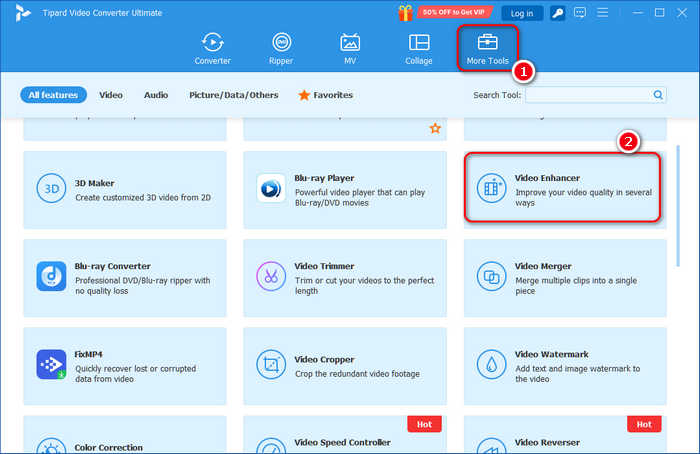
Step 3 Click the Add button to add your video files to this video combiner program.
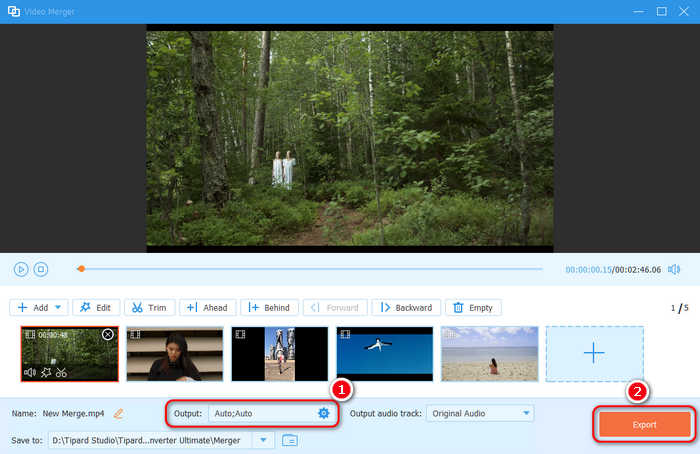
Step 4 You can also click the Add button to add more video files. Here, you can edit each video or apply your editings and customizations to all videos. You can also drag to rearrange each video.
Step 5 You can click the Output dropdown button to select a desired output format, including MP4, MOV, AVI, MKV, etc. You can also adjust the video resolution, bitrate, frame rate, codec, and other parameters.
Step 6 Finally, click the Export button to merge all video clips with this video combiner.
2. Using the Converter function:
Step 1 Add videos to Tipard Video Converter Ultimate
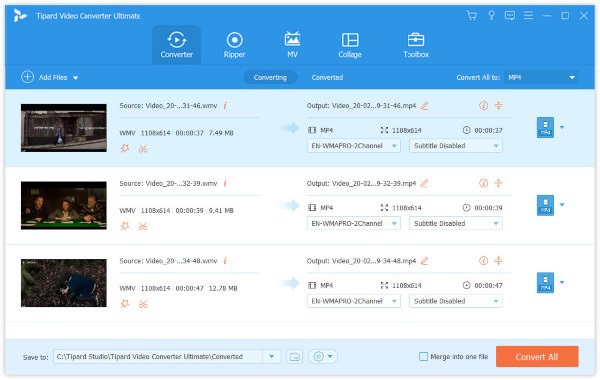
Since Tipard Video Converter Ultimate is the desktop software, you need to download and install it to your computer. Then launch it and click the Add Files button to import the video clips to combine.
Step 2 Combine video clips
If you want to combine the video clips together, enable the Merge into one file option by clicking on it. Moreover, you are allowed to edit each video clip by clicking the Edit button.
Step 3 Export the video
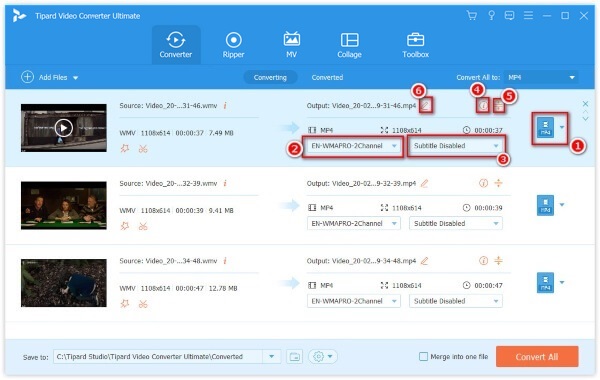
After editing, you can click the MP4 tab at the right to select the output format. Then click the Convert All button to merge your videos in this video combiner on your computer.
2: Windows Movie Maker
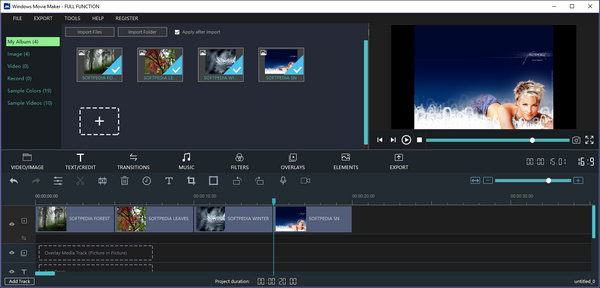
Windows Movie Maker remains a classic, free video and audio merger and editor tailored for Windows users. Its most significant advantage is that it is completely free of charge, offering a straightforward timeline for merging clips and adding simple transitions.
However, you should note that Microsoft officially discontinued the Windows Essentials suite years ago. Consequently, the video with audio merger software is no longer available for download from the official Microsoft website, and it lacks support for modern high-resolution codecs like HEVC or 8K. While it remains a nostalgia-driven choice for basic, quick stitching on older systems, it has largely been succeeded by the modern Microsoft Clipchamp or more robust professional alternatives.
- Merge video clips on the storyboard simply.
- Preview the video story with the built-in media player.
- Include basic video editing tools and several filters.
- Most third-party plugins require to purchase.
3: Bandicut
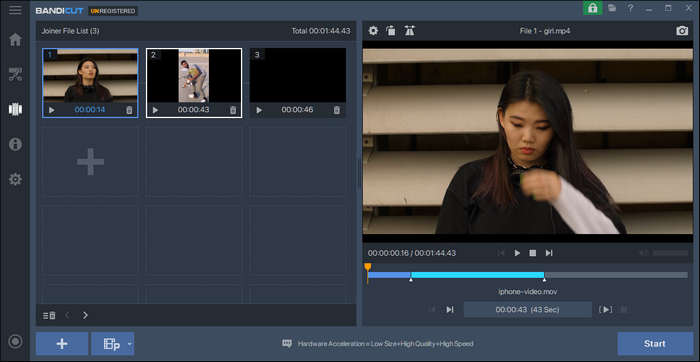
Bandicut is a high-performance video merging and cutting software renowned for its industry-leading High-Speed Mode. Unlike many other video combiners that force a re-encoding process, Bandicut video combiner allows you to join multiple video clips while maintaining the original video quality exactly as it is. This ensures a lightning-fast merging experience without any generational loss in resolution or bitrate. Its minimalist interface is designed for users who prioritize efficiency and precision, making this video merger an excellent utility for quickly stitching together large 4K files or high-frame-rate gaming footage without taxing the CPU.
- High-Speed Mode allows for lossless video merging without re-encoding.
- User-friendly, minimalist interface ideal for rapid editing workflows.
- Supports hardware acceleration (Intel, Nvidia, AMD) for high-efficiency processing.
- Precisely join or cut videos by frame for professional-level accuracy.
- The free version adds a watermark at the end of the output video.
- Extremely limited feature set; lacks advanced filters, transitions, and audio editing.
You May Also Like:
4: Openshot Video Editor
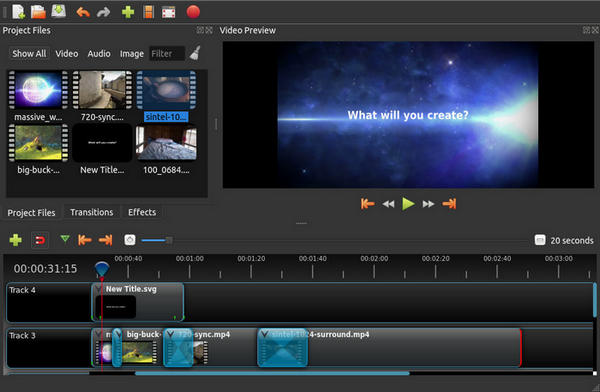
OpenShot Video Editor is a powerful, award-winning open-source and free video merger and editor that provides professional-grade features completely free of charge. Designed with a focus on ease of use and flexibility, this video combiner for Windows offers a multi-track timeline that allows you to drag and drop an unlimited number of video clips, audio tracks, and images for seamless merging. Whether you are a beginner looking to stitch family videos or a hobbyist creating content for social media, OpenShot provides a modern, intuitive interface equipped with advanced capabilities like 3D animations and keyframe-based effects.
- Access the full suite of professional features without any subscriptions, hidden costs, or watermarks.
- Merge as many video and audio layers as you need, offering great flexibility for complex storytelling.
- Provides a uniform user experience across Windows, macOS, and Linux.
- Includes a wide array of built-in transitions, title templates, and digital effects to enhance your merged videos.
- Can experience significant lag or stability issues when processing large 4K files or complex multi-layer projects.
- Lacks the highly optimized GPU acceleration found in commercial competitors, leading to longer export times.
5: iMovie (macOS)
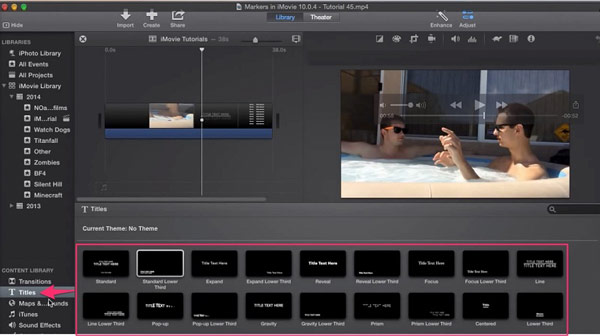
iMovie is a free video merger for Mac computers. It relies on projects to edit videos and combine video and audio clips on tracks quickly. Moreover, this video merger works well with QuickTime and other utilities on Mac. You don't need to download iMovie on your Mac, for this video combiner is a built-in program.
- Put video and audio files on the timeline for combination.
- Adjust brightness, contrast, exposure and more parameters.
- Keep the original video quality as much as possible.
- The output formats are limited.
Part 5. Top 5 Video Mergers on iPhone and iPad
1: InShot
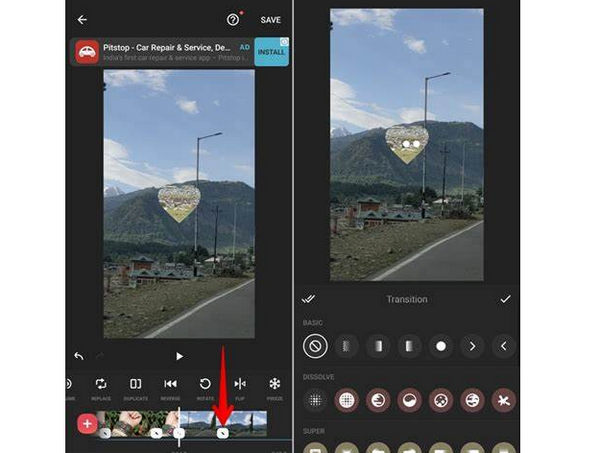
InShot is a top-rated, versatile video merger app and editor specifically designed for creators on the go. Optimized for both iPhone and iPad (iOS 11.0 or later), it offers a remarkably smooth and stable experience for stitching together clips into high-quality stories. As a comprehensive video combiner for iPhone and Android, InShot integrates trending styles and professional editing tools within an intuitive mobile interface. Beyond simply merging videos, you can effortlessly trim footage, apply aesthetic filters, add popular music, and enhance your projects with stylish stickers and text, making it an all-in-one creative studio for social media.
- Put video clips together on tracks on iOS devices.
- Include extensive video effects and filters.
- Share to social media, like Facebook, Instagram, WhatsApp, etc.
- Some features and elements need to purchase in app.
2: Splice
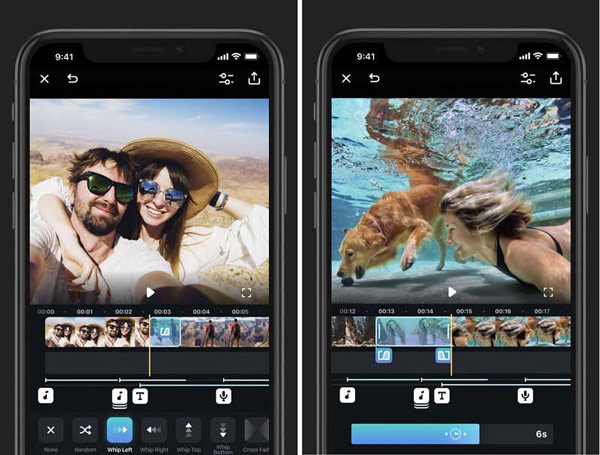
Splice is a high-performance app to combine videos for free on iOS and Android. It is designed for creators who demand desktop-class precision on iPhone and iPad. Optimized for the latest Apple hardware, this video merger app provides a sophisticated yet accessible platform for cinematic storytelling. Splice excels at seamlessly merging clips with professional-grade transitions, advanced speed effects, and frame-accurate trimming. While the app is free to download, this free video merger app operates on a subscription-based model, unlocking a powerful creative suite that includes an expansive royalty-free music library and high-end editing tools capable of turning your raw footage into polished, social-ready movies in minutes.
- Apply filters and effects to each video clips before merging.
- Adjust background color, orientation, music and more.
- Add titles, text overlays, emojis or stickers.
- The built-in transitions are limited and outdated.
3: VivaVideo
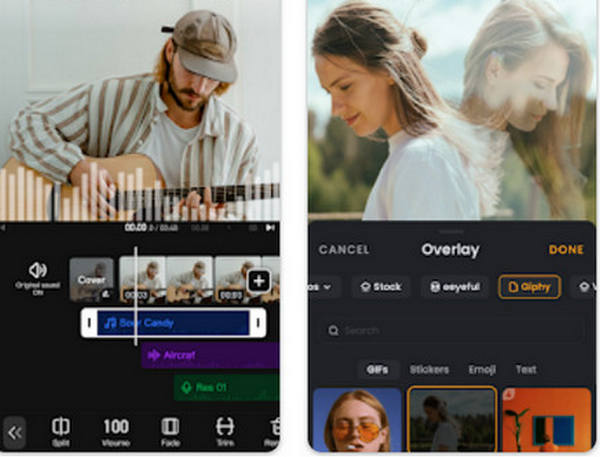
VivaVideo is a globally recognized video merger app and creative editor designed for users who want to transform simple clips into engaging, fun-filled movies. As a highly accessible video combiner for iPhone and iPad, it specializes in making the merging process both quick and entertaining. Whether you are stitching together family vacation clips or creating a birthday montage, VivaVideo provides a vast ecosystem of aesthetic themes, stylized stickers, and trendy transitions. Its strength lies in its balance between simplicity and variety, offering an extensive toolkit that allows you to join videos, adjust speeds, and apply artistic filters with just a few taps.
- Combine video clips, photos and animated images on iOS device.
- Trim, crop and edit video clips with ease.
- Upload your works on Facebook, YouTube, Instagram and more.
- You have to upgrade to pro version if you want to export video to 4K and HD resolution.
4: KineMaster
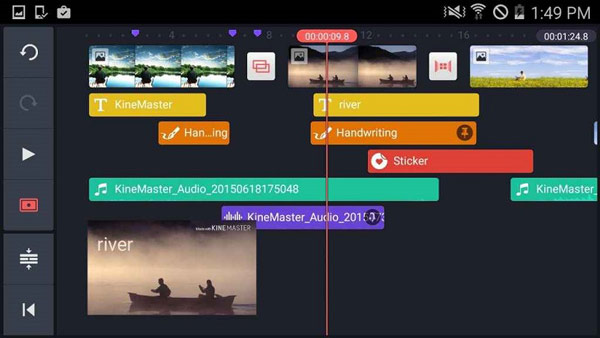
KineMaster is a professional-grade video merger and editor that brings desktop-class precision to iPhone and iPad users. Designed for creators who need more than just simple stitching, it features a sophisticated multi-layer timeline that allows you to merge multiple video clips, images, and audio tracks with frame-accurate control. Supporting over a dozen languages, KineMaster video merger ensures global accessibility that few mobile editors can match. Its signature neat and clear interface provides an organized workspace for complex projects, making it the ideal choice for users who want to fine-tune audio levels, apply chroma key effects, or precisely synchronize sound with their combined video footage.
- Combine video clips, images, effects, text and audio files on layers.
- Add voiceovers, background music, and integrated audio effects.
- Control color, speed and other options.
- Some features require payment, such as 4K output resolution.
5: Magisto
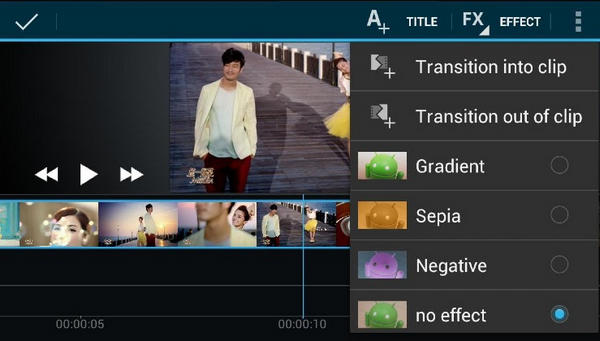
Magisto is an intelligent video merger and smart editor that leverages sophisticated AI technology to transform your raw footage into professionally edited movies. Unlike traditional video combiners that require manual trimming and synchronization, Magisto acts as your personal AI filmmaker. By simply selecting your video clips and choosing a preferred editing style and soundtrack, the video combiner app's advanced algorithms automatically find the best parts of your footage, stabilize shaky images, and stitch them together with perfectly timed transitions. This audio video merger is the ultimate choice for users who want high-quality, emotionally engaging video stories without spending hours on a complex timeline.
- Choose the built-in video theme to make a project quickly.
- Combine photos and video clips from your Cameral Roll or Google Photos.
- Share your content to social media, messaging app or email quickly.
- This video merger app is not completely free.
Part 6. Top 5 Video Mergers for Android
1: CapCut
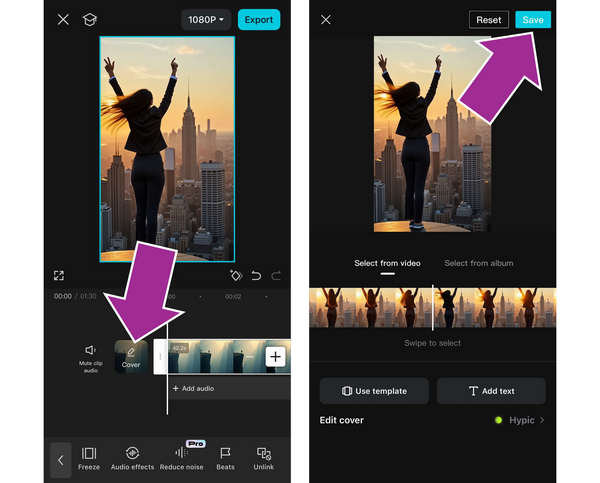
CapCut Video Editor (formerly Viamaker) is the powerhouse all-in-one video merger and editor that has redefined mobile content creation. As the official companion app for TikTok, this video joiner app excels at transforming multiple video clips into viral-ready masterpieces with extraordinary ease. Beyond simple merging, CapCut video merger offers a sophisticated multi-track timeline where you can layer videos, audio, and effects with pinpoint accuracy. Its standout feature is its massive library of trending templates and AI-driven tools, such as auto-captions, background removal, and intelligent beat-syncing, allowing you to produce high-energy, professional-looking videos that are perfectly tuned to current social media trends.
- Offer trending songs and specialized transitions designed to make your combined clips go viral.
- Effortlessly merge videos with intelligent tools like auto-captioning and text-to-speech.
- Offers professional speed ramping to create smooth slow-motion or fast-action sequences.
- Supports merging and exporting in 4K at 60 FPS with Smart HDR support for crystal-clear visuals.
- Heavily optimized for short-form, vertical content; may feel less intuitive for traditional long-form landscape projects.
- many of the most popular effects and advanced AI features are now locked behind a paywall.
2: VideoShow AI
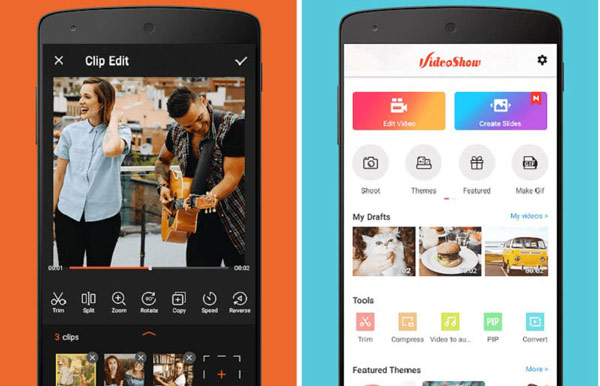
VideoShow AI is a highly popular, all-in-one video merger and creative video editor app that blends traditional editing tools with cutting-edge artificial intelligence. As an evolution of the classic VideoShow app, this video merger app focuses on making the merging process both smart and effortless. The video combiner app excels at combining multiple video clips and photos into high-quality stories, using AI to automatically suggest transitions, filters, and themes that match your content’s mood. Whether you are building a cinematic vlog or a quick social media reel, VideoShow AI provides a rich toolkit, including AI video generation, smart subtitles, and background removal, to ensure your combined projects stand out with professional flair.
- Contain over 50 elaboration themes to make personalized stories.
- Combine video clips, images and GIFs quickly.
- Add transitions, filters, sound effects and more.
- The output quality is not as good as other video mergers.
3: Videoshop
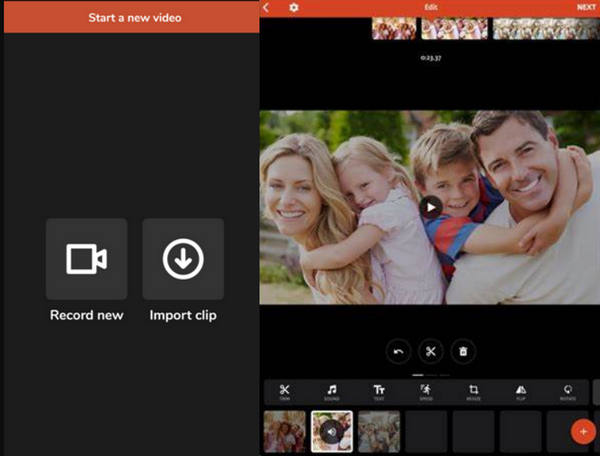
Videoshop is a top-tier, user-friendly video merger and editor tailored for Android users who value speed and simplicity. Known for its vibrant and clean interface, this video joiner application transforms the often-complex task of video combination into a seamless, enjoyable process. Whether you are a beginner or a casual creator, Videoshop's intuitive on-screen guides lead you through merging multiple clips, adding personalized music, and integrating quirky sound effects with ease. This video combiner app is the perfect "quick-edit" companion, allowing you to stitch together memories, adjust playback speeds, and apply artistic filters, all within a highly responsive mobile environment optimized for modern Android hardware.
- Combine multiple video clips into one on Android phone.
- Adjust brightness, contrast, saturation, etc.
- Apply sound effect or add personal music from your library.
- It only offers 4 transitions
4: AndroVid
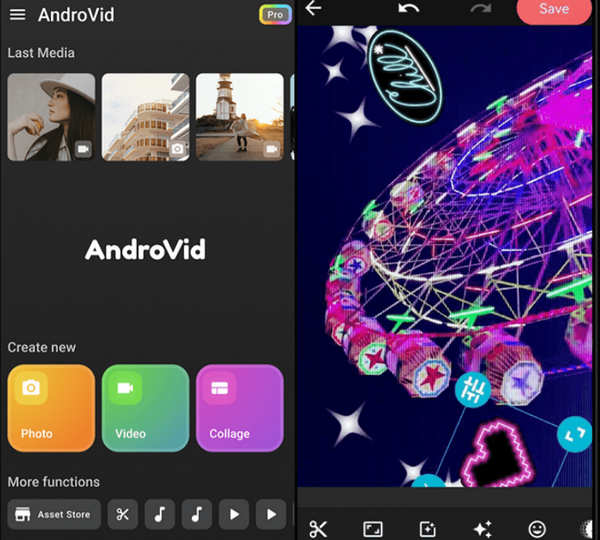
AndroVid is a highly efficient, lightweight free video merger and toolbox editor optimized for a wide range of Android devices (running Android 5.0 and up). It stands out as a versatile utility that simplifies complex tasks like merging, trimming, and transcoding into a few intuitive taps. Unlike standard mobile audio and video combiners, AndroVid offers professional-grade technical depth, allowing users to consolidate multiple clips while maintaining high visual fidelity. While the base version provides a robust set of free tools, the Pro subscription unlocks an elite creative suite, including AI-driven video upscaling, support for the high-efficiency HEVC (H.265) codec, and 4K Ultra HD exporting, making it a top choice for creators who need technical precision on a mobile platform.
- Join several video clips to make one movie file for free.
- Add background music or use personalized music.
- Apply text, stickers, emoji and watermark on videos.
- It is not available to old Android devices.
5: VN Video Editor
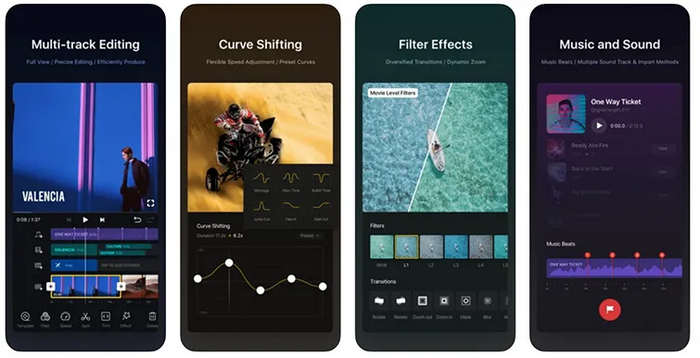
VN Video Editor (also known as VlogNow) is a professional-grade, multi-track video merger and editor that has gained massive popularity for its "clean, powerful, and free" philosophy. Unlike many mobile editors that feel like toys, VN provides a desktop-class timeline experience on both mobile and macOS/Windows. It excels at merging high-resolution footage with frame-accurate precision (down to 0.05 seconds). Its standout feature is its ability to offer advanced tools, like curve speed shifting, keyframe animations, and LUT filter imports, without the intrusive watermarks that plague other free apps. It is the ideal choice for vloggers and professional creators who want a minimalist, Apple-style UI combined with robust, performance-oriented editing capabilities.
- Allow you to export your merged projects without a brand logo for free.
- Easily manage and merge multiple layers of video, audio, stickers, and text with a clear, visual interface./li>
- Feature advanced "Curve Speed" shifting, allowing for smooth, cinematic transitions between fast and slow motion.
- Support merging and exporting 4K footage at 60 FPS
- You may experience stutters and crashes when dealing with large 4K videos.
- The advanced features may take longer time for beginners to master.
Part 7. Top 5 Video Mergers Free Online
1: Kapwing
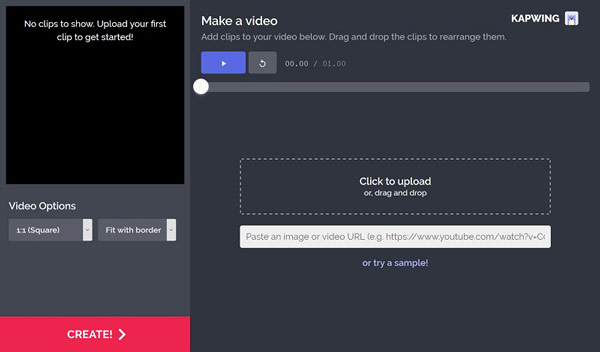
Kapwing is a leading, browser-based video merger online and collaborative editor designed for creators who want professional results without the need for high-end hardware or software installations. As a modern "cloud-first" platform, it offers a remarkably intuitive, drag-and-drop timeline that makes merging multiple video clips as simple as editing a document. Kapwing’s standout feature is its seamless integration with the tools you already use; you can import footage directly from Google Drive, Google Photos, and Dropbox, or simply paste a URL to pull content from the web. Combined with its powerful AI suite, including auto-subtitles and intelligent "Smart Cut" for removing silences, this online video merger is the ultimate workspace for teams and solo creators to stitch, refine, and export polished videos from any device..
- Upload video clips from your hard drive or URL for editing.
- Organize your video clips on the storyboard.
- Change aspect ratio or zoom in and out the images.
- It cannot share the result video to social networks
2: Clideo
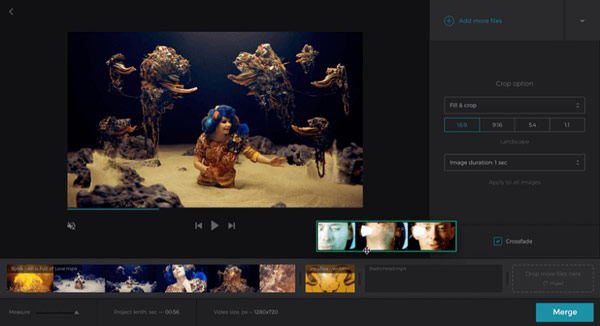
Clideo is a premium and online video combine that prioritizes speed and security for users who need a reliable online solution. Featuring a sleek, distraction-free interface, Clideo video merger offers an exceptionally "refreshing" and streamlined workflow for combining multiple video clips into a single, polished file. It is uniquely powerful among online tools, capable of processing large tasks up to 500MB (and up to 750MB for registered users) with remarkable stability. Whether you are merging social media reels or longer presentation clips, Clideo ensures a smooth experience across all browsers, allowing you to fine-tune your project with custom aspect ratios and background music, all without the need for complex software installation.
- Import video files from your computer for editing online.
- Crop, trim or adjust video clips before combing them.
- Preview the video format with the online media player.
- It takes longer time to upload videos.
3: Canva Video Merger
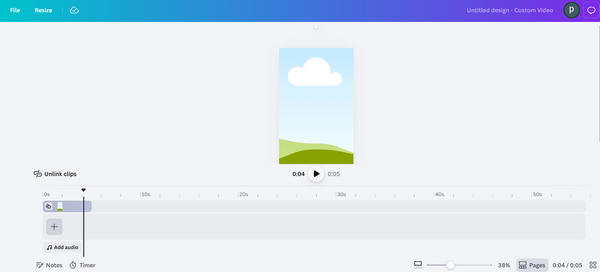
Canva Video Merger is a versatile online video merging platform that brings professional-grade storytelling to everyone, regardless of technical skill. Known for its "design-first" approach, Canva’s online video combiner allows you to stitch together clips using an intuitive drag-and-drop timeline that feels more like building a presentation than complex editing. This free and online video merger excels at creating high-energy, social-ready content by integrating a massive library of premium templates, graphics, and stock footage directly into your workflow. With the latest 2026 updates from Magic Studio™, Canva now offers advanced AI-driven features like Beat Sync, which automatically aligns your video transitions to the rhythm of your music, ensuring a cinematic flow with zero manual effort.
- Allow you to merge videos and export without a watermark in the free version.
- Offer many free and excellent stock videos.
- Features like Magic Animate and Beat Sync can handle the tedious video editing.
- You may experience lags and stutters.
4: Pixiko
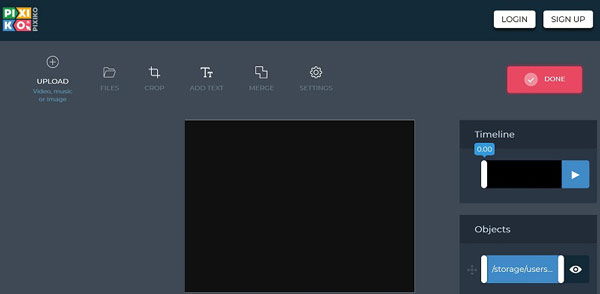
Pixiko is a highly responsive, online and free video merger designed for creators who prioritize speed without sacrificing creative control. Standing out with its signature "expanded editing panel," Pixiko provides an exceptionally clear and organized workspace that makes stitching multiple video clips, text, and music feel effortless. It is more than just a simple video combiner; it is a versatile online studio where you can precisely reorder objects on a multi-layer timeline, apply trendy filters like Glitch or Retro, and add animated text in just a few clicks. With its high-speed generation and direct integration with stock libraries like Pixabay, Pixiko is a reliable, "no-install" solution that maintains professional 1080p quality for everything from quick social media stories to full-length presentations.
- Upload video files from your hard disk for editing further.
- Edit your video files online frame by frame.
- Provide extensive profile settings for each video project.
- It requires sign-up to download the output.
5: Aconvert
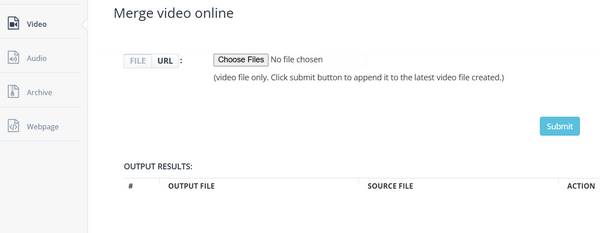
Aconvert is a specialized, web-based utility designed for users who need a straightforward video merging experience. Unlike complex creative suites that require a learning curve, Aconvert Video Merger functions as a powerful backend processor that excels at stitching together video files from various sources. Its greatest strength lies in its extensive format support, capable of handling virtually any container, from common MP4 and MOV to niche professional codecs. While it lacks a real-time preview player, this "blind merging" approach allows for a faster, lighter interface that focuses purely on file integrity. It is an ideal, lightweight solution for users who have already pre-edited their clips and simply need a reliable cloud engine to join them into a single, high-quality output file.
- Load video clips from computer or URL.
- Support online-click video combination.
- Easy to use and totally free.
- It only works on limited video formats.
Part 8. FAQs of Video Merger
What's the best way to combine videos?
The best way to combine videos relies on your specific needs. But if you want convenience, Clide Video Merger is a good choice. If you prefer seamless merging and smooth playback, a desktop program like Tipard Video Converter Ultimate is your best choice.
How to merge videos in VLC?
To merge videos in VLC, go to Media > Open Multiple Files, click Add to import your clips, select Convert from the Play dropdown, choose a profile like MP4, and click Start to merge videos with VLC Media Player.
Can I merge videos on an iPhone?
Yes, you can. The built-in iMovie app can merge videos on an iPhone. Just create a new project and import all videos you want to merge. Put them in the timeline and reaarang the sequence. Finally, export the project to merge the videos into one single video.
Conclusion
Now that you have explored the top-tier video combiner programs for Windows, Mac, iOS, and Android, selecting the right tool depends on your specific workflow. If you require a professional-grade, all-in-one desktop solution, Tipard Video Converter Ultimate stands out as the premier video combiner on the market. Engineered for both speed and precision, it goes beyond simple merging by offering a robust creative suite, including advanced AI video upscaling, lossless quality enhancement, and comprehensive editing tools. Whether you are stitching 4K footage or refining social media clips, Tipard provides the performance and versatility needed to achieve cinematic results with ease.
More Reading

About the Author

 Click here to join the discussion and share your comments
 Tipard Video Converter Ultimate