

AVI and MP4 are both excellent formats that can give you the best quality. They are also playable on various media players, making them the most reliable formats out there. However, we can't ignore the fact that there will be the best formats you can use for a better viewing experience. With that, if you wonder which format is suitable for you, check this post right away. We are here to give you the information about the two formats, allowing you to get more insights into these formats. You will also learn how to transcode AVI to MP4 and vice versa. Thus, to learn everything about the discussion, begin reading this article.

Part 1. What is MP4
The MP4, also known as MPEG-4 Part 14, is the advanced, modern, and universal standard for digital video. This was designed in the early 2000s; it is a highly efficient multimedia 'container' created for the internet age. Compared with older formats, MP4 expertly packages video, audio, subtitles, and even interactive menus into a single, highly compressed file. Its core strength is achieving a great balance between good quality and small file size, making it perfect for streaming, downloading, and sharing online. In addition, this efficiency and versatility have made MP4 the most compatible format across devices today. It plays seamlessly on virtually every platform, from smartphones, tablets, and smart TVs to gaming consoles and web browsers.
Part 2. What is AVI
The AVI format, also known as Audio Video Interleave. It is a classic video container format. It was designed by Microsoft in 1992. You can think of it as a digital container that can deal with separate audio and video streams into a single playable file. Plus, its key design feature was to synchronize audio with video, which was a major advancement at the time. Being an older format, AVI is known for its simple, uncompressed or lightly compressed nature, which can preserve high visual quality but often results in very large file sizes.
Part 3. A Comparison Between MP4 and AVI
Are you interested in learning more about the two formats? In that case, you can check the simple comparison table below. After that, we will offer a detailed explanation, enabling you to understand their capabilities fully. Without further ado, check everything below and learn more about AVI and MP4 formats.
| MP4 | vs. | AVI |
|---|---|---|
| Smaller file size | File Size | Larger file size |
| Highly compressed | Compression Quality | Less or no compression |
| MPEG-1,2,4, H.265/HEVCVP8, H.264/AVC, VP9 | Codecs | Xvid and DivX |
| Microsoft platforms and consoles | Compatibility | Available on all platforms |
| Supports 1080p | Quality | Supports 4K |
AVI vs. MP4: Compatibility
In terms of compatibility, there is no doubt that MP4 is the best choice. The AVI container format is only playable on some Microsoft platforms and consoles. The MP4 format is playable on almost all platforms, ensuring that you won't encounter any compatibility issues. Plus, if you are planning to edit videos, MP4 is better since almost all video editing software can support the format, allowing you to remove subtitles from the video, crop, trim, add filters, adjust playback speed, and more.
AVI vs. MP4: File Size
When it comes to file size, we can tell the AVI is larger since its compression algorithm is less or none. This format is not ideal if you want to collect videos on your device since it will consume too much space. If you prefer a video with a smaller file size, using MP4 is better. With this format, you can keep as many videos as you want, making it suitable for keeping collections.
AVI vs. MP4 : Video Quality
The AVI container format can support up to 1080p resolution, which is already perfect for watching videos satisfactorily. However, since larger TVs and advanced software are showing up nowadays, watching a video with a quality superior to 1080p is ideal. Fortunately, MP4 can help you achieve a better viewing playback since it can handle videos with 4K resolution.
AVI vs. MP4: Codecs
Even though they are both container formats, they differ fundamentally in how they handle video and audio codecs. The AVI container format is a rigid, older container that can house simple, often uncompressed codecs (like M-JPEG or DivX). On the other hand, MP4 is a flexible, modern container explicitly created to efficiently encapsulate and synchronize advanced, highly compressed codecs like H.264, HEVC, and AV1 codecs, making it the universal standard for high-quality video with small file sizes.
Part 4. How to Convert AVI to MP4 and Vice Versa
Do you want to convert AVI to MP4 and vice versa? In that case, we would like to recommend using Tipard Video Converter Ultimate. This video converter can offer all the features you need. It has a fast conversion process, up to 120 times faster compared with other converters. The software can also support a batch conversion feature, allowing you to transcode multiple files simultaneously. The best part here is that it can re-encode and remux videos, making it ideal for all users. What we like here is that you can also add, change, and remove audio files and subtitles, ensuring that you can get an appealing video output. Lastly, you can access various video editing tools, such as trimmer, cropper, compressor, rotator, and more. Thus, if you are looking for the best video converter and editor, look no further than Tipard Video Converter Ultimate.
To start the conversion process, follow the provided steps below.
Step 1 Download and install Tipard Video Converter Ultimate on your Windows or Mac device. After that, launch it to begin the video conversion process.
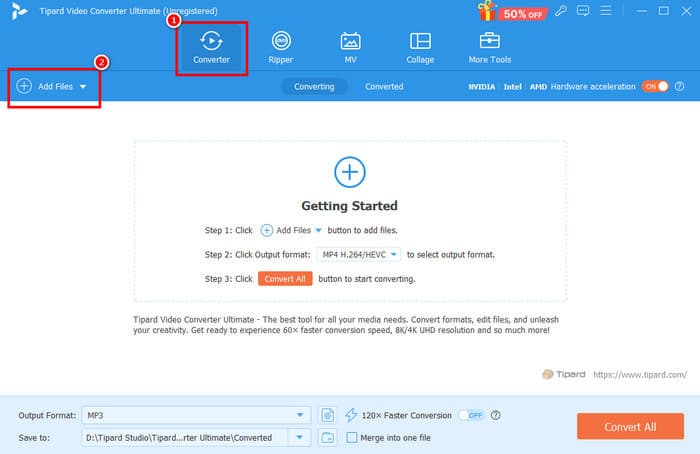
Step 2 Then, from the layout, proceed to the Converter feature and add the AVI or MP4 file by tapping the Add Files button.
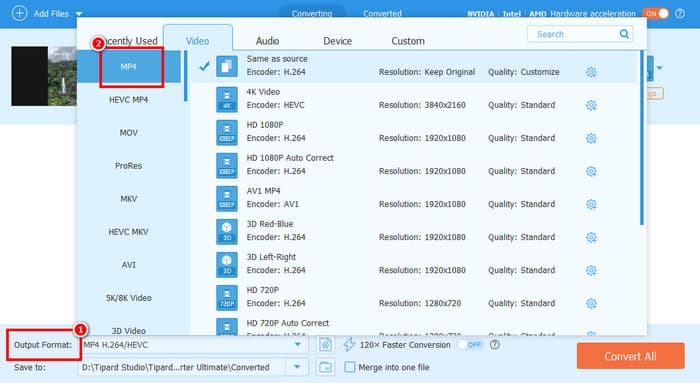
Step 3 After that, proceed to the Output Format section to select your desired format. You can also pick/select your desired video quality.
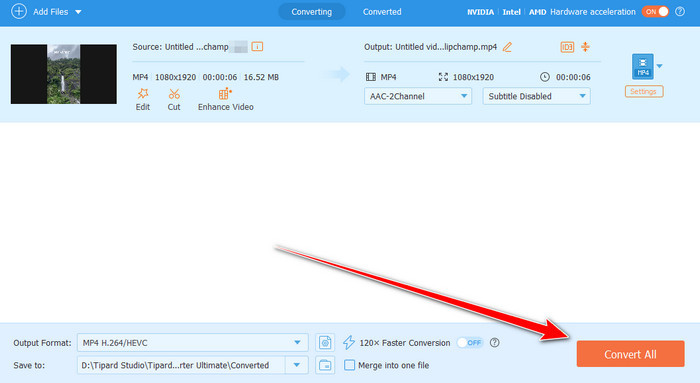
Step 4 For the final process, tap the Convert All button to start the conversion process. Once the procedure is done, the program will automatically save the video to your assigned folder.
With this process, you can effectively transcode your AVI and MP4 files to your desired format. It can even offer a fast and smooth conversion process, making it the best converter for all users. Thus, always rely on Tipard Video Converter Ultimate to change your video to your preferred output format.
Conclusion
Now you have an idea about the differences between AVI and MP4 formats. You even learned more about their codecs, compatibility, quality, file size, and more. Plus, if you want to convert AVI to MP4 and vice versa, it would be better to use Tipard Video Converter Ultimate. With this program, you can transcode your videos with the best quality, making it a go-to media converter for you.
More Reading



About the Author

 Click here to join the discussion and share your comments
 Tipard Video Converter Ultimate