

Want to learn how to make a WhatsApp sticker? Well, making stickers is fun since you can use them to send messages to other people. It can even make the conversation enjoyable and engaging. If you are interested in learning how to create your WhatsApp stickers, you must read this post. We will offer the best method you can use and follow to create appealing and creative stickers. Without anything else, check this post and explore the best WhatsApp sticker creation procedure.
Part 1. How to Create Custom WhatsApp Stickers on WhatsApp
WhatsApp is not just a reliable messaging platform. Another feature you can access on this platform is its capability to create and customize stickers. With this feature, you can make your conversation with other people engaging and creative. What we like here is that creating your desired sticker is simple. It is because the app has a simple user interface, allowing you to navigate everything easily and quickly. You can attach multiple stickers, add time, use the pencil tool, insert text, and more. You can even use its AI feature to create your desired result with high accuracy. With that, we can tell that WhatsApp is another powerful platform you can use to perfectly create the best sticker.
To create a sticker on WhatsApp, you can follow the detailed steps we have provided below.
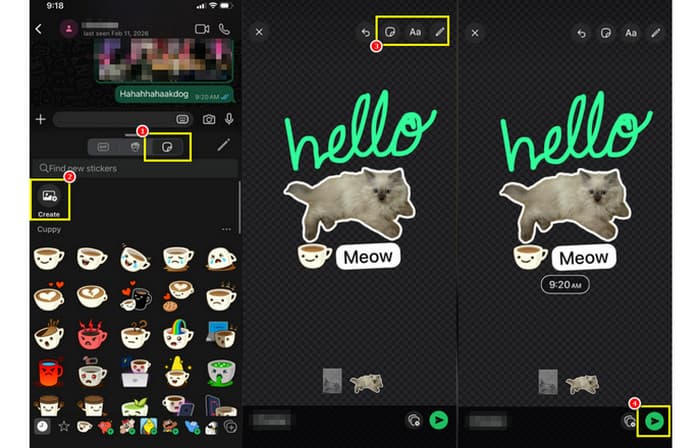
Step 1 First, you must open the WhatsApp app on your mobile phone. Then, open your conversation with a certain person.
Step 2 Press the Sticker feature and touch the Create button. Once done, you can select any image from your Gallery or Photos app.
Step 3 When the photo is already in the canvas, you can edit your sticker. You can utilize the pen tool to draw something on the sticker. You can also press and use the Text and Sticker feature to add more stickers and text to your sticker.
Step 4 If you are satisfied with your sticker, you can touch the Send button below.
With this WhatsApp sticker maker, there is no doubt that creating a WhatsApp sticker is a simple task. You can even access more stickers and various elements to create astounding stickers. Thus, if you want to create a sticker using WhatsApp on iPad, iPhone, and Android, you can always rely on the provided instructions above.
Part 2. Convert Video and GIF into Animated WhatsApp Stickers
Do you want to convert your video and GIFs into animated WhatsApp stickers? Then, you must use an exceptional converter that can give you all the features you need. In that case, we suggest using Tipard Video Converter Ultimate. This program is perfect since it ensures that you can convert your file smoothly. It can even provide a fast conversion process up to 120 times faster compared with other converters. Plus, you can even edit your file. You can change the aspect ratio, resolution, metadata, and more. You can even save the GIF with the best frame rate for better viewing. With that, if you are searching for an excellent and reliable converter that can give you the result you need, always access Tipard Video Converter Ultimate on your Windows and Mac desktop.
To start the conversion process, you can use the instructions below.
Step 1 Download and run Tipard Video Converter Ultimate on your computer. You can use the buttons below to instantly access the program.
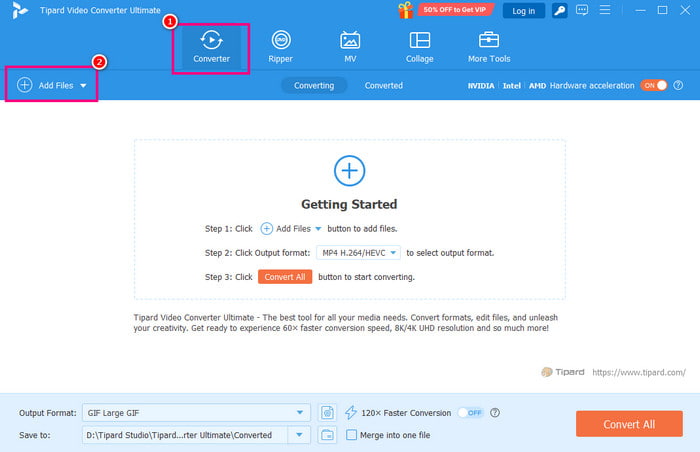
Step 2 You can proceed to the Converter section and tap the Add Files button to attach/insert the video or GIF that you want to convert into an animated WhatsApp sticker.
Step 3 You can also edit your file if you want to. You can tap the Edit feature to start improving your file, such as adjusting the aspect ratio, cropping the video or GIF, adding effects, filters, and more.
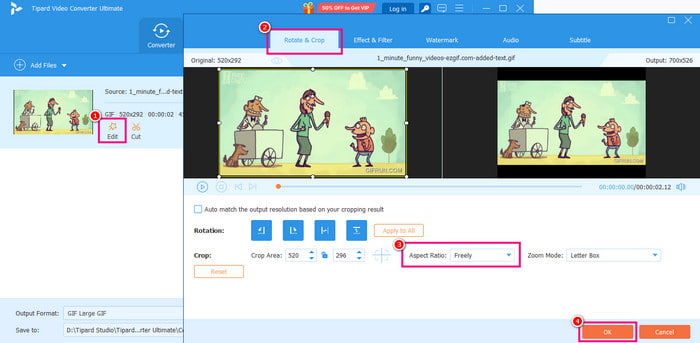
Once done, you can tap the OK button to apply the changes.
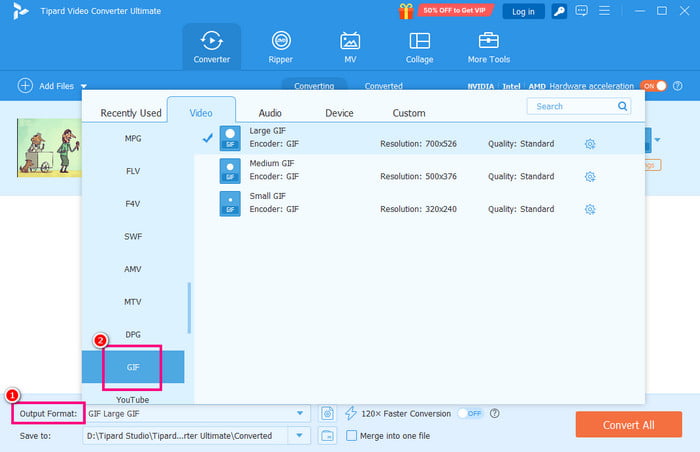
Step 4 Then, go to the Output Format to choose GIF as your final format. Note that you can also change the frame rate, resolution, color settings, and more parameters.
Step 5 For the final process, you can tap the Convert All button from the bottom interface. Once done, you can now send and share the sticker using the WhatsApp platform.
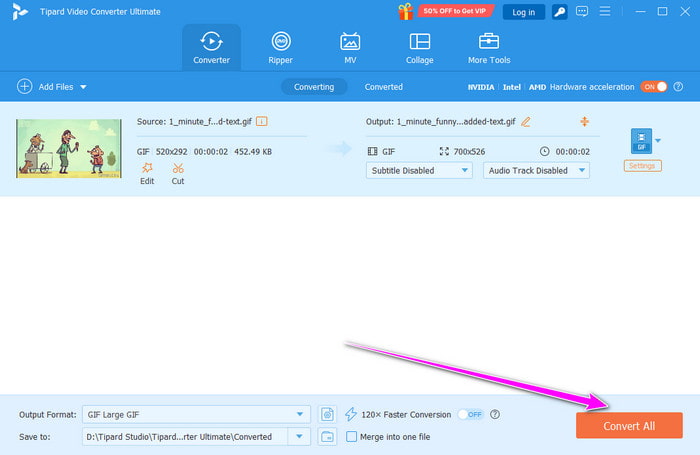
Thanks to this method, you can effectively transcode/convert your file into an animated WhatsApp sticker. Thus, always rely on this program to obtain your preferred output.
Part 3. How to Use AI to Generate WhatsApp Stickers from Text
Do you want to create a WhatsApp sticker on iPhone and Android using AI? In that case, we are here to help you. WhatsApp can also offer an AI-powered technology that can help you generate your desired sticker. All you need is to insert a helpful prompt. After that, the app will begin generating the sticker. What makes it ideal is that you can download the generated file, allowing you to share it on various platforms.
To generate a stickler using AI, you can use the simple steps below.
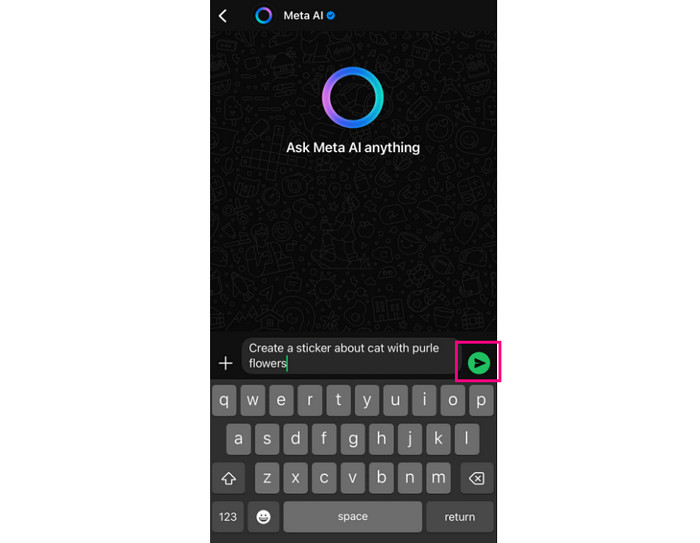
Step 1 Open your WhatsApp app and press the Meta AI from the bottom interface. Then, you can start inserting the prompt.
Step 2 After inserting the prompt, you can start pressing the Send button.
Step 3 Once the result is already on your screen, you can just hold and press the image to hit the Save button.
Part 4. Troubleshooting: Why Can't I Upload My Stickers to WhatsApp
There are various reasons why you can't upload your stickers to WhatsApp. Some of the reasons are:
Incorrect File Format
If your sticker has an incorrect file format, then there's no chance of uploading it to WhatsApp. Always ensure that the sticker has the right format, like WebP and PNG.
Large File Size
You can't upload a sticker with a large file size. Stickers must be under 512 KB. With that, it would be better to resize the sticker for a successful uploading process.
Incorrect Dimension
A larger or smaller dimension from the sticker may cause an error during the uploading process. Always ensure that the dimensions of your sticker are 512×512 pixels.
Missing Transparent Background
The stickers from WhatsApp are expected to be transparent. With that, if you have a customized sticker, you must first remove the background before uploading it. That way, you can use and share the sticker with other users using WhatsApp.
Conclusion
If you want to create stickers on WhatsApp, you can just follow the detailed tutorials above, and even customize your sticker based on your preferences. You can even use its AI technology to generate your sticker. Plus, if you want to convert your videos and GIFs to a better animated WhatsApp sticker, we suggest using Tipard Video Converter Ultimate. With its effective conversion capability, you can ensure getting your desired output after the process, making it a powerful program for users.
More Reading



About the Author

 Click here to join the discussion and share your comments
 Tipard Video Converter Ultimate