

People enjoy listening to podcasts for stories and ideas. Clear audio makes every word count. Even with a good microphone, editing is still necessary. That is why a reliable podcast audio editor is important.
In this write-up, you will learn helpful tips for podcast audio editing. You will also get to know the top three editors, their benefits, and their limitations. These tools will guide you to transform your raw recordings into polished, professional-sounding episodes.
Part 1. Why Podcast Editing is the Secret to Growth
Podcast editing is one of the most important steps in creating a successful show. It is not just about fixing mistakes or removing long pauses.
Editing shapes how your audience hears your content. Clean audio keeps listeners focused and engaged. Poor audio can make them leave early. Editing also highlights important points and removes unnecessary filler words.
A well-edited podcast sounds professional and polished. It helps attract new listeners, builds trust, and keeps your audience coming back episode after episode.
Part 2. Top 12 Tips for Podcast Audio Editing
Podcast audio editing can initially seem challenging. But small steps can make a big difference. Following our simple tips can help your episodes sound professional and clear.
- Remove background noise so your voices are clear and easy to listen to.
- To ensure that no one is overly loud or quiet, adjust the volume of each speaker.
- Use fade-in and fade-out effects for smooth starts and endings.
- To maintain the flow, cut out long pauses, "um" sounds, and filler words.
- Balance music and voice levels so the music does not overpower speech.
- Apply noise reduction to remove hiss, hum, clicks, or static.
- Normalize audio to make loud and soft parts consistent.
- Test your podcast on headphones and speakers to hear it clearly everywhere.
- Use EQ to make voices sound natural and easy to understand.
- Add intro and outro music carefully so it matches your podcast style.
- Save backup copies before final edits to avoid losing work.
- Listen to the full episode to catch mistakes and ensure smooth flow.
Using these tips can make your podcast sound polished and professional. It also keeps listeners engaged and helps your show stand out from others.
Part 3. Top 3 Editors for Podcast Audio
You have learned the top tips for podcast audio editing; now, it is time to meet the tools that make editing easier. Please check them out below and see which provides the audio editing features you need.
1. Tipard Video Converter Ultimate
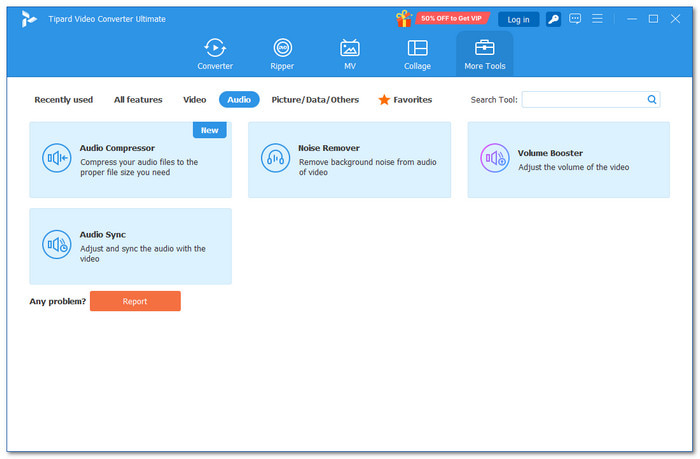
Supported Operating Systems: Windows & Mac
The number one for audio podcast editing is Tipard Video Converter Ultimate, and you will know why. It offers easy audio enhancement tools like noise remover, volume booster, and audio sync, helping your recordings sound clear and balanced.
It supports many audio formats and codecs so that you can work with almost any file. You can apply your edits to all files with one click, saving time. Batch editing is also supported, letting you finish multiple episodes immediately and efficiently.
Key benefits and concerns: You can cut audio, add fade-in and fade-out effects, and boost volume up to 200%. You can also modify the audio format to MP3, M4A, WAV, or FLAC, which are common for podcasts. However, the free version has limits. To unlock all features, you need to upgrade, starting at $18.
User review from Capterra: Tipard Video Converter Ultimate gives almost everything you need for audio and video editing. The support team is helpful if you run into problems. Overall, it is a reliable program with excellent features and great service.
2. Adobe Audition
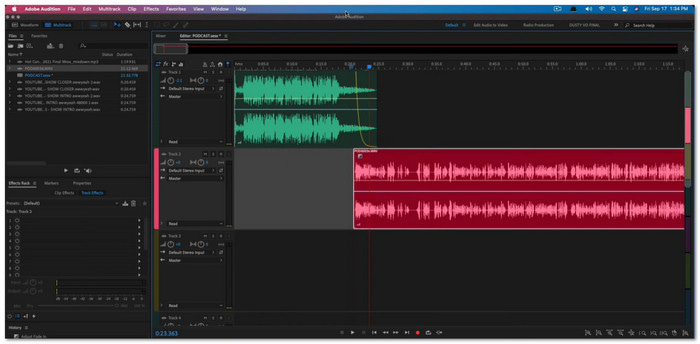
Supported Operating Systems: Windows & Mac
Adobe Audition is made for serious audio work and is perfect for editing audio for podcast projects. It lets you place each voice on its own track. That helps when editing interviews or group shows. The essential sound panel also makes voice fixing easier. You can quickly apply basic effects, match volume, and clean speech.
Key benefits and concerns: It gives strong repair features and clear sound output. Long audio files are also handled properly by it. However, the layout can feel hard at first. Plus, the monthly payment is also expensive for some users.
User review from Capterra: Adobe Audition gives clear recording clarity and dependable editing tools. It helps shape audio with ease and produce clean segments for podcasts, radio work, and short ads.
3. WavePad
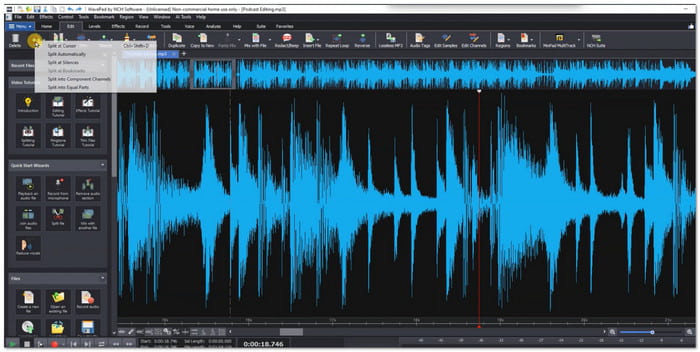
Supported Operating Systems: Windows, Mac, Android, & iOS
WavePad is a great audio editor for podcasts. It opens fast and keeps the controls simple. You can trim speech, cut mistakes, and remove silence in a short time. It also has batch tools for many files, which helps when editing several episodes at once. Its light design also makes it easy to run on older devices.
Key benefits and concerns: It is easy to learn and does not cost much. It also works on desktop and mobile. However, advanced mixing is limited. Large projects might also require an additional editor.
User review from G2: WavePad makes merging audio simple. Combining several files is simple. It also has tools to reduce white noise and clean up recordings. The finished audio is crisp and well-produced.
Part 4. How to Polish Your Podcast Audio
Polishing your audio is the last step to make your podcast sound professional and clean. Learning how to polish podcast audio properly can make your show more enjoyable and keep listeners engaged. Follow these:
- Remove background noise to keep voices clear and crisp. It includes hiss, hum, or any unwanted sounds.
- Adjust the volume on each track so every speaker is balanced.
- For seamless starts and endings, use fade-ins and fade-outs. Transitions sound more organic as a result.
- To ensure that speech is constantly audible, balance the music and effects. Background noise should complement, not overpower.
- To balance out the loud and soft areas, apply compression or normalization. It maintains a steady and comfortable listening experience.
- Listen carefully from start to finish to catch mistakes, awkward pauses, or timing issues.
Your listeners will enjoy it more and notice the difference once you follow the to-dos above. Always remember that a polished episode keeps them engaged and coming back for every episode.
Conclusion
Whether you plan to create an audio drama podcast, comedy podcasts, or interview podcasts, you will need to edit the audio.
You can rely on the three excellent editors mentioned above. Tipard Video Converter Ultimate is especially useful. It has many convenient audio editing features that make podcast production easier.
With the right tools, your audio podcasts will sound clear, professional, and enjoyable. Plus, good editing helps your episodes stand out and keeps listeners coming back!
More Reading

About the Author

 Click here to join the discussion and share your comments
 Tipard Video Converter Ultimate