

- Part 1. The Shortlist: 2026's Best Blu-ray Rippers
- Part 2. How We Stress-Tested the 8 Blu-ray Rippers
- Part 3. Master Comparison of the 8 Best Blu-ray Rippers
- Part 4. Editor's Top Picks of the 3 Elite Best Blu-ray Rippers
- Part 5. 5 Other Blu-ray Rippers Worth Considering
- Part 6. What to Consider for Finding Your Best Blu-ray Ripper
- Part 7. FAQs of Blu-ray Ripper
Key Takeaways:
We've spent 2 days testing 23 Blu-ray ripper programs and finally selected the 8 best ones. Tipard Blu-ray Converter is best for decryption and high-quality output; MakeMKV is the best free Blu-ray ripper for lossless remux and backup in MKV files; HandBrake is the best for advanced users to rip non-protected Blu-rays with deep customization on output files.
If you love binge-watching, your Blu-ray collection is huge. But using a Blu-ray drive and switching discs whenever you want to watch can be a hassle. Plus, discs can get damaged over time. Why not rip your Blu-ray discs to digital copies with a Blu-ray ripper? This way, you can watch your favorite movies anytime with a regular blu-ray player.
In this article, we will share the best Blu-ray rippers you can use on your computer. They can rip Blu-rays into 4K blu-rays and numerous blu-ray formats, offering other great features. Keep scrolling to find the one that suits your needs!

- Part 1. The Shortlist: 2026's Best Blu-ray Rippers
- Part 2. How We Stress-Tested the 8 Blu-ray Rippers
- Part 3. Master Comparison of the 8 Best Blu-ray Rippers
- Part 4. Editor's Top Picks of the 3 Elite Best Blu-ray Rippers
- Part 5. 5 Other Blu-ray Rippers Worth Considering
- Part 6. What to Consider for Finding Your Best Blu-ray Ripper
- Part 7. FAQs of Blu-ray Ripper
Part 1. The Shortlist: 2026's Best Blu-ray Rippers
Top-Tier Professional Decryptors
Tipard Blu-ray Converter
- Best for: High-quality decryption and diverse format support.
- Highlights: Tipard Blu-ray Converter can rip the latest released and old copy-protected Blu-rays and convert the media files to 500+ formats, like MP4, MOV, MKV, AVI, ProRes, FLV, WebM, and more, without losing quality. It can either remux Blu-ray to digital or transcode the physical media to high-quality videos with decent compression and AI upscaling.
DVDFab Blu-ray Ripper
- Best for: All-in-one efficiency and speed.
- Highlights: This Blu-ray ripper has extremely fast ripping speed with advanced GPU acceleration and support AI video enhancement.
Leawo Blu-ray Ripper
- Best for: Balanced features and device presets.
- Highlights: It is good at handling regional protections and offers a wide range of presets for smartphones, tablets, and gaming consoles.
The "Gold Standard" for Lossless Backup
MakeMKV
- Best for: Lossless "Remuxing" (1:1 copies).
- Highlights: It extracts the raw data from the disc and places it into an MKV container without re-encoding. It is the best choice for enthusiasts who want to keep every detail (including all audio tracks and subtitles) intact.
Open-Source & Multi-Purpose Tools
HandBrake
- Best for: Video transcoding and compression and extremely flexible customization.
- Highlights: HandBrake Blu-ray ripper is completely free and open-source. While it cannot decrypt discs on its own, this Blu-ray ripper is the industry standard for compressing large Blu-ray files into smaller, high-quality MP4 or HEVC files.
VLC Media Player
- Best for: Basic and simple ripping without extra software.
- Highlights: VLC is primarily a player, but its "Convert/Save" feature allows for basic ripping. It is a "jack-of-all-trades" tool that most users may already have installed.
Niche & Entry-Level Blu-ray Converters
Acrok Video Converter
- Best for: Specific professional formats.
- Highlights: Acrok Video Converter is known for its ability to convert Blu-rays into formats compatible with professional editing software like Avid Media Composer or Adobe Premiere Pro.
Freemake Video Converter
- Best for: Casual users who need a simple UI.
- Highlights: Freemake Video Converter has a simple interface and easy workflow while offering H.264 codec for MP4, MKV, AVI, and more common and standard output formats.
Part 2. How We Stress-Tested the 8 Blu-ray Rippers
To provide you with the most objective and reliable recommendations, we spent over 50 hours putting these 8 Blu-ray rippers through a series of rigorous, real-world stress tests. We didn't just look at the interface; we pushed each software to its technical limits.
1. Our Standardized Test Bench
To eliminate hardware bottlenecks and ensure a level playing field, all tests were conducted on the same high-performance workstation:
- CPU: Intel Core i9-14900K (16 Cores / 32 Threads)
- GPU: NVIDIA RTX 4090 (24 GB GDDR6X)
- RAM: 24 GB DDR5
- Disc Drive: LG WH16NS60 (Flashed with LibreDrive firmware for UHD support)
- Operating System: Windows 11 Pro 64-bit
The 7 Key Performance Benchmarks
We evaluated each Blu-ray ripper based on four critical pillars that matter most to users:
- Decryption Capability: We tested the software against various copy protections, including AACS 2.1, BD+, and Cinavia, using both brand-new 4K UHD releases and older, region-locked discs.
- Ripping Speed & Hardware Acceleration: We measured the time taken to rip a full 30GB Blu-ray to MP4 (H.264) and MKV (H.265). We specifically looked for NVIDIA CUDA/NVENC and Intel QuickSync optimization.
- Output Quality: To ensure "lossless" claims are true, we compared the ripped files against the output codec, bitrate consistency, and HDR, Dolby, and DTS preservation.
- Stability Under Load: We initiated multiple simultaneous conversion tasks to see if the software crashed or experienced thermal throttling issues during long-term processing.
- The "Dirty Disc" Test: We used a slightly scratched physical disc to test the software’s error-correction algorithms and its ability to skip or repair unreadable sectors.
- The 4K HDR Pass: We ripped a 4K UHD disc with HDR10+ and Dolby Atmos metadata to verify if the software could maintain the high dynamic range and spatial audio integrity.
- The Compression Challenge: We compressed a 50GB ISO image into a 5GB 1080p file to see which software offers the best Size-to-Quality ratio.
Verification of Performance Metrics
Every claim made in this guide has been cross-referenced through a multi-layer verification process to ensure that our speed benchmarks and quality ratings are 100% reproducible.
Part 3. Master Comparison of the 8 Best Blu-ray Rippers
Our benchmarking process involved an exhaustive analysis across the entire Blu-ray ecosystem, including encrypted commercial releases, standard unprotected discs, ISO images, and BDMV folders. To push these tools to their limits, we even utilized non-standard, deeply customized Blu-rays with unconventional codecs, bitrates, and resolution parameters. Our rigorous testing confirmed that elite solutions like Tipard Blu-ray Converter, DVDFab, and HandBrake consistently demonstrate the robust compatibility required to handle these complex formats. The following table serves as a definitive reference, establishing a new standard for performance and versatility in Blu-ray digitizing.
| Product Name | Decryption Capability | Ripping Speed | Output Formats | 4K/UHD Support | Built-in Editor | Chapter/Track Retention | Overall Rank |
|---|---|---|---|---|---|---|---|
| Tipard Blu-ray Converter | Powerful (AACS, BD+, Region Codes) | 30× (Blu-Hyper Tech) | 500+ (MKV, MP4, etc.) | Full Support (Up to 8K) | HAdvanced Suite | Fully Preserved | Best Overall |
| DVDFab Blu-ray Ripper | Strong | Fast | Wide Range | Support (HDR10) | Basic Editing | Preserved | Runner Up |
| MakeMKV | Moderate (Old Protections) | Slow | MKV Only | No 4K Support | No Editor | Fully Preserved | Specialist |
| Leawo Blu-ray Ripper | Moderate | Slow | Many | Support | Basic Editing | Preserved | Standard |
| Acrok Video Converter | None | Fast | Many | Support | Basic Editing | NO | Standard |
| HandBrake | None (Unprotected only) | Average | MP4, MKV, WebM | No | Basic | Partial | Open Source |
| Freemake Video Converter | None | Average | Limited | No | Basic | NO | Entry Level |
| VLC Media Player | None | Extremely Slow | Limited | No | No Editor | NO | Basic Tool |
Part 4. Editor's Top Picks of the 3 Elite Best Blu-ray Rippers
Top 1. Tipard Blu-ray Converter
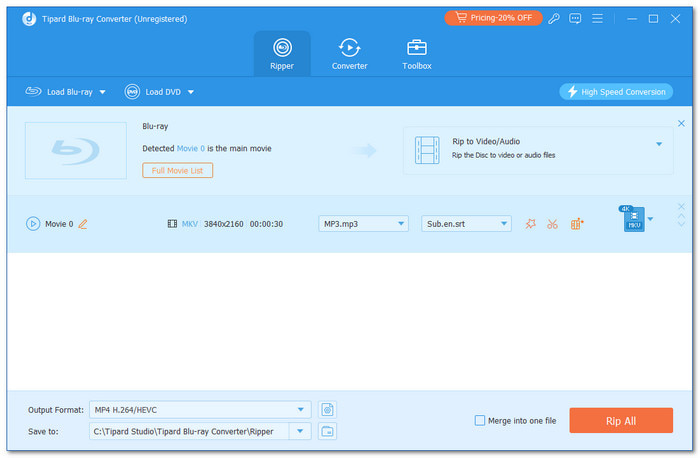
Tipard Blu-ray Converter is the premier Blu-ray ripper for Windows and Mac, supporting over 500 video and audio formats including MKV, MP4, MOV, ProRes, AVI, and lossless MKV. Unlike standard tools, it features a powerful decryption engine that effortlessly bypasses region codes and advanced copy protections (like AACS and BD+), ensuring seamless access to any commercial disc. Powered by Blu-Hyper technology, this Blu-ray ripper delivers lightning-fast processing speeds, up to 30× faster than competitors, by leveraging full GPU and CPU hardware acceleration for maximum efficiency.
Beyond its core ripping power, the Blu-ray ripping software offers a professional suite of built-in editing features. Users can easily crop, rotate, merge, and adjust visual parameters like brightness and contrast, or add custom filters, subtitles, and watermarks to personalize their media. By combining robust decryption with an intuitive interface, Tipard Blu-ray Converter provides a simple yet powerful experience that satisfies both casual beginners and high-end professionals.
Best for: Ripping encrypted Blu-rays and DVDs with advanced decryption capabilities.
Platform: Windows and Mac
Main Features of Tipard Blu-ray Converter:
- Decrypt copy-protected Blu-rays and DVDs to convert and play them without any restriction.
- Support 1080p, 4K, 8K, and lossless backup for seamless playback on different displays.
- Offer H.264, HEVC, AV1, ProRes, and many other video codecs with standard and customizable settings.
- Provide many useful and practical video editing features, like crop, trim, rotate, filters, and more.
- Rip your Blu-rays with subtitles, audio tracks, titles, chapters, and all files in the Blu-rays.
- Utilize full hardware acceleration to quickly decode/remux, edit, and re-encode your disc media.
- Simple workflow and clear interface.
- Fast Blu-ray and DVD ripping.
- The total CPU usage is low.
- Quickly decrypt encryptions.
- Easily open standard and home-made (deep customization) Blu-rays and DVDs.
- The interface can be more fashionable.
Why We Select It:
We select Tipard Blu-ray Converter as the best overall Blu-ray ripper because it can rip all types of Blu-ray and DVD discs, including encrypted movie discs, home-made discs, and highly customized discs. It can bypass new and standard encryptions like 99-Titles, CSS, ACCS, and more. We can convert large 4K UHD Blu-rays to compressed videos while keeping high video quality. We can also remux Blu-rays and DVDs to lossless MKV videos, keeping the original content, including subtitles, titles, audio tracks, and more. The full hardware acceleration can make the ripping speed very fast.
How to Rip Blu-ray with Tipard Blu-ray Converter:
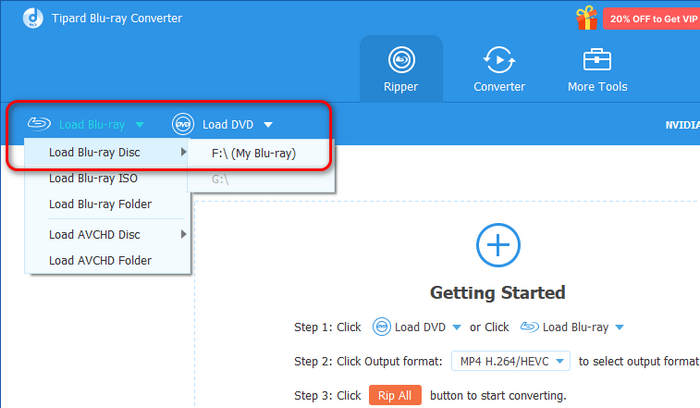
Step 1 Load Your Blu-ray
Insert your Blu-ray disc to your Blu-ray drive. Connect the drive to your Windows or Mac computer.
Download, install, and launch Tipard Blu-ray Converter on your computer. Click the Load Blu-ray button at top left and select your Blu-ray drive to load your Blu-ray disc.
Step 2 Choose Output Format
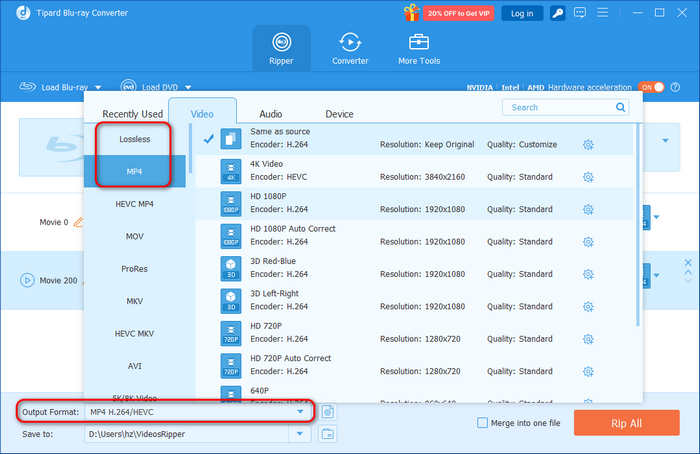
Click the Output Format dropdown button at the bottom left. Then, select a desired output format. If you want to play videos on different common devices, like iPhone, TVs, iPad, and a computer, you can select an MP4 preset (like 4K Video or HD 1080P) with H.264 video codec. If you prefer lossless backup, you can select Lossless and then choose Lossless MKV.
Step 3 Start Ripping Blu-ray
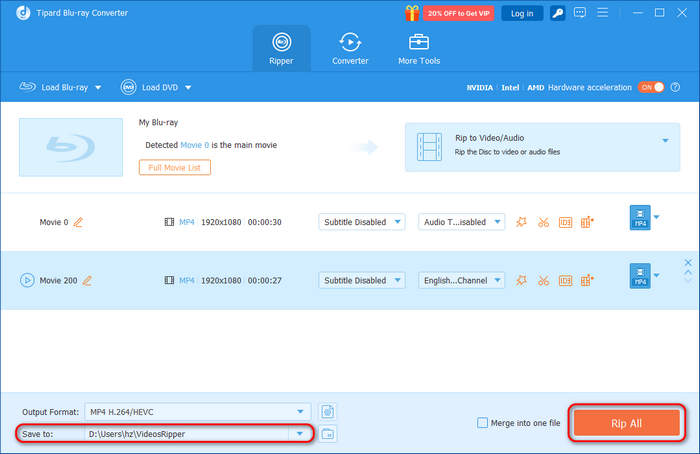
Click the Save to dropdown list to select an output folder for your ripped files. Then, click the Rip All button. This best Blu-ray ripper for Windows and Mac will quickly rip your Blu-rays with its advanced hardware acceleration technology.
Top 2. DVDFab Blu-ray Ripper
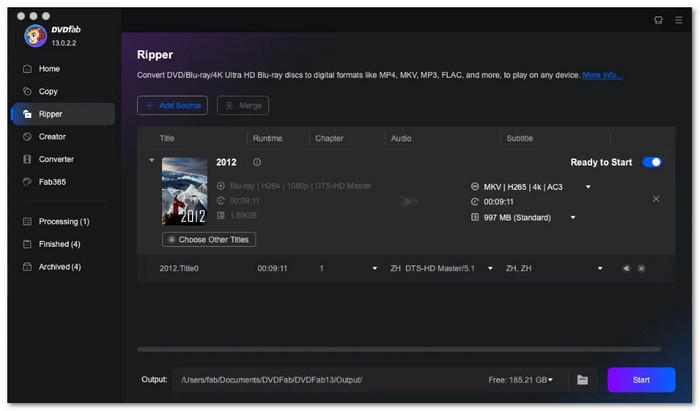
DVDFab Blu-ray Ripper is a good choice for ripping Blu-rays and DVDs, especially if they have encryption. This Blu-ray ripper is designed to handle locked discs, which many other programs struggle with. This ripper produces high-clarity Blu-rays, including 4K with HDR support, so the colors and details look impressive.
Also, it has features for joining Blu-ray and DVD titles and chapters and cutting scenes. DVDFab Blu-ray Ripper also supports many standard output video formats, including MP4, MKV, MOV, AVI, etc. Also, this Blu-ray DVD ripper has a metadata option and a preview feature that lets you view the disc info and preview the video.
In the latest version of DVDFab, you can select "Remux" or "Transcode" immediately after loading your Blu-ray or DVD. To preserve the original quality and content, the "Remux" option allows you to save the Blu-ray as an MKV file. Alternatively, if you need to convert the Blu-ray to other video formats, you can choose the "Transcode" option. This update is highly user-friendly, as it enables both professionals and casual users to quickly select the optimal mode based on their specific needs.
Best for: Ripping encrypted Blu-rays and DVDs with advanced decryption capabilities.
Platform: Windows and Mac
- Bypasses encryption
- Supports 4K High Dynamic Range
- Offers editing features for refining your blu-rays
- The free version only allows ripping at 480P or 1080P
- The upscaling feature requires a separate subscription
- Cannot change the output format for each clip separately
Why We Select It:
DVDFab is one of our favorite Blu-ray rippers due to its advanced, cloud-based decryption technology. This ensures a high success rate when ripping encrypted Blu-rays and DVDs, even if you haven't updated to the latest version immediately. When using this software, you can expect crystal-clear video output paired with crisp, original audio pass-through. Although its GPU acceleration is not as efficient as some competitors—making the software feel a bit heavy—it remains an excellent choice for users who prioritize superior video quality above all else.
Top 3. MakeMKV
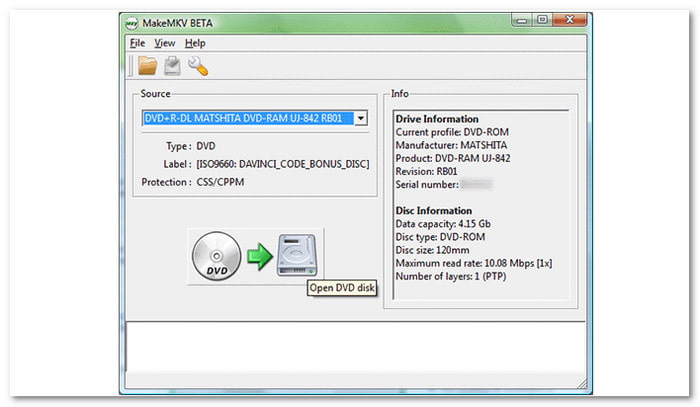
MakeMKV is simple and reliable Blu-ray ripping software. It is especially useful for those who want to avoid complicated settings. MakeMKV Blu-ray ripper focuses on creating MKV files, a format known for retaining the original clarity of the Blu-ray and original videos, audio files, subtitles, menus, titles, chapters, and Blu-ray structure. Everything is preserved during the ripping process.
MakeMKV Blu-ray ripper can also remove copy protections such as AACS and BD+ from Blu-ray and DVDs. In addition, it is free for Blu-ray ripping, which is perfect for those who want to find an affordable tool. However, it does not work with newer, more complex copy protections. This means that some of the commercial movies may not be decrypted properly. Also, if you have customized Blu-ray discs or mounted Blu-ray ISO images, MakeMKV Blu-ray ripper may fail to load them.
Best for: Making lossless Blu-ray backups in MKV.
Platform: Windows, Mac, and linux
- Free to use
- Preserves metadata when ripping
- Keeps the original blu-ray and audio clarity
- Slow ripping speed
- Only saves files in MKV format
- Struggles with newer, advanced copy protections
Why We Select It:
We selected MakeMKV primarily for its transparency and efficiency; this Blu-ray ripper excels at stripping away complex encryptions while preserving every original audio track, subtitle, and chapter marker. For those who prioritize the integrity of their digital library above all else, MakeMKV is an essential, foundational tool that bridges the gap between physical discs and modern media servers.
Part 5. 5 Other Blu-ray Rippers Worth Considering
1. Leawo Blu-ray Ripper
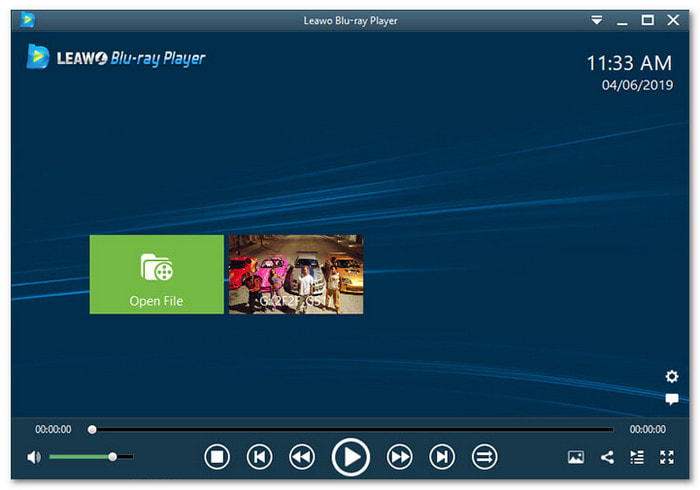
Leawo Blu-ray Ripper (now Leawo Prof. Media) offers a balance between user-friendliness and advanced features. This Blu-ray ripping software works well for both beginners and tech-savvy users. This program supports many formats, such as MP4, AVI, and MOV, so playing your ripped Blu-rays on various devices is easy.
Furthermore, it also has basic editing features that let you trim, watermark, or fine-tune effects in your Blu-rays. It is especially good at preserving subtitles and audio tracks, which are important for many users. In addition, it can remove most copy protections and break region codes. It is especially helpful if you own Blu-rays from different regions.
Best for: Ripping 4K Blu-rays quickly.
Platform: Windows and Mac
- Provide the most standard MP4 profiles
- Offers basic editing features
- Handles 4K Blu-ray contents
- Removes copy protections and breaks region locks
- The interface and workflow is complicated for beginners
- There is no free version, and it is expensive
- Select only one blu-ray from the list for conversion at a time
You May Also Like:
2. Acrok Video Converter Ultimate
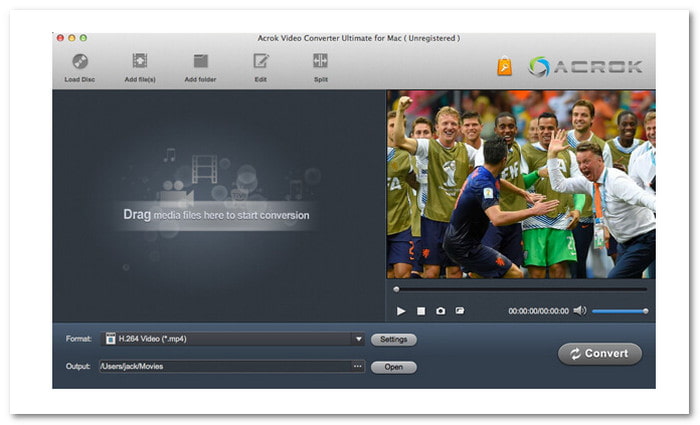
Acrok also has a Blu-ray ripper feature, which focuses on high-resolution Blu-ray ripping and is known for handling 4K content with ease. This 4K Blu-ray ripper is versatile and supports many formats, allowing you to convert your Blu-rays for playback on almost any device.
This ripper keeps the original clarity at a 1:1 ratio. It ensures you do not lose Blu-ray or audio clarity. Besides that, Acrok Blu-ray ripper includes basic editing features like cropping and trimming, so you can adjust your Blu-rays. It is a reliable option for users who want both ripping and conversion features in one program. However, if you want to rip Blu-ray to play on iPhone, iPad, and other popular digital devices, Acrok Blu-ray ripper is not a good choice. From our test, it can only support presets for up to iPhone 8.
Best for: Simple Blu-ray ripping and conversion.
Platform: Windows and Mac
- Fast ripping speed
- Includes a built-in blu-ray editor
- Supports 4K and 1080 pixels Blu-ray discs
- Support standard and home-made discs.
- Cannot rip Blu-ray to ISO files or DVD folders
- Cannot handle region codes or copy protections
- It does not preserve titles, audio tracks, subtitles, or chapters
3. HandBrake
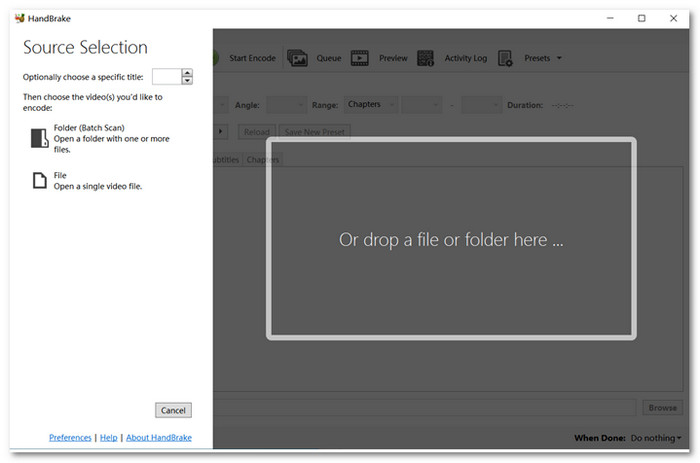
HandBrake Blu-ray ripper is a free, open-source program popular for simple Blu-ray ripping. It works well for non-encrypted discs, letting you convert them into formats like MP4 and MKV. HandBrake also includes basic editing features, such as cropping and adding subtitles, which makes it versatile for quick tasks.
However, it cannot handle encrypted Blu-ray discs. You cannot use it to rip commercial Blu-ray movies with copy protection, so it is not a 4K Blu-ray ripper. However, for non-commercial Blu-rays or homemade collections, HandBrake is an excellent Blu-ray ripping software option.
Best for: Fast Blu-ray and DVD ripping with deep customization in output video files.
Platform: Windows, Mac, and Linux
- Offers three output options
- Offers default presets for fast ripping
- Open-source for Windows, Mac, and Linux
- It does not support 4K clarity
- It can be complex for most users
- Limited to homemade or unprotected Blu-rays only
4. Freemake Video Converter
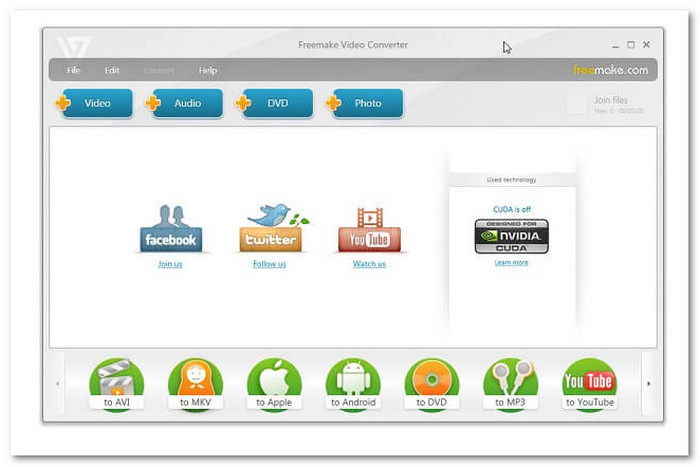
Freemake Blu-ray Converter is perfect for those users who do not need complex software for everyday Blu-ray conversion. It supports formats like MP4 and AVI, and you can also include more subtitles to the Blu-rays. Also, you can directly share your ripped Blu-ray movies to YouTube and other platforms if needed. Freemake Blu-ray ripper has a few options for experienced users, but it is fine for simple conversion and ripping jobs.
However, you should know that Freemake Blu-ray ripper cannot decrypt encryptions on Blu-rays and DVDs. Also, from our tests, it fail to load homemade Blu-ray discs and ISO images. You can only use this Blu-ray ripper to rip unprotected standard discs.
Best for: Ripping standard Blu-rays with no need for any advanced features.
Platform: Windows only
- Free for basic ripping tasks
- Works with common blu-ray formats
- Integrates CUDA and DXVA technology for acceleration
- The output will be watermarked
- Limited in terms of advanced functionality
- It does not handle encrypted discs or 4K content
5. VLC Media Player
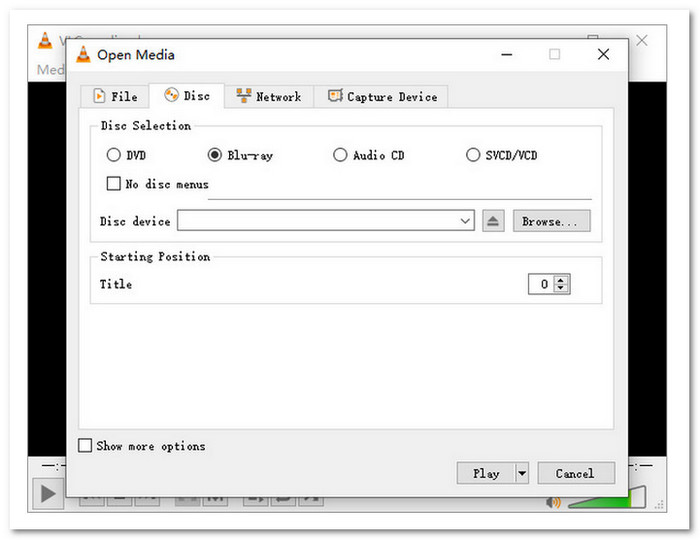
VLC Media Player is widely known as a Blu-ray player, but it can also act as a basic Blu-ray ripper software. It is completely free and converts non-encrypted discs into playable formats. However, there are some disadvantages to the VLC Media Player. It does not have native support for decrypting Blu-ray discs, so one must configure other files or modify something to play the films.
From our test, we found that VLC can support GPU acceleration to transcode Blu-rays to digital formats, but the setup requires manual operation, and it is quite limited. Therefore, ripping Blu-rays is slow, and this Blu-ray ripper software struggles with some Blu-ray menus. Despite these limitations, VLC is an excellent choice if you want a free way to play Blu-ray discs on Windows and Mac.
Best for: Users who just have VLC and don't need any advanced Blu-ray ripper.
Platform: Windows, Mac, and Linux
- Free and open-source
- Can handle multiple Blu-ray discs at once
- Works as both a media player and a ripping program
- Ripping is extremely slow
- It does not work with all Blu-rays
- Limited customization options and output formats
Part 6. What to Consider for Finding Your Best Blu-ray Ripper
Selecting the right Blu-ray ripper is essential for a seamless transition from physical discs to digital libraries. To ensure high-quality results, consider these eight critical features:
- Ripping Speed: Blu-ray data is massive. Look for a Blu-ray ripping software that supports GPU hardware acceleration (like NVIDIA or AMD). This ensures fast conversion without sacrificing visual clarity or overheating your system.
- Decryption Capability: Most commercial discs use advanced encryption (AACS, BD+). A top-tier ripper must regularly update its decryption engine to bypass these protections, ensuring you can back up any movie in your collection.
- Versatile Output Formats: Compatibility is king. The best Blu-ray ripper tools offer a wide range of containers, such as MP4, MKV, and HEVC (H.265), along with optimized presets for smartphones, tablets, and gaming consoles.
- Essential Editing Tools: Basic post-processing can enhance your digital copy. Look for built-in features to trim segments, crop black bars, or adjust contrast, allowing you to refine the video before the final export.
- Advanced Subtitle Support: Subtitles are vital for foreign films. Your ripper should allow you to select specific tracks and offer options to either hardcode them into the video or keep them as selectable soft subtitles.
- 4K & UHD Quality: To preserve the brilliance of Ultra HD discs, your Blu-ray ripper software must support 4K resolution output. This ensures that the digital file maintains the sharpness and HDR depth of the original source.
- Track and Chapter Preservation: A premium ripper preserves the "disc experience" by retaining original chapter markers and multi-channel audio tracks (like DTS-HD or Dolby Atmos), keeping the metadata intact for your media player.
- Intuitive User Interface: Powerful software shouldn't be confusing. A clean, logic-driven layout helps beginners navigate the process in just a few clicks, while still providing advanced settings for power users
When you consider these factors, you will find it easier to pick the best Blu-ray ripper for your needs. Always look for a Blu-ray ripper that matches your priorities: speed, clarity, or ease of use. A well-chosen ripper will save you time and effort while preserving your favorite movies in the best possible way.
Part 7. FAQs of Blu-ray Ripper
Is it possible to rip a Blu-ray?
Ripping Blu-rays is effortless when you utilize a professional-grade tool like Tipard Blu-ray Converter. It provides comprehensive support for both commercial and homemade discs, easily bypassing complex encryptions and region codes. Whether you need to convert a standard movie or a deeply customized disc, you can seamlessly digitize your content into popular formats like MP4 (H.264/HEVC) for universal playback or remux Blu-ray content to MKV for a 1:1 lossless backup.
Is HandBrake or MKV better?
From out test, HandBrake can be a better Blu-ray ripper even though it doesn't have the lossless feature like MakeMKV. Because HandBrake can open almost all Blu-ray types, like standard and homemade discs. With manually installed decryption files, you can feel free to digitize Blu-rays with encryptions. It also supports many modern profiles for you to digitize, compress, and upscale Bu-rays easily.
What is the free Blu-Ray ripper for Windows 11?
While MakeMKV, VLC Media Player, and HandBrake are popular free options for Windows 11, they each come with significant functional trade-offs. For instance, HandBrake Blu-ray ripper cannot bypass commercial encryption natively, VLC lacks robust GPU acceleration for fast processing, and MakeMKV is strictly limited to MKV output. If you demand seamless performance and high-fidelity results, a premium solution like Tipard Blu-ray Converter is a superior choice, offering comprehensive decryption, lightning-fast hardware acceleration, and a vast array of output formats.
Conclusion
We have curated the 8 top Blu-ray rippers to help you digitize your movie collection into high-quality formats for seamless playback across all your devices. These tools ensure your favorite films are always accessible without the need for a physical player. Among these options, Tipard Blu-ray Converter stands out as the premier choice. It combines powerful decryption with precision tools to trim files, fine-tune visual effects, and convert content into any format—all while guaranteeing pristine, lossless picture quality.
More Reading


About the Author

 Click here to join the discussion and share your comments
 Tipard Blu-ray Converter