

Key Takeaways
We've tested 15 Blu-ray ripping programs and finally selected the top 6 that offer good experiences. HandBrake is our most recommended free Blu-ray ripper due to its fast workflow and decent GPU acceleration; MakeMKV is also a good choice due to its powerful lossless remuxing feature. But, if you want to handle Blu-ray encryptions and rip all types of highly customized home-made Blu-rays, Tipard Blu-ray Converter is your best choice.
For cinephiles, Blu-ray remains the gold standard for high-bitrate video and lossless audio. However, bridging the gap between physical discs and modern media servers like Plex requires more than just a simple copy. A professional-grade free Blu-ray ripper is essential to bypass hardware bottlenecks and digitize your collection into high-efficiency formats—without losing the cinematic clarity you paid for.
Our 2026 Guide benchmarks the industry's leading converters across three critical pillars: decryption success rate, encoding efficiency (AV1/HEVC), and UI simplicity. Whether you need a one-click mobile export or granular control over 10-bit HDR and subtitles, these are the best free tools to modernize your home cinema today.

Part 1: How to Choose a Quality Free Blu-ray Ripper
While "free" is the primary draw, the real value lies in finding a tool that balances high-performance output with system integrity. To avoid the common pitfalls of legacy software, we evaluate every free Blu-ray to digital converter against these three definitive pillars:
- Verified Security: We prioritize open-source or vetted software that is 100% malware-free and devoid of resource-heavy bloatware, ensuring your OS remains fast and secure.
- Native OS Architecture: A good ripper must provide stable, native support for Windows 11 and macOS Sequoia, leveraging modern APIs for a crash-free experience.
- Next-Gen Encoding: Beyond standard MP4, look for tools supporting AV1 and HEVC (H.265). These formats offer 50% better compression for Plex servers or mobile storage without sacrificing 4K clarity.
- Ripping Speed: Speed is a critical metric for any free Blu-ray ripper. Given the massive data density of Blu-ray discs, a slow extraction process does more than test your patience; it subjects your CPU and RAM to sustained thermal stress. Prioritize software that leverages GPU hardware acceleration to ensure rapid digitization without compromising system stability.
Part 2: Top 6 Free Blu-ray Rippers on Windows/Mac
Our Test Standards
Our evaluation is strictly authentic, based on rigorous hands-on stress tests rather than synthetic benchmarks. To find the best free Blu-ray ripper for 2026, we processed 50+ Blu-ray titles across multiple genres, focusing on:
- Decryption Performance: Testing against the latest AACS and BD+ protections.
- Hardware Synergy: Measuring CPU/GPU load on Windows 11 and Apple Silicon (M3/M4) systems.
- Output Fidelity: Frame-by-frame comparisons to ensure zero artifacts in AV1 and HEVC encodes.
- Testing Environment: All performance benchmarks were conducted on a high-end workstation featuring an Intel Core i9-14900K processor paired with 64GB of DDR5 RAM and an NVIDIA RTX 4090 GPU for hardware-accelerated encoding. To ensure strictly authentic results and peak data throughput, we utilized an ASUS BW-16D1X-U external drive connected via USB 3.2. This controlled environment allowed us to measure the true decryption and transcoding speed of each tool across both Windows 11 and macOS Sequoia.
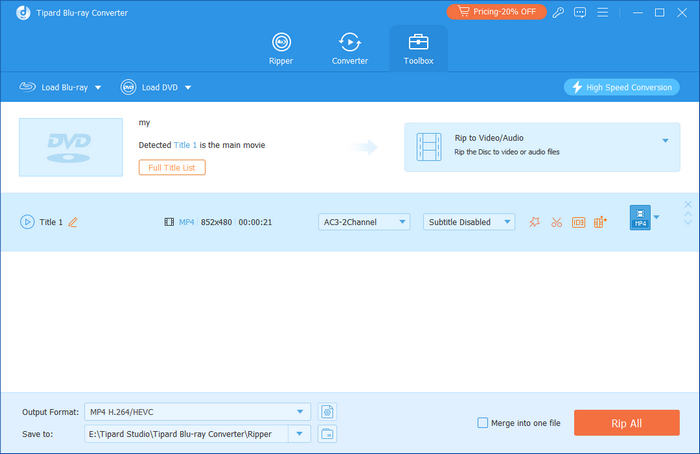
1. Tipard Blu-ray Converter - Best Blu-ray Ripper on Windows/Mac
Tipard Blu-ray Converter redefines the ripping experience by balancing workstation-grade power with a minimalist interface. While most free Blu-ray ripper tools suffer from steep learning curves and unstable decoders, Tipard leverages advanced hardware acceleration to deliver near-instant conversions without compromising bit-for-bit quality. Whether you are archiving lossless MKV master copies or optimizing HEVC/AV1 files for mobile devices, it effortlessly bypasses complex encryption that stalls standard rippers. Download the free version to experience professional-grade digitization at its most efficient.
Platform: Windows, Mac

- Free rip Blu-ray discs that have the latest encryptions.
- Rip Blu-ray to MP4, MOV, ProRes, lossless MKV, and more formats.
- Clip, crop, rotate, upscale, and add filters to your Blu-ray videos before ripping.
- Rip the whole Blu-ray disc or choose your desired video chapters and audio or subtitle tracks.
You May Need to Know: When you rip a Blu-ray disc, you may want to keep the original content structure with original quality and files. Also, you may want to convert the disc to a more compatible digital format. Based on different needs, you have different choices:
- If you want lossless ripping: Choose the Lossless MKV output format. It will keep the original video and audio codecs, frame rate, bitrate, sample rate, subtitles, and more.
- If you want smaller file size with decent quality: Choose HEVC MP4 or H.264 MP4. The two codecs are the most compatible ones now.
- Rip your Blu-ray and DVD discs with GPU acceleration.
- Support many Blu-ray discs for input and many popular output format presets.
- Support lossless ripping and customizable ripping.
- Offer a clear interface with simple workflow.
- The interface can be improved.
2. MakeMKV
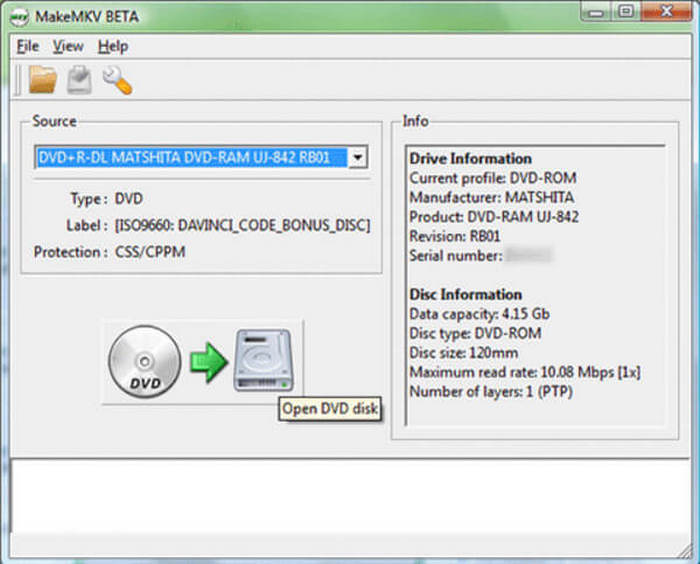
Looking for a simple free Blu-ray ripper? MakeMKV serves as an excellent entry point for digitizing your collection. Operating as a bit-for-bit copier, it bypasses the learning curve of complex transcoding software.
While this free Blu-ray ripper excels at stripping copy protections from many Blu-ray and DVD titles, users should note its specific workflow. Since it produces uncompressed MKV containers, the resulting files are large and may not play natively on Apple devices or smart TVs without a media server. If you need device-specific profiles or the ability to rip specific chapters to save space, you might find its minimalist approach restrictive. However, for a high-fidelity, free-to-use solution, MakeMKV is an essential tool in any cinephile's arsenal.
Platform: Windows, Mac, and Linux
Main Features of MakeMKV:
- Convert Blu-ray and DVD to MKV video with original video and audio quality.
- Select your desired video, audio, and subtitle tracks.
- Keep the chapter and track information.
- Read your DVD and Blu-ray in detail.
You May Need to Know: Although MakeMKV is a free Blu-ray ripper that supports lossless ripping, you may encounter different types of issues. That s also a big limitation of free tools. You may see problems below:
- Output MKV File Too Large: Lossless ripping will output a very large MKV video, so you can compress the MKV file after ripping.
- Loading Failure in MakeMKV: MakeMKV utilizes bit-perfect ripping method, so if there's a slight dirt or scratch, MakeMKV cannot load your disc. You can wipe the Blu-ray disc clean.
- Remove AACS and BD+ protections.
- Convert your Blu-ray and DVD as fast as your drive can read the data.
- Convert the whole Blu-ray or choose your desired chapters.
- The free Blu-ray ripper is very lightweight.
- It usually collapses on Windows 11.
- The interface is difficult to understand for beginners.
- It only supports MKV output format.
You May Also Like:
3. CloneBD
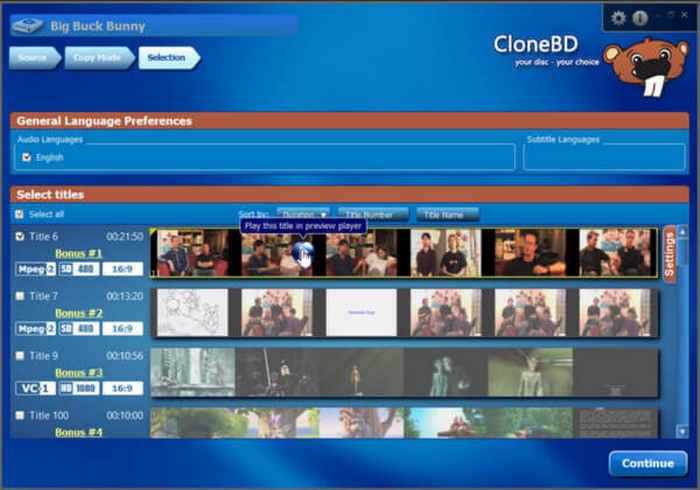
While CloneBD is often praised for its visually driven interface, some beginners may find its extensive feature set and evolving layout a bit overwhelming at first. As a powerful tool for media preservation, the free edition of this Blu-ray ripper serves primarily as a trial. Users can perform full disc copies, but be aware that ripped videos will include watermarks. Despite these limitations, this free Blu-ray ripping software remains a versatile option to convert Blu-ray to MKV and MP4, providing a glimpse into its high-speed transcoding capabilities before upgrading to the Pro version.
Platform: Windows and Mac.
Main Features of CloneBD:
- Copy your Blu-ray disc to ISO or Blu-ray folder.
- Support Blu-ray disc/ISO/folder input.
- Convert Blu-ray to digital format.
- Fully rip your Blu-ray or select your desired chapters.
- Support both Blu-ray disc/ISO/folder input and output.
- You can preview each video and audio on your Blu-ray disc.
- Support Blu-ray to digital conversion.
- The interface is difficult to understand for beginners.
- It only supports MP4 and MKV digital output formats.
- It can't rip Blu-rays with encryption.
4. Leawo Prof. Media
Leawo Prof. Media stands out for its beginner-friendly design, offering a vast library of optimized presets for smartphones, tablets, and gaming consoles. This simplifies the workflow for users unfamiliar with complex video codecs. However, it is important to note that the free Blu-ray ripper is significantly restricted, typically allowing only the conversion of the first five minutes of a disc and adding watermarks to the output. By upgrading to the full version on Windows or Mac, you can unlock high-speed GPU acceleration and comprehensive customization tools for a professional-grade experience..
Platform: Windows and Mac.
Main Features of Leawo Prof. Media:
- Rip Blu-ray disc to ISO, Blu-ray folder, and digital profiles.
- Gather many multimedia conversion features.
- Remove copy protection from Blu-ray discs.
- Offer video editing features before you rip Blu-ray.
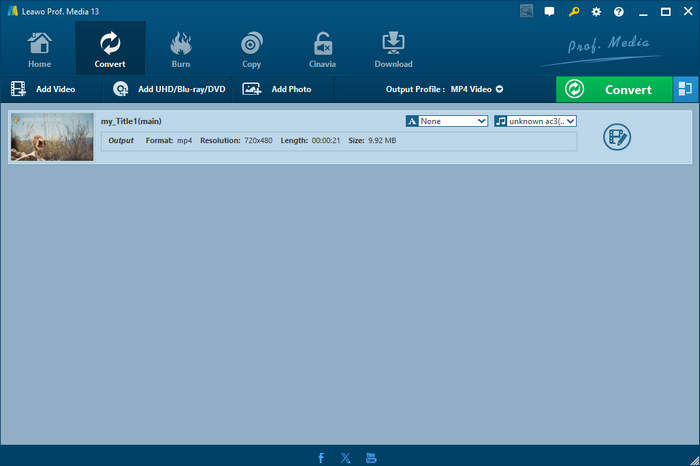
You May Need to Know: Leawo has gathered Leawo Blu-ray Ripper into an all-in-one program: Prof. Media. It can also deal with DVD, video, audio files, and other multimedia files.
- Support many digital video output formats.
- Support Blu-ray, DVD, and digital multimedia file conversion.
- Offer preview features before you rip Blu-ray.
- The program is huge in size and takes much memory.
- The video editing features are difficult to use.
- It's not easy to locate your desired features.
5. HandBrake
HandBrake is the most famous free open-source Blu-ray ripper (transcoder) for advanced users seeking total control over output quality. As a completely free Blu-ray ripper, it allows you to adjust bitrates, codecs, and subtitles to create the perfect digital file. However, it’s important to note that HandBrake lacks built-in Blu-ray decryption, meaning it cannot function as a standalone free ripper for protected Blu-rays. When paired with a decrypter, it becomes a powerful free tool to convert Blu-ray to MP4, though it involves a steeper learning curve than commercial alternatives.
Platform: Windows, Mac, and Linux.
Main Features of HandBrake Free Blu-ray Ripper:
- Support Blu-ray discs and folders.
- Convert Blu-ray to digital video and audio formats.
- Rip your desired chapters and tracks in Blu-ray disc.
- Support both Blu-ray, DVD, and video & audio conversion.
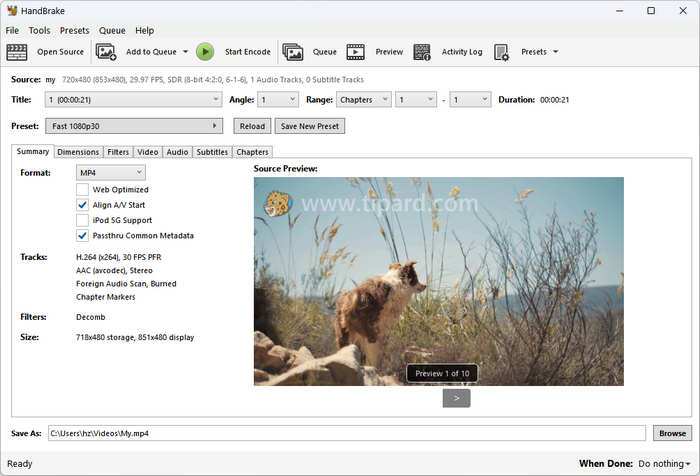
- Automatically detect your Blu-ray disc.
- Add filters to your Blu-ray videos.
- Adjust your video, audio, subtitles, and chapters easily.
- Cannot remove encryption on any Blu-ray disc.
- You can't preview your Blu-ray disc as a video.
- It doesn't support Blu-ray ISO input.
6. VLC Media Player
VLC Media Player, the versatile tool already on your PC, can technically function as a free Blu-ray ripper on Windows 11/10. It’s a convenient, "no-install" solution for basic tasks. However, its ripping capabilities are secondary to its main purpose. VLC cannot bypass Blu-ray copy protection (AACS/BD+) natively, and its encoding process is less intuitive than dedicated free Blu-ray ripping software. While it is excellent for playing Blu-ray on VLC, users seeking high-speed conversion or advanced output formats may find its feature set restrictive compared to professional decrypters.
Platform: Windows, Mac, and Linux.
Main Features of VLC Free Blu-ray Ripper:
- Rip Blu-ray discs to many video and audio formats.
- Easily play your Blu-ray videos.
- Adjust video and audio settings for Blu-ray ripping.
- Convert interlaced Blu-ray video to progressive video.
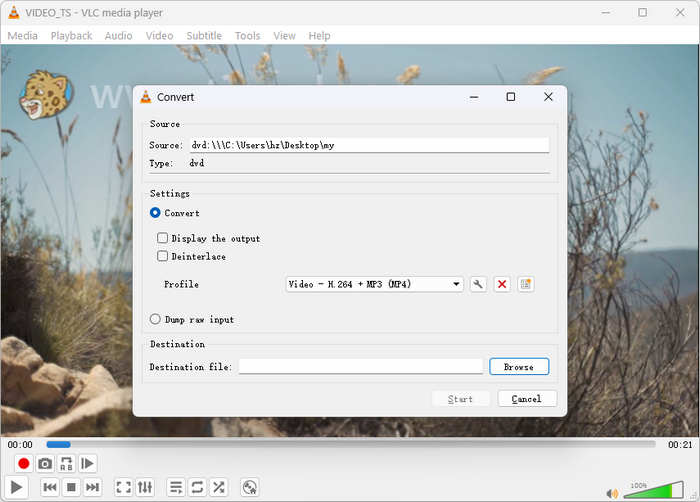
- Support output formats for popular devices and platforms.
- Rip Blu-ray discs, ISO files, and Blu-ray folders.
- Change video settings to enhance or compress your videos.
- Cannot rip Blu-ray to ISO image or a Blu-ray folder.
- You can't preview your Blu-ray while ripping.
- It can't remove any encryption on Blu-ray or DVD.
Part 3: Comparison of the 6 Best Free Blu-ray Ripper Software
This article has recommended 6 gorgeous free Blu-ray rippers for you. But you may not have enough time to check them one by one. In that case, you can read the comparison table below to find the free Blu-ray ripper best for you.
| Product | Best for | Bypass Encryption | 1:1 Lossless Rip | Hardware Acceleration |
|---|---|---|---|---|
| Tipard Blu-ray Converter | High-speed 4K/AV1 digitizing | Yes (Built-in) | Yes (ISO/Folder) | NVIDIA, AMD, Intel |
| MakeMKV | 1:1 original quality archives | Yes (AACS/BD+) | Yes (MKV) | N/A (Direct Stream) |
| HandBrake | Custom compression for mobile | No (Needs libdvdcss) | No (Transcode only) | QSV, NVENC, VCE |
| Leawo Prof. Media | Beginners seeking an all-in-one suite | Yes | No | NVIDIA, Intel |
| CloneBD | Copying specific titles/chapters | No (Needs AnyDVD) | Yes | Yes |
| VLC Media Player | Occasional, basic captures | No | No | Decoding only |
Part 4: FAQs of Free Blu-ray Ripper
What is the best free Blu Ray ripper?
It depends. If you want a lossless video file and keep the Dolby and DTS audio quality, MakeMKV is a good choice. If you want to transcode your Blu-ray movie to a smaller file with decent video quality, choose HandBrake. But if you have trouble with encryptions, you can select Tipard Blu-ray Converter.
Is using MakeMKV illegal?
The legality of MakeMKV is a jurisdictional gray area centered on the act of bypassing encryption. In the United States, the DMCA technically prohibits circumventing DRM (like AACS), even for personal backups of discs you legally own. However, many other regions recognize a "right to format shift" for private use. While ripping for a personal media server is widely considered ethically acceptable "fair use" within the community, it remains legally contentious because current laws prioritize the protection of digital locks over the consumer's right to digitize their physical property.
Why do I fail to load Blu-ray in a free Blu-ray ripper?
If your Blu-ray fails to load, it is likely due to advanced encryption or a highly customized disc structure that standard free tools cannot recognize. You can use Tipard Blu-ray Converter to bypass these protections directly and initiate the ripping process. Whether you are dealing with commercial DRM or complex, home-made media, Tipard provides the professional-grade compatibility needed to open and digitize the disc successfully.
Conclusion
In conclusion, while there are several excellent free Blu-ray converters on the market, choosing the right one depends on your specific needs, whether it’s the lossless extraction of MakeMKV or the open-source flexibility of HandBrake. However, if you are looking for the overall best free Blu-ray ripper that combines powerful decryption, high-speed GPU acceleration, and diverse output formats (ISO, MP4, MKV, AVI), Tipard Blu-ray Converter is the professional choice you shouldn't miss. Beyond simple ripping, it offers advanced video enhancement and editing tools, ensuring your digital collection looks better than ever.
More Reading
About the Author

 Click here to join the discussion and share your comments