

Key Takeaways
The right tools and strategies to manage a music collection are abundant if you know how to access and edit ID3 Tag information. This article outlines some of the best:
- An ID3 Tag allows collection managers to organize their music by title, artist, album, genre, and cover art.
- Album art can be added, and ID3 Tags can be used to ensure that files are error-free and compatible with a variety of devices.
- The best ID3 Tag editing software is Tipard Video Converter Ultimate. In addition to editing ID3 Tags, the software allows for batch processing, multiple format conversions, and other media-related functionalities.
If your music library is messy or missing details, an ID3 tag editor can save the day. Whether fixing wrong titles, adding album art, or organizing tracks, the right tool makes managing your songs quick and stress-free.

Part 1. What Is a Tag in an MP3 or MP4 File?
A tag is the metadata embedded in an MP3, MP4, or other music file. It stores information such as the song title, artist, album name, track number, genre, year, and album artwork. MP3 files use ID3 tags, while MP4/AAC files use a similar metadata system. These tags allow music players to display, sort, and organize your songs correctly.
Why You May Want to Edit ID3 Tags
1. To correct and add missing song information, such as the artist, album, or title.
2. To ensure tracks play in the correct order by adding and adjusting track order numbers.
3. To streamline the organization of large collections and enhance searching and sorting.
4. To replace or add low-quality or missing album art.
5. To ensure the music is playable on a variety of devices, media players, and cars.
Part 2. Top 4 ID3 Tag Editors on Windows and Mac
1. Tipard Video Converter Ultimate (Recommended)
Tipard Video Converter Ultimate is an all-inclusive video converting program that also allows users to customize the ID3 tags of video and audio files using the integrated media metadata editor. With this feature, users can conveniently manage their music and video files in one place.

- You can edit artist, title, genre, date, and other ID3 tags.
- Album cover artwork can be edited or replaced easily.
- Many formats are supported, including MP3, MP4, FLAC, ALAC, MKV, and more.
- Video and audio tools are available, such as audio delay adjustment and noise removal.
- Batch editing is supported, allowing multiple files to be processed at once.
Step 1 Get the Software and Install
Tipard Video Converter Ultimate is a software that can be downloaded and installed from the official Tipard website.
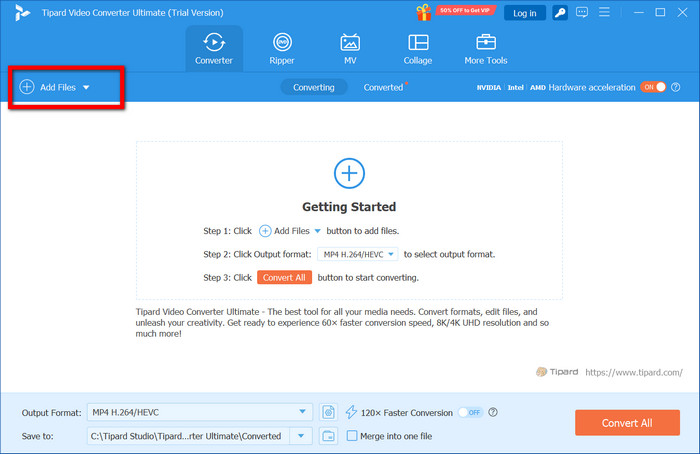
Step 2 Add Music Files
When you launch the software, you can start adding music files to the software that you want to edit by clicking the Add Files button.
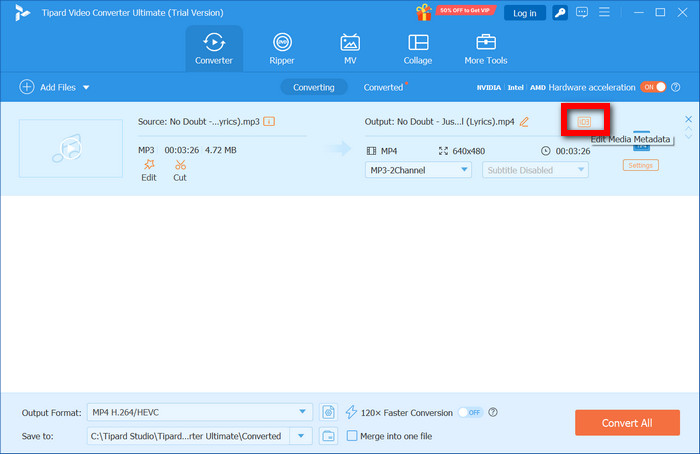
Step 3 Launch Metadata Tag Editor
From the list of added music files, locate the one that you want to edit the music metadata for and click the Edit Media Metadata button beside it to launch the tag editor.
Step 4 Update the ID3 Tag Info
You can change the title, artist, album, genre, and cover art of the music file as you fill out the ID3 tag info to your desire.
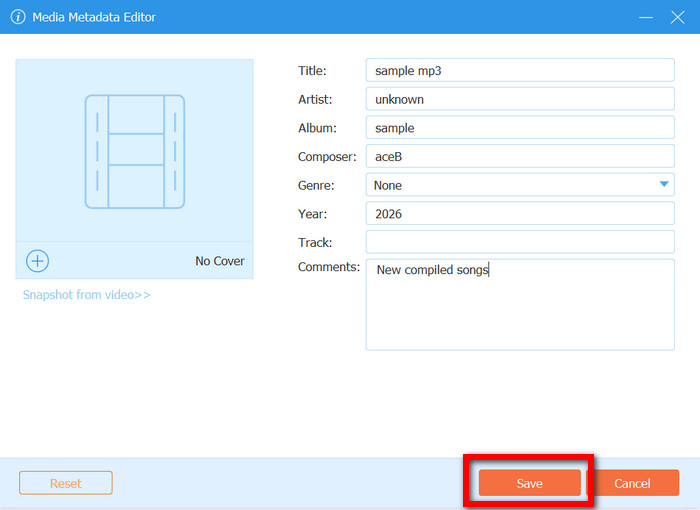
Step 5 Export Updated ID3 Tag File
To save the changes you have made to the ID3 tag info, click on Save, and then you can export the updated file to your collection.
Why We Select It
Tipard Video Converter Ultimate is our number one software to recommend, because it has ID3 tag editing alongside great media improvising and editing. Unlike dedicated tag editors, it is ideal for people who want a single software to manage, convert, and organize their audio and video files.
- Simple and neat interface.
- Ability to edit audio and video metadata.
- Ability to edit in batches.
- Plenty of additional media features.
- To unlock additional features, you will need to purchase the software.
2. Music Tag
Music Tag is a new music tag editor for beginners. Its design lets users edit metadata, album art, and tags manually or automatically, and it allows for batch processes to be performed to organize music libraries.
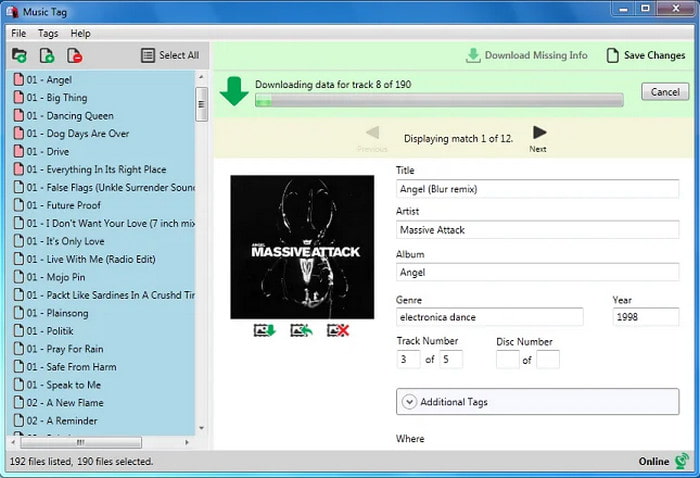
Main Features:
- Automatic and manual ID3 tag editing.
- Digital fingerprinting for missing metadata.
- Supports MP3, MP4, AAC, WMA, and FLAC.
- Available on Windows and Mac.
Ratings:
Major sites like Trustpilot or G2 have not reviewed the MP3 tag, so it lacks any current rating.
- Users have said it is quite straightforward.
- Reviews have said it does good tagging automatically.
- Reviews claim it has a nice design.
- The premium version does have more features.
3. MP3Tag
MP3 Tag is a customizable and potent tag editor for more sophisticated users. It enables the batch processing of music collections across various formats, the automation or manual processing of metadata, the renaming of files, and organization.
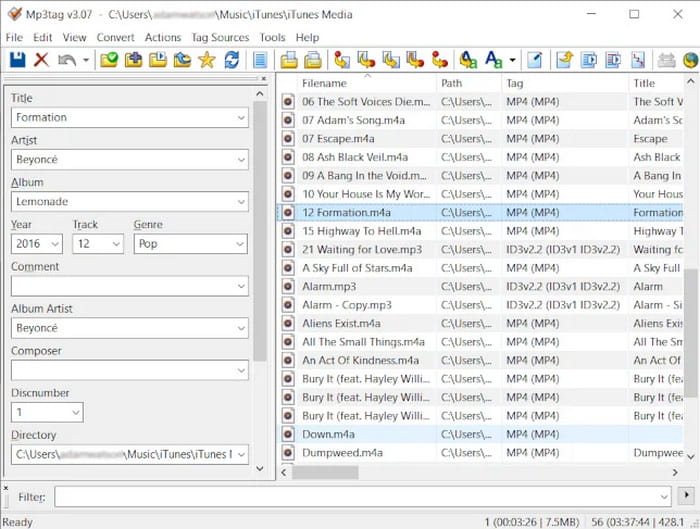
Main Features:
- Manual and automated editing of ID3 tags training is available.
- Users have said it has strong tools for editing playlists in batches.
- It works with various audio formats.
- Users have said the soft interface is likely to suit your needs.
- It is free software that works on Windows.
- Interfaces may feel overwhelming for beginners.
- The Mac version is paid.
4. MusicBrainz Picard
MusicBrainz Picard can help users efficiently organize large collections of music files, as it can be used to edit and update metadata for various music files. It is an open-source software and tag editor that can help users edit and update metadata online or manually use an accurate online database.
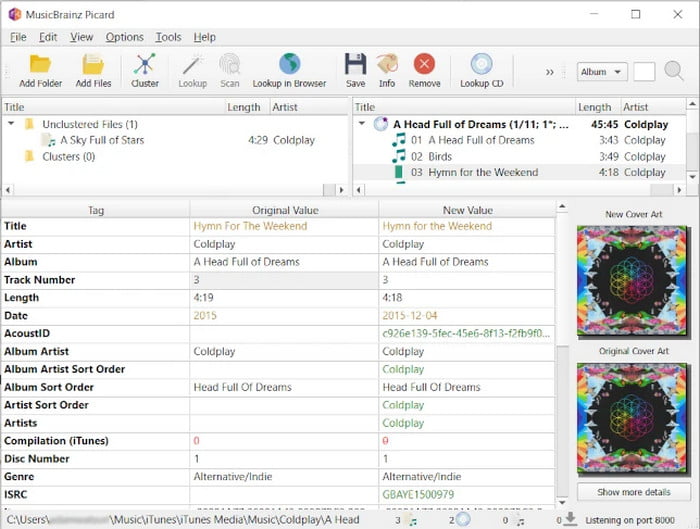
Main Features:
- Provides automatic tagging using digital fingerprints.
- Provides lookup, scan, and online matching options.
- Compatible with Windows, Mac, and Linux.
- Offers precise matching for tags.
- Free and open-source.
- Provides an appealing and modern layout.
- It requires track clustering, which may frustrate beginners.
Part 3. Top 3 ID3 Tag Editors on Android and iPhone
1. Evertag
Evertag can also edit music metadata for more than 30 audio formats. Evertag is also capable of batch edits, updating album covers, and syncing with iCloud, Dropbox, and Google Drive for music editing online.
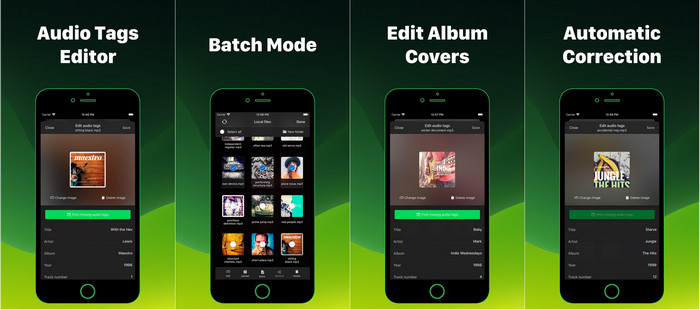
- Supports over 120 tag fields and multiple formats.
- Batch edits files in groups.
- Has a (limited) integrated cloud with file management.
- Some advanced features require in-app purchases.
- Other simple edits may seem like a clunky interface.
2. MP3 Tag Editor
You can edit almost all audio formats with the MP3 Tag Editor. It is a full-featured editor that lets you edit the audio file title, artist, album, genre, year, and cover art. It is also capable of filling tags in large libraries.
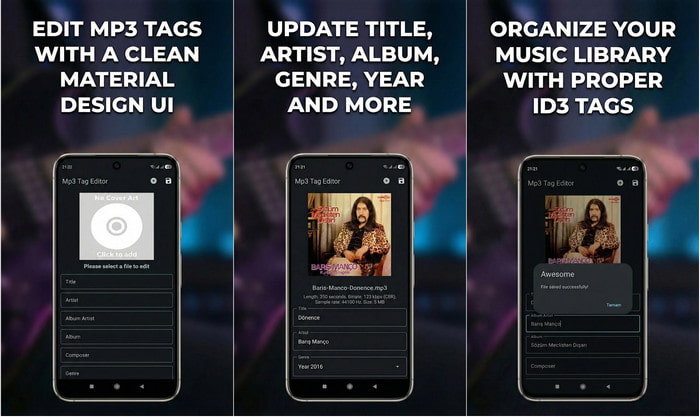
- Supports a great range of formats.
The CDA to MP3 tagging and cover art finder is AI-enhanced.
- Compatible with iPhone, iPad, and Mac.
- It is a paid app (premium price).
- Features some advanced geared users.
3. Smart MP3 Tag Editor
Smart MP3 Tag Editor is an Android MP3 metadata editor that supports automatic and manual tagging, lets you edit artist, title, album, genre, artwork, batch edit files, and add high-resolution covers and lyrics directly.
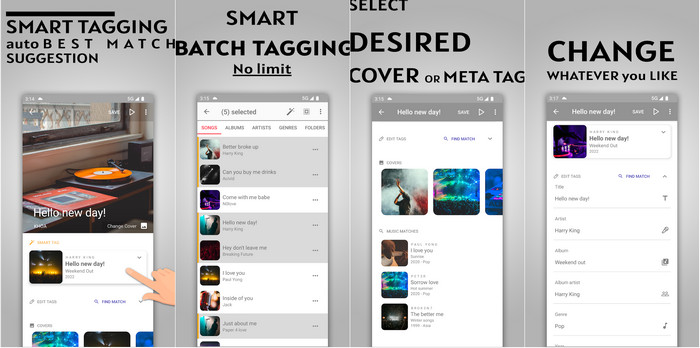
- Free with batch tagging support.
- Includes artwork download and lyric embedding.
- Easy bulk edits for large collections.
- The interface is simple and may lack deeper organization tools.
- Ads may appear in the app.
Conclusion
Editing ID3 tags helps keep your music library organized, accurate, and visually appealing. With the right tools for Windows, Mac, or mobile devices, managing metadata, album art, and track details becomes fast, easy, and efficient.
More Reading


About the Author

 Click here to join the discussion and share your comments
 Tipard Video Converter Ultimate