

MP3 and MP4 are truly the most popular formats in the digital world. You have probably seen them when downloading music, recording audio, watching videos, or streaming media online. But you should know that they are not the same and have different uses.
In this MP3 vs. MP4 post, we will discuss each format and its differences. We will cover where you can use them, compression methods, and more. At the end, you will also learn how to convert them to each other.
So, please continue reading and get all the information you need!
Part 1. MP3 vs MP4 - Key Differences
In this MP3 versus MP4 part, you will get to know their key differences, perks, and limitations. So, please scroll down to learn all the details.
MP3 (MPEG-1 Audio Layer III)
MP3 is an audio format designed to compress sound files while keeping good quality. It is widely used for music and podcasts.
- It plays on almost all devices. The file size is small and easy to store. Also, it works well for music and spoken audio.
- Unfortunately, it cannot store video. Audio clarity is lower than the newer formats. Plus, it only supports limited extra data like artwork or notes.
MP4 (MPEG-4 Part 14)
MP4 is a versatile multimedia format that can store video, audio, images, and text in one file. It delivers high-clarity media and is widely used for streaming and online sharing.
- It supports many types of media. It delivers high clarity audio and video. It uses better compression for video. Also, it supports subtitles and chapters.
- The downside is that the file sizes are bigger than audio-only files. It can sometimes have video-audio sync issues. Its popularity also makes illegal sharing of copyrighted content easier.
Part 2. Comparison of MP3 and MP4
In this section, you will learn the main differences between MP3 and MP4 formats. We will show a clear comparison table, explain when to choose one over the other, and also look at the MP5. It is gonna have a lot of essential details!
Comparison Table: MP3 vs. MP4
| Feature | MP3 | MP4 |
|---|---|---|
| File Extension | MP3 files use the .mp3 file extension. | MP4 files use the .mp4 extension, while audio-only files may use .m4a. |
| Common Codecs | MP3 files rely on the MP3 audio codec to store sound. | MP4 files often use AAC for audio and H.264 for video. |
| Quality | MP3 offers good sound quality but has clear limits. | MP4 supports higher quality audio and video. |
| File Size | MP3 files are smaller because they store sound only. | MP4 files are larger because they include video and extra data. |
| Compression Method | MP3 uses lossy audio compression to reduce file size. | MP4 uses lossy compression for both audio and video. |
| Streaming Support | MP3 works well for audio streaming services. | MP4 is ideal for video streaming and media platforms. |
| Device Support | MP3 plays on almost all devices, including older players. | MP4 works best on modern devices and updated players. |
| Show MoreShow Less | ||
When to Decide Between MP3 and MP4
- Choosing MP3 makes sense when you only need sound. Music tracks, podcasts, and audiobooks work well in MP3 format because the files stay small and easy to store. MP3 also plays on old players and simple devices without issues. If saving space matters, MP3 is the safer choice.
- Choosing MP4 is better when your content includes video or mixed media. It lets you keep audio, video, and subtitles in one file. It makes it perfect for streaming platforms and social media uploads. Also, it gives better clarity and supports modern features.
MP3 vs. MP4 vs. MP5
What do you think is the difference between MP3, MP4, and MP5?
MP3 is an audio-only format made for compressed sound files. MP4 is a flexible container that holds audio, video, and subtitles in one place. MP5 is not a real global standard. It is often a marketing term or a device-specific idea for advanced or interactive media.
For more details, please check the table presented.
| Factors | MP3 | MP4 | MP5 |
|---|---|---|---|
| Content | MP3 has only audio for music and sound files. | MP4 can hold audio, video, images, and subtitles. | MP5 content depends on the device or programs. |
| Function | MP3 makes audio files smaller while keeping the sound clear. | MP4 keeps audio and video in sync for smooth playback. | MP5 plays certain video files without changing their format. |
| Use | MP3 is used for music, podcasts, and audiobooks on most devices. | MP4 is used for video streaming, storage, and online media. | MP5 is rarely used and works with specific devices or software. |
| Show MoreShow Less | |||
Part 3. How to Convert MP3 to MP4 or MP4 to MP3
To have the popular video format (MP4) and audio format (MP3), Tipard Video Converter Ultimate is the key. It enables you to turn MP3 to MP4 format or MP4 to MP3 format easily. You can work with many video and audio files at once because it supports batch conversion.
The conversion is super fast, up to 60× faster. Plus, it works with Nvidia, Intel, and AMD hardware acceleration. With all those benefits, you can quickly turn your audio into video or video into audio.
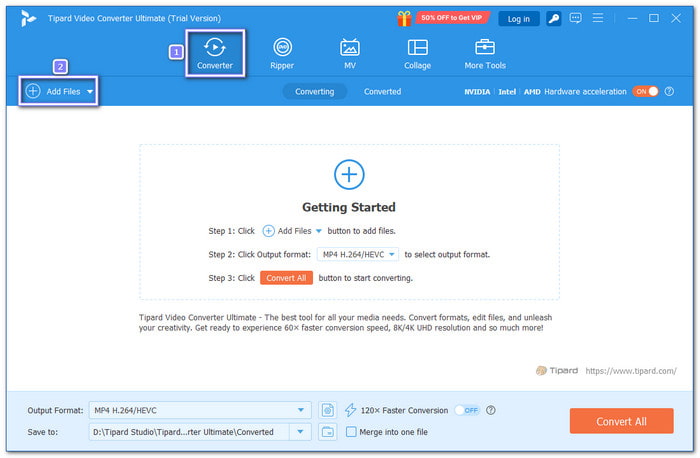
Step 1 First and foremost, download and install the offline converter for free on your Windows or Mac computer.
Step 2 Run the program and click the Add Files button. Then, choose the MP3 or MP4 files you want to convert. You can add one file or many files at the same time.
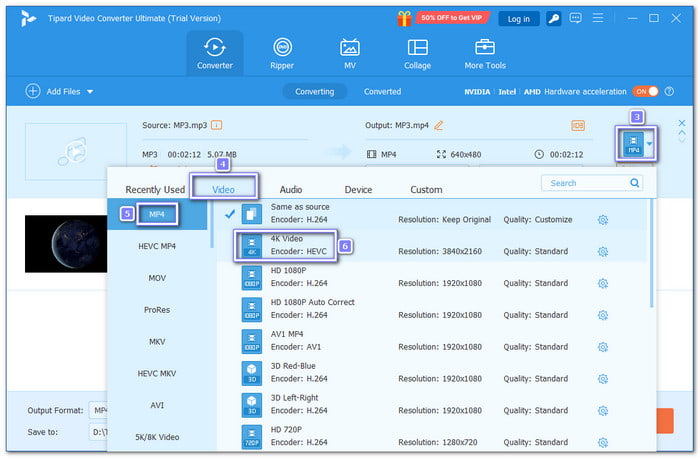
Step 3 After adding the files, click the Output Format menu at the top right corner.
- To convert MP3 format to MP4, go to the Video tab and select MP4. You can also pick the resolution, like 4K or HD 1080P.
- To convert MP4 format to MP3, go to the Audio tab and choose MP3. Then, select the bitrate. 128kbps is common, but 320kbps keeps higher quality.
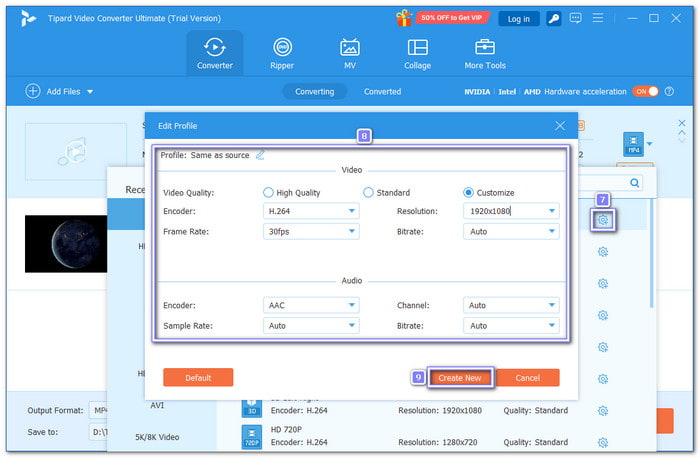
Step 4 You can also modify your file output settings by clicking the Cogwheel button.
- For MP3 to MP4, fine-tune video settings like the encoder, frame rate, and bitrate.
- For MP4 to MP3, you can fine-tune audio settings like the encoder, sample rate, and channels.
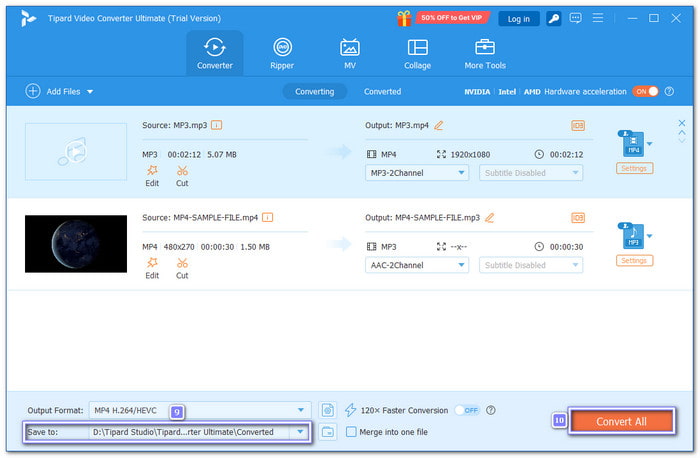
Step 5 Now, please pick a folder that is easy to find later. Once selected, click the Convert All button. Tipard Video Converter Ultimate will start converting your MP3 to MP4 or MP4 to MP3.
You can also use Tipard Video Converter Ultimate to convert MP4 to WAV or FLAC, which are also audio formats, like MP3.
Conclusion
There you go! You have learned the difference between the MP3 and MP4 formats. Just remember, MP3 is for audio only, while MP4 can hold both audio and video. To work with these formats, you can use Tipard Video Converter Ultimate. It can convert files fast, keep high quality, and even manage many files at once. So, go ahead and use it to do all your conversion needs!
More Reading



About the Author

 Click here to join the discussion and share your comments
 Tipard Video Converter Ultimate