

Taking videos on an Android phone offers various benefits. This device can capture high-resolution recordings. It will be more convenient if you use famous brands and models. Some users prefer to edit their videos to make engaging content and a coherent story.
The good thing about Android phones is that they allow you to edit your videos. How to edit videos on Android? This procedure is easy! In fact, this article suggests the top five best Android video editing apps. Scrolling below will help you know all the details about them.
Part 1: Top 5 Video Editing Apps for Android in 2026
Every Android phone has its built-in video editing features. However, these features are limited to cropping, trimming, etc. Some users are not satisfied due to their limitations and prefer an alternative. Luckily, you can edit video on Android using applications. The five best apps are posted below.
1. KinesMaster
KinesMaster is one of the top video editing tools on Android phones. The main function of the application is to polish videos that are included in the content. It allows you to arrange and synchronize the videos using a built-in timeline editing system.
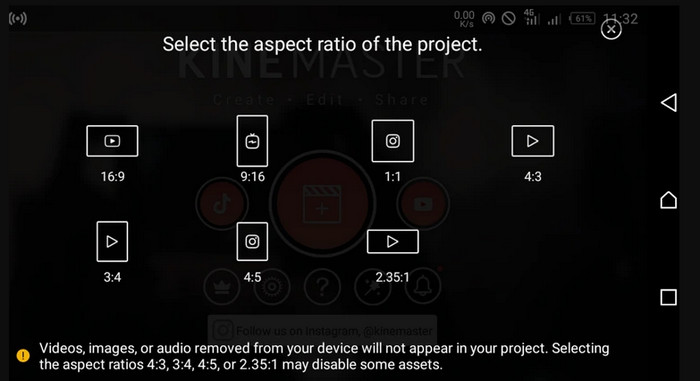
Key Features:
- Supports a layer-based editing system.
- Adjusts playback speed.
- Instant preview video playback.
- Audio editing tools.
- Export customizations.
Pricing:
- The app costs you $51.99 for its 1-year plan and $7.99 for its 1-month plan.
- Intuitive interface.
- You can get updates frequently.
- Wide range accessible.
- Optimizes quick content creation.
- No additional apps needed.
- Cluttered interface on small screens.
- Internet-dependent.
- Resource-intensive.
- Long videos are hard to manage.
2. PowerDirector
Cyberlink develops PowerDirector. You can use it on your Android phone and desktop. The mobile version of this app also creates high-quality videos. Below are its other details, including the guide on how to edit video on an Android phone using it.
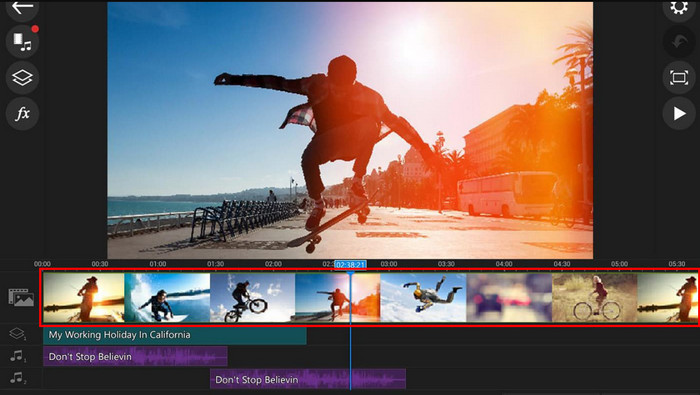
Key Features:
- Supports AI-powered editing features.
- Contains 360-degree video editing.
- Extensive format support.
- Allows you to record your screen.
- Supports customizations with precision.
Pricing:
- $149.99 for PowerDirector 365 Business
- $89.99 for Director Suite 365
- $48.99 for PowerDirector 36
- $139.99 for PowerDirector 20 Ultimate
- $99.99 for PowerDirector 20 Ultra
- Beginners will find it easy to use.
- Supports a detailed tutorial.
- Optimizes a quick export.
- Supported on different platforms.
- Features depend on the subscription.
- It is a hardware-dependent performance.
- Stability issues.
- macOS has limited support.
3. Adobe Premiere Rush
Adobe Premiere Rush is built to help you design your videos with quick content creation. In fact, this app is famous in different Android phone brands, including Vivo, Oppo, Samsung, and more. However, it is not available in some countries. Learn how to edit videos on an Android phone using the app as you scroll below.
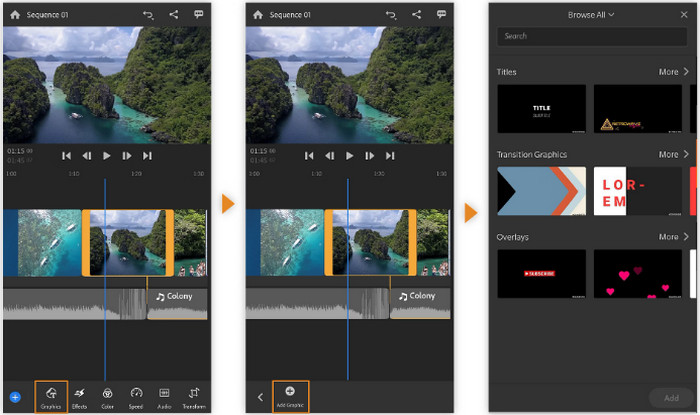
Key Features:
- Multiple device synchronization.
- Automatic lower background music for speech.
- Drag-and-drop upload process.
- Supports direct publishing tools.
- Integration with cloud storage.
Pricing:
- Creative Cloud All Apps plan for $52.99
- Premiere Pro plan for $20.99
- Adobe Express Plan for $9.99
- You can rotate video on Android using the app.
- Works with different Adobe apps.
- Clean interface.
- Performance does not rely on an internet connection.
- A professional or a beginner can use it.
- Supports limited advanced features.
- You need to purchase a plan.
- Free versions support limited exports.
- Less timeline control.
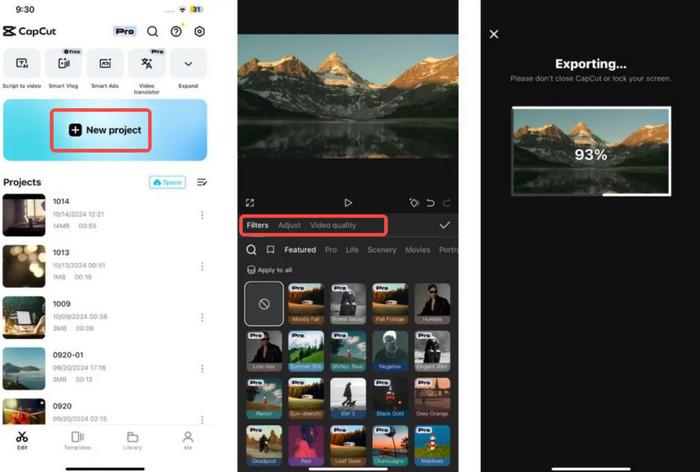
4. CapCut
CapCut is indeed famous nowadays due to the integration it has with different social media platforms. It is known for creating short videos for content. Though it can manage long videos, depending on the storage of your Android phone.
Key Features:
- Supports multiple powered AI tools.
- Contains pre-made templates.
- Supported green screen.
- It has a subtitle and text generator.
- Supports built-in effects library.
Pricing:
- Standard Plan for $9.99
- Pro Plan for $19.99/Month and $179.99/Year
- Free to use.
- Supported by social media platforms.
- Accessible for different devices.
- Advanced tools need subscriptions.
- Privacy concerns.
- Experiences performance issues.
5. Videoleap
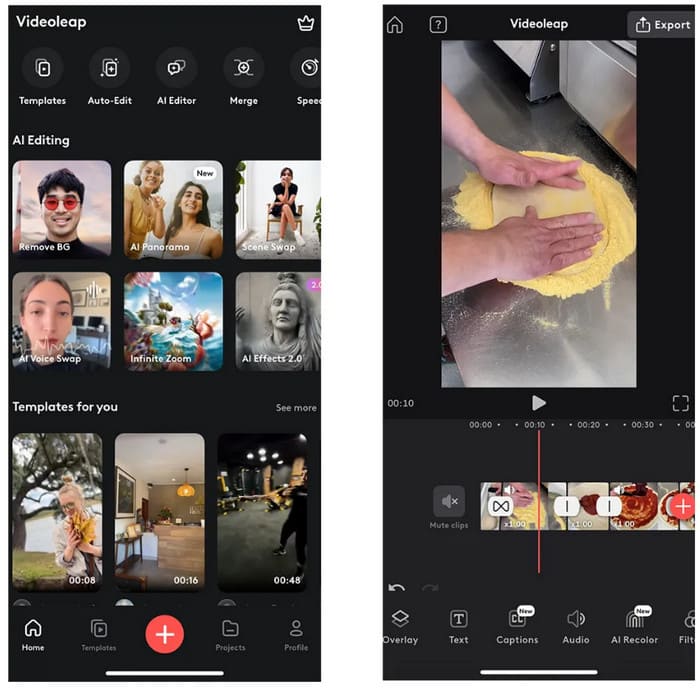
Videoleap is an app that can edit video for Android phones, combining the beginner-required skill with an easy interface. Professionals can also use the app, but they will find it inconvenient and lacking. However, you cannot import or play videos on Android using the app if they are not supported.
Key Features:
- Supports AI editing tools.
- Layer-based editing.
- Keyframe animation.
- Color adjustment tools.
Pricing:
- $5.99 for Pro Plan/Month and $69.99/Year
- AI integration.
- Allows different skill levels.
- Quality output.
- Requires subscription.
- Performance issues.
- Limited desktop support.
Part 2: The Limits of Editing Video on Android Devices
Video editing is indeed helpful for enhancing your videos for different platforms, including social media. The applications presented can help you edit your videos conveniently. However, there are some limitations needed to be known.
- Some editing apps cannot process large video files because they might experience lagging and overheating issues.
- There are editing apps that are hard to navigate due to limited screen sizes.
- Managing the video files is way harder on mobile phones.
- The app will experience slow export procedures for bigger file sizes.
- Some apps depend on the internet connection and subscriptions.
Part 3: Easily Master Video Editing for Android Devices
Alternatively, you can use Tipard Video Converter Ultimate. It is a tool that has a simple interface with an easy workflow. It also offers easy video editing features and AI-driven editing and enhancement features. It includes rotating, cropping, adding effects, adding a watermark, adding subtitles, and more. The tool supports level-3 hardware acceleration to decode, edit, and re-encode videos.
Why We Selected It
Some applications have a dependency on the internet connection, especially when exporting. Tipard Video Converter Ultimate does not rely on the said network. It works offline. Also, it has a simple interface that users will find convenient. It has other features that you can use, including a converter, DVD ripper, and more.
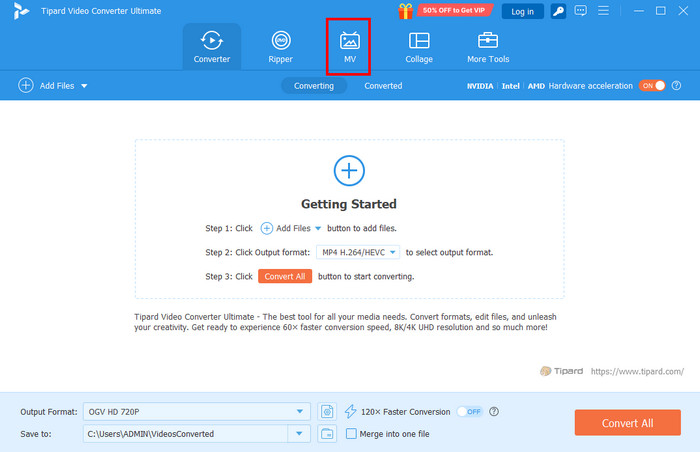
Step 1 Download and open Tipard Video Converter Ultimate. The first screen will show you its features.
Step 2 Click MV. Then, click Plug or Add on the button on the left. Choose the video you want to edit.
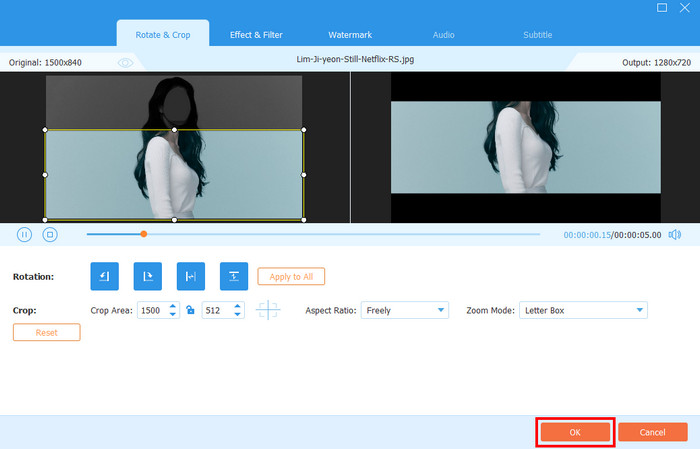
Step 3Select Edit. Choose the editing tool you prefer. It includes the Rotate & Crop, Effect & Filter, Watermark, Audio, and Subtitle. Then, click OK to apply changes. Finally, export the video.
Part 4: Comparison of Android Video Editing Apps
Above is the detailed information about the applications. The table below is your quick guide to their important details for your quick browsing experience.
| App Name | Ease of Use | Feature Depth | Supported Platform | Strength |
|---|---|---|---|---|
| KinesMaster | Beginner | Moderate | Android and iOS | Quick and Flexible |
| PowerDirector | Moderate | High | Windows, Android, and some Mac versions | Advanced Editing Tools |
| Adobe Premiere Rush | Beginner | Basic to Moderate | Android, Windows, Mac, iOS | Cross-device video creation |
| CapCut | Beginner | Moderate | Android, Web, iOS, Windows | Short videos |
| Videoleap | Moderate | Moderate to High | iOS and limited Android devices | Creative video production |
| Show MoreShow Less | ||||
Conclusion
To summarize, Android video editing can be done using the built-in editing features and apps. This article presents the five best video editing apps you could ever use on your Android phone. Tipard Video Converter Ultimate is a great tool that can edit your videos on a Mac or PC. You can download the tool to explore its features.
More Reading


About the Author

 Click here to join the discussion and share your comments
 Tipard Video Converter Ultimate