

If you are fond of taking videos on your smartphone, editing them on your computer is indeed convenient. Compared to smartphones, a computer has a larger screen that allows you to multitask while editing videos. There are multiple video editing programs for the mentioned device, such as Final Cut Pro. This tool is commonly used on Mac.
On the other hand, is there Final Cut Pro software for Windows? Eyes here! Everything you need to know about this topic is here. It includes the compatibility, pros, cons, key features, and alternatives of the mentioned software. Kindly scroll below to discover the said details.

Part 1. What Is Final Cut Pro?
Can you use Final Cut Pro on Windows? To tell you frankly, no. The mentioned software is not available on your Windows computers. It is native for Mac, and Apple does not officially release a Windows version. It is only available on macOS and selected iPadOS models, especially the ones with Apple silicon chips.
On the other hand, some users attempt to use macOS virtual machines. In this case, they try to use the said tool. However, these procedures are unsuccessful due to unusable software and slow performance of Final Cut Pro. In short, you will need a Final Cut Pro alternative if you want video editing on Windows.
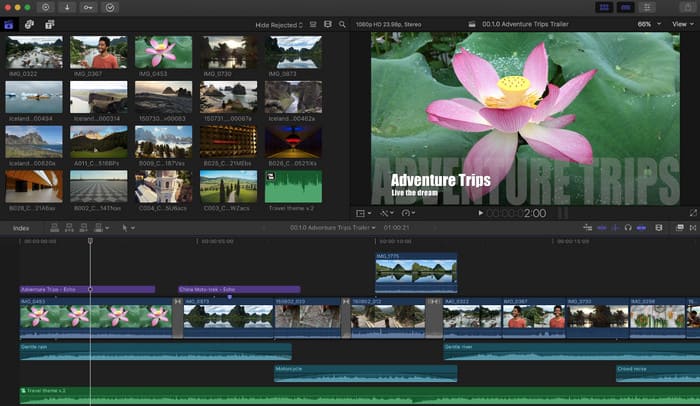
Final Cut Pro is a professional editing tool that is designed to edit complex projects and high-resolution media. It works for Macs that have a minimum of 8 GB RAM, but the most recommended is 16GB. Also, the tool requires 6.5 GB to install. It means that additional files from the tool can consume more storage on your Mac. So, ensure that you have enough storage to run the tool on your Mac.
Part 2. Key Features of Final Cut Pro
Final Cut Pro uses a non-linear editing workflow that can be used for flexible clip arrangement. One of the best things about it is that you can combine footage from different cameras because it offers multi-camera editing. Additionally, it supports 360-degree video editing, which professionals find more convenient. The following are the other key features of Final Cut Pro.
- It offers a keyframe animation for different video formats.
- You can use various timeline editing controls.
- It allows you to add object tracking for the videos.
- You can test or use the motion graphic tools easily.
- It has built-in transitions.
- Video filters are available.
- You can add visual effects to any supported video format.
- Advanced color grading tools can be used.
Part 3. Detailed Review of Final Cut Pro
Users have reported multiple detailed experiences with Final Cut Pro. They described it as a magnetic timeline that can automatically adjust clips, which allows you to prevent gaps or collisions. It also supports a drag-and-drop interface that can make the uploading process quicker. Also, it does not allow you to render the video because it allows a real-time preview manually.
1. Target Users
The tool is intended for beginners and professionals. It is commonly used by content creators, YouTubers, filmmakers, and more.
2. Performance Details for Optimization
The tool is good for optimizing your media files, like videos and audio files. However, it lacks background rendering explanation, proxy workflows, and more.
3. File Format & Compatibility
Lightworks supports countless media formats. It includes MP4, ProRes, HEVC, and more. The import and export flexibility of this tool is convenient for multiple files. It is also compatible with third-party tools.
4. Pricing
- $299.99 for One-time Purchase
- $12.99/Month and $129/Year for Apple Creator Studio, including Logic Pro, Compressor, Motion, etc.
5. Tech Specs
- The operating system requires macOS 15.6 or later.
- RAM requires a minimum of 8 GB, but 16 GB is recommended.
- Your Mac must have 6.5 GB for installation.
- It requires a Metal-compatible GPU.
- The processor must be Apple Silicon (M-series) or Intel-based Mac.
6. Pros & Cons
- It supports fast export and rendering speeds.
- It requires only a one-time purchase instead of a subscription model.
- You can also edit 3D videos on Final Cut Pro.
- It has a strong optimization for Mac systems.
- It is efficient in handling large video resolutions.
- It supports professional color grading tools.
- It has high-quality built-in effects and transitions.
- Large projects can slow down the other operations of the tool.
- The tool is not available on Windows or Linux.
- The plugin ecosystem is smaller than that of other competitors.
- Most of the workflows rely on Apple hardware.
- Its collaboration tools are less advanced.
Part 4. What If You Want a Final Cut Pro Alternative on Windows
You probably want to know a Final Cut Pro similar for Windows. In this case, you will experience the same video editing procedures. In this section, we will show you the three leading alternatives to the tool.
1. Tipard Video Converter Ultimate
Tipard Video Converter Ultimate can be used by both novices and professionals. It is one of the advantages of the tool compared to Final Cut Pro, which requires only professional skills. It supports a wide range of famous audio and video formats, like MOV, MP4, AVI, MKV, FLAC, WMV, and more. This way, you can access them on different mainstream devices, such as iPhone, iPod, Huawei, Xiaomi, Motorola, iPad, and more.
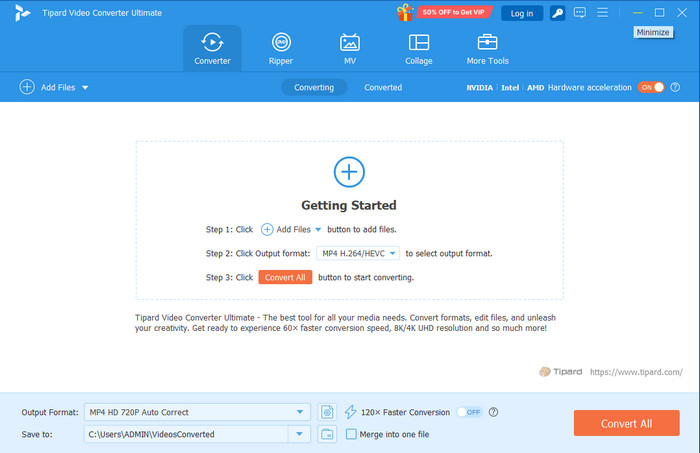
- It can convert videos to 4K UHD and 1080p HD videos.
- It can rip DVDs to video and audio files.
- The tool copies DVD to ISO image, DVD, folder, MKV, and MPG losslessly.
- You can use it to enhance video and audio files using an AI-driven technology.
- It can crop, rotate, clip, add a watermark, collage, and more to your videos.
- It is available on your Mac and Windows computers.
- It has limited features for its free version.
2. Adobe Premiere Pro
Adobe Premiere Pro is another Windows Final Cut Pro alternative. It is commonly used for creating films, commercials, YouTube videos, and more. It may be associated with your Adobe Creative Cloud. It is commonly used by professional video editors, filmmakers, and content creators. It uses a non-linear editing (NLE) system.
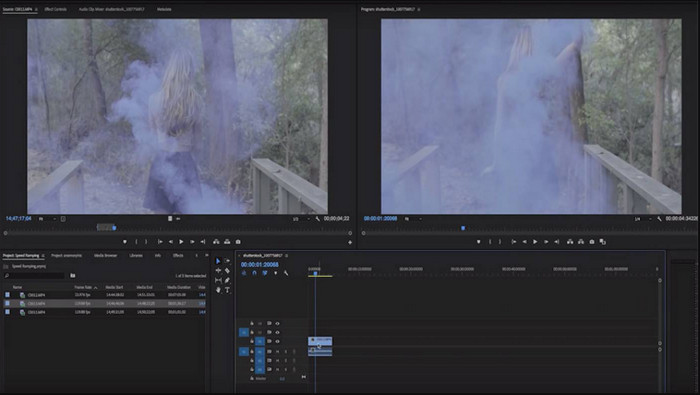
- It is available on Mac and Windows.
- It supports multiple video formats that can reduce the need for file conversion.
- It connects with other tools, including Adobe Audition, Photoshop, Adobe After Effects, and more.
- Multiple third-party plugins are available.
- Its subscription is too expensive.
- It requires powerful hardware.
- Its interface is too complex for beginners.
- It takes up large amounts of storage for temporary files and media caches.
- Some users experience crashing and lagging issues.
3. Blackmagic DaVinci Resolve
Blackmagic DaVinci Resolve is widely used for professional video editing in film production, YouTube content creation, and television editing. The primary unique feature of this tool is that it can combine different post-production tools in one application. The tool can be downloaded on your Windows, Mac, and Linux computers.
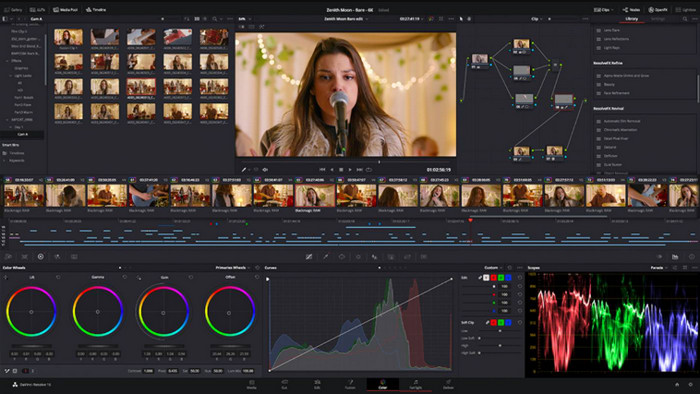
- It supports powerful color grading tools.
- It can edit, add audio mixing, visual effects, and color grading.
- Its free version allows you to use advanced tools.
- It needs high hardware requirements.
- It contains a large installation size.
- Most of the advanced features of the tool are paid for.
- The performance of the tool depends on the GPU.
Conclusion
All in all, Final Cut Pro Video Editing Software for Windows is not available. The software is only compatible with Mac. The good thing about this post is that it offers Tipard Video Converter Ultimate. It is the best alternative to the mentioned software for editing your videos. Downloading this tool will help you discover its full features.
More Reading

About the Author

 Click here to join the discussion and share your comments
 Tipard Video Converter Ultimate