

InShot Video Editor is among the most reliable editing apps you can access on your Android and iOS devices. It can even offer various editing tools you can access, such as cropper, filter, effects, speed adjuster, and more. So, are you interested in learning more about this editor? Then, you must read this review since we will offer a detailed review that discusses its capabilities as an excellent tool. Aside from that, we will also introduce the best alternative to the app for a better editing process. With that, read here and learn everything about InShot.

Part 1. What is InShot Video Editor
The InShot app is an excellent tool you can use to edit videos and images. With this app, you can beautify your content in your own way. You can add filters, retouch, use effects, crop videos, and more. The best part about this app is that it has a simple user interface that is perfect for all types of users. Not only that, you can even save the edited video with the best quality for better playback.
Where to Access InShot?
You can download the InShot editor on your Android and iOS devices. It is easy to install from both the Play Store and App Store, making it more accessible to all users.
Is InShot Free?
The app can offer its free version to edit your media files. But it has various limitations. With that, if you are planning to get the paid version, the price will start at $3.99 per month. Accessing the subscription plan allows you to save your video with better quality without any watermark.
Part 2. Key Features of InShot Video Editor
Want to explore more about the editing app's capabilities? Then, read this section and learn more about its core features.
Video Editing Tools
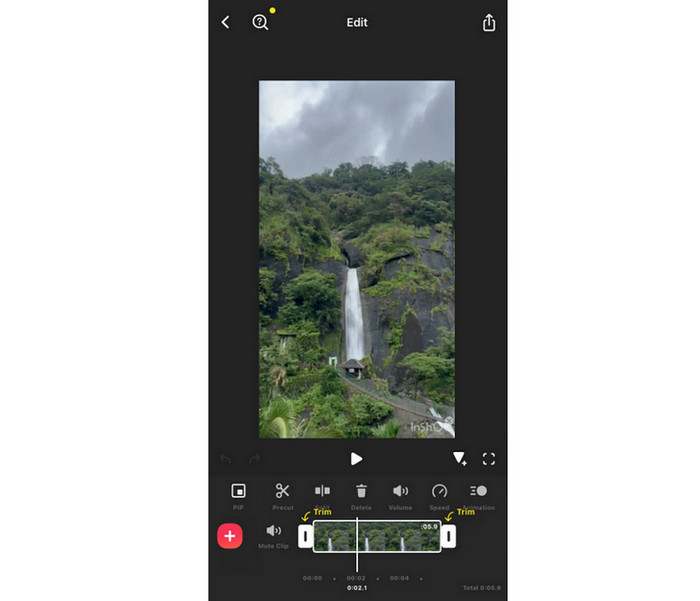
The InShot video editing app's core feature is to offer various video editing tools. You can access a cropper to resize your videos. You can also use the trimmer, splitter, and cutter to deal with your videos. The best part here is that you can even combine multiple videos, allowing you to turn multiple videos into a single file.
Effects and Filters
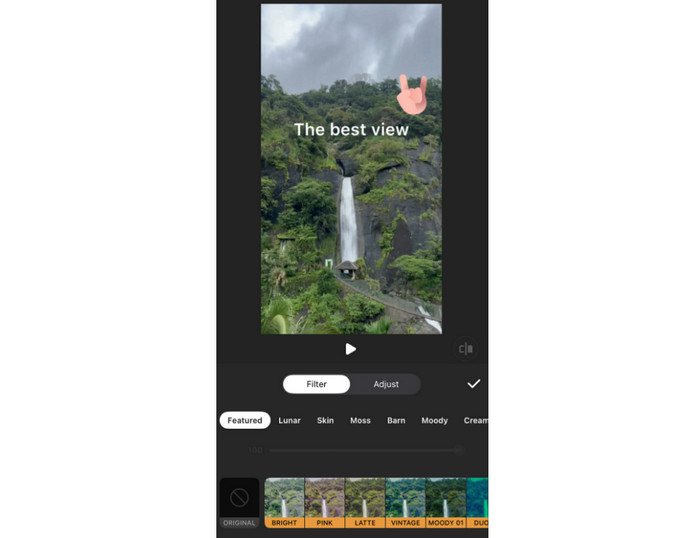
Another helpful feature the app can offer is its capability to provide video filters and effects. With this feature, you can beautify your videos based on your preferences. You can add various effects or filters on your videos, such as vintage, moody, latte, pink, and more. What makes it more ideal is that you can add transitions, blur, retro, and glitch to your video. With that, you can ensure a better appearance of your file after giving some retouch to it.
Audio Integration
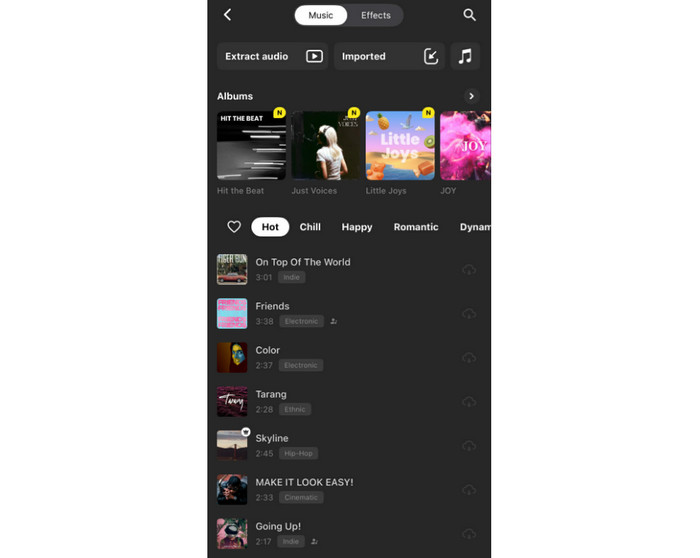
What makes the InShot editing app powerful is that it can be integrated with audio. You can add music or a background song to your video. Plus, the app can provide various stock audio files and sound effects you can access. You can even attach music from your phone, especially when adding voiceovers.
Text and Stickers
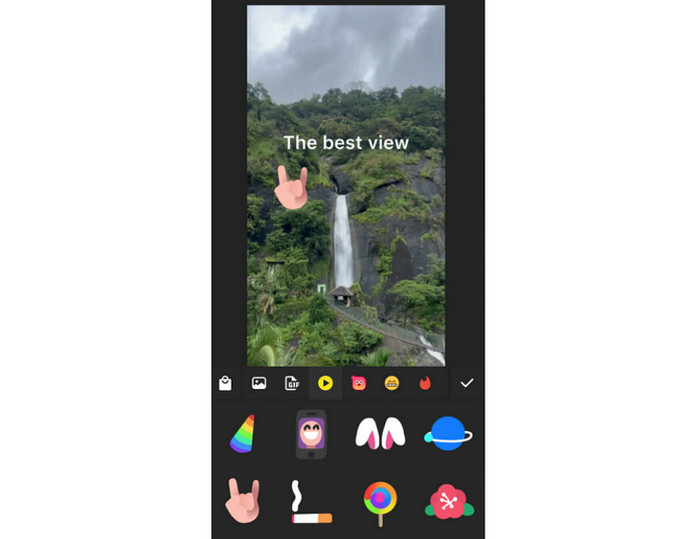
Do you want to make your video engaging? Then, you can insert text and stickers into it. The app can give you various stickers you can use for your videos. This is perfect if you want to attach eye-catching elements to your media file. What we like here is that you can add a GIF if you want something moving on your videos. Plus, you can add text if you want to add captions or subtitles to the videos.
Speed Control
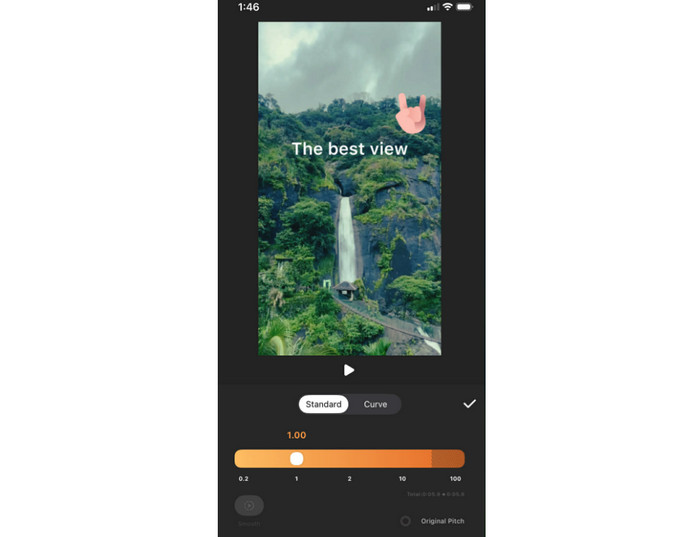
If you want to speed up video on iPhone and Android, you can also use InShot since it can offer its playback speed controller feature. You can even slow down the video if you want to. With that, if you want to show the highlight or create a timelapse, it would be best to rely on this feature.
Photo Editing
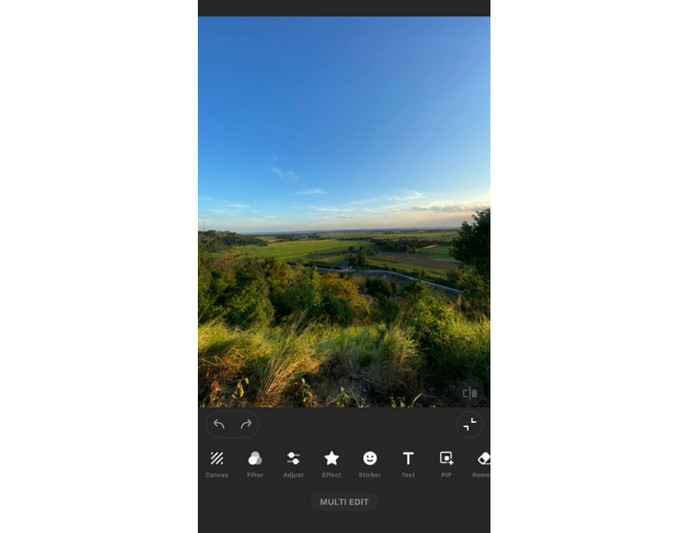
Besides video editing, you can also deal with your images. InShot can offer its photo editing feature. It lets you add effects, adjust the image brightness, insert a sticker, remove a background, and more. The best part here is that you can create a collage, allowing you to organize multiple images in a single canvas.
Part 3. Detailed InShot Video Editor Review
For more details about the InShot Video Editor app, see all the information below.
Good Things about InShot Video Editor
User-Friendly Interface
The app has an intuitive user interface. It has a timeline editing, quick export option, and drag-and-drop tools, making it an ideal video editing app for beginners.
AI-Powered Features
The app can offer a smart background blur, auto-captioning, and AI filters to streamline editing, which is perfect for an easier and faster editing process.
Social Media Integration
The good thing about InShot is that it can be integrated with multiple social media apps/platforms. You can share the edited video on TikTok, Instagram, YouTube, and more.
Affordable Pricing
InShot is not a 100% free editor. But the good news here is that you can use the subscription plan at an affordable price, making it accessible to users.
Drawbacks of InShot Video Editor
Watermark on the Video
When using the app's free version, the watermark will appear on the video after the saving process. To remove the watermark, it is ideal to access the free version.
Mobile Only
The video editing app is only available on iOS and Android. If you want a desktop-based editor, it is recommended to use a separate video editor.
Export Limitations
While the app can support High Definition and 4K exports, rendering large projects is time-consuming, especially on old devices.
Performance and User Experience
Overall Performance
The app can offer a smooth editing process, especially on modern phones. The best part here is that you can use all the functions easily, making it ideal for all skilled and non-professional users.
Export Quality
InShot is perfect for dealing with short-term content. With that, if you have a simple clip you want to improve and enhance, using the app is suggested. However, if you are dealing with lengthy videos, the app will reduce the video's original quality.
Workflow Speed
With the help of AI presets and ready-to-use templates, content creators can finish edits in just a few minutes. Thus, if you want a fast-paced social media posting, using InShot is a must.
Verdict
InShot for Android and iOS is an excellent editing application that you can use to edit your videos. You can even access various features you can use, such as cropper, trimmer, effects, playback speed controller, and more. However, when using the free version, the watermark will appear. There are also times when it is not performing well, especially on an updated mobile phone. But still, if you want to improve your videos, consider using this video editing app.
Part 4. InShot Video Editor Alternative
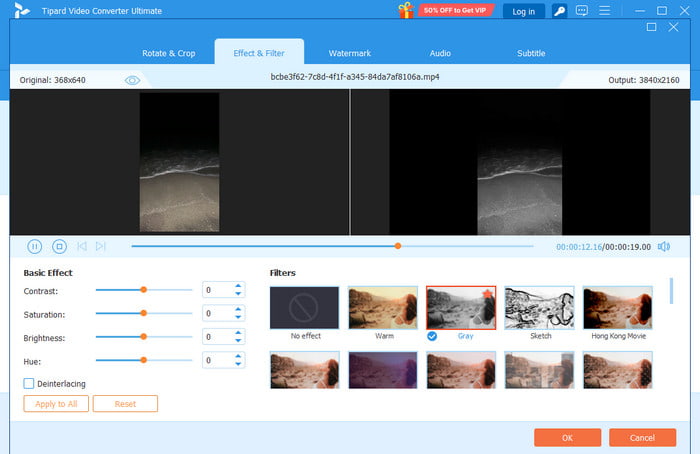
Do you want an InShot for Mac and Windows? Well, there is no desktop version for InShot. With that, if you want a desktop-based video editor, we suggest using Tipard Video Converter Ultimate. This program has a simple user interface, allowing you to have a smoother and easier workflow. It can even support level-3 hardware acceleration so that you can edit videos instantly. What we like about this video editor is that it can provide various AI-driven video editing features. You can access video enhancer, trimmer, upscaler, watermark remover, noise remover, and more. Lastly, you can convert and save your videos in various formats, including MP4, WMV, MOV, FLV, AVI, MKV, M4V, VOB, and more.
More Features:
- The video editor is accessible on various platforms, such as Mac and Windows.
- It can save edited videos with the best quality for up to 4K.
- The program can offer a fast export procedure.
- It can offer a Music Video feature, perfect for creating videos with a background song.
- Its converter feature can convert media files faster by up to 120× faster.
Conclusion
InShot is an astounding video editing app you can access on your mobile phone. Thanks to this honest review, you have explored more about its helpful features, advantages, drawbacks, pricing, overall performance, and more. However, if you want to edit your videos on your computer, you must use a separate video editor. Thus, we recommend using Tipard Video Converter Ultimate. This video editor can offer all the basic and advanced video editing features you can use to edit and enhance videos with the best quality. Thus, use this program and make a better version of your videos.
More Reading

About the Author

 Click here to join the discussion and share your comments
 Tipard Video Converter Ultimate