

How can you make Instagram photo collage? You must have checked those nice video and photo collages on Instagram. Don't you want to make one like that? An Instagram collage is a good idea to share your moments and gain more fans. With a collage, you can make your photos or videos very appealing on Instagram.
If you also want to share your life on Instagram, you can read this article to learn how to make a photo or video collage on Instagram Stories, Reels, and Feed Posts.
Part 1. What Is Instagram Collage?
Instagram collage is a visual post that combines multiple images or videos in a single frame with artistic layouts. It includes photo collage and video collage, or text collage. For example, you can combine multiple photos and videos taken during your trip or a weekend.
Why Is Instagram Photo and Video Collage a Good Idea?
1. Simplify Narrative Delivery: High-quality Instagram collages make complex stories instantly accessible for your audience to explore.
2. Enhance Aesthetic Quality: Utilizing artistic layouts to combine media ensures your feed remains cohesive, polished, and visually striking.
3. Efficiency for the Viewer: Minimize scroll fatigue by presenting multiple assets in a unified format, saving your audience time while maximizing impact.
Understand Instagram Collage vs. Layout
Layout is a tool in Instagram that can help you create a photo collage, but its features are limited and not customizable.
Instagram collage is not a tool or app, but just those video or image collages posted on Instagram. You can use some apps or tools (such as Layout) to make an Instagram image or video collage.
Part 2. How to Make a Photo Collage on Instagram
As mentioned above, Instagram Layout can make photo collage easily. You can check how to do that with the guide below.
How to Create a Photo Collage for Instagram Feed Posts with Layout
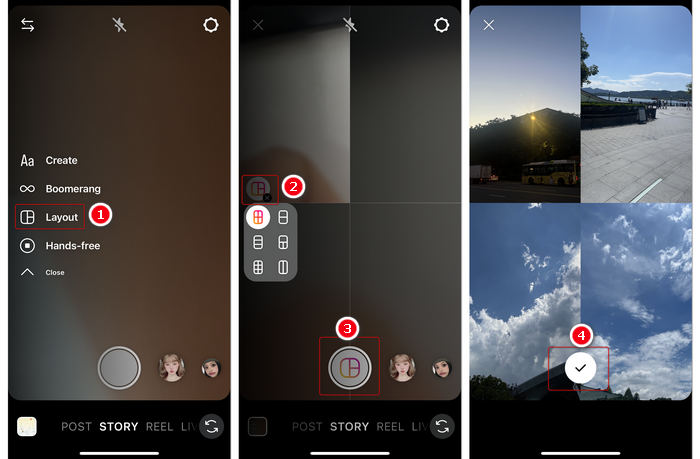
Step 1 Open Instagram and tap the Add button at the bottom. Then, select the Layout feature.
Step 2 Here, you can tap the Grid button on the left side to change an image collage template. To add photos for making an image collage on Instagram, you should tap the Photo button at the bottom. Each tap can add only one photo taken from your camera or Photos app.
Step 3 After adding photos, you can tap the OK button to finish making the Instagram photo collage. You can also choose background music or add some text, or do other editing or enhancement. Then you can post it.
Part 3. How to Make a Video Collage on Instagram
Instagram doesn't offer a true video collage tool; it relies on a picture-in-picture overlay system, just like webcam overlay. However, you can still get a compelling result if you can select video clips that complement each other's movement and composition.How to Make a Video-Collage-Like Video for Instagram Reels and Stories
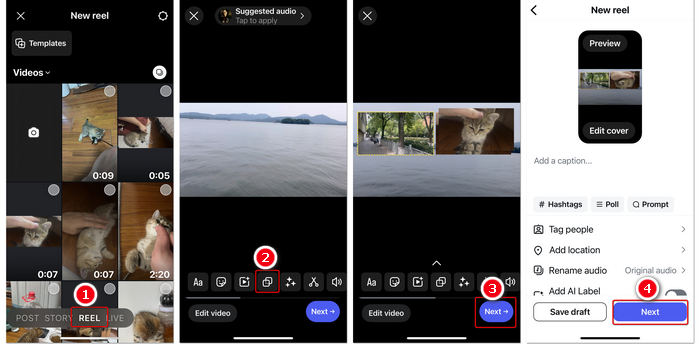
Step 1 Tap the Add button in the top left corner, select REEL or STORY tool at the bottom.
Step 2 Import a video from your phone. This video will also be the entire background of the video collage. Then, you can tap the Overlay button on the bottom toolbar.
Step 3 You can add multiple videos as overlay to make a video collage on Instagram. Then, tap the Next button on the bottom right side after extra editing.
Step 4 Now, you can add hashtags and do other settings. Tap the Next button to share this excellent Instagram video collage.
This approach has a significant drawback: you must add a video as the background of the video collage. If you don't want a background, then Instagram itself cannot help, and you should use another method: check how to make a collage of videos for Instagram with the method below.
Part 4. How to Make Video Collage for Instagram Stories and Reels
To make a real video collage for Instagram Stories and Reels, you can use a professional video editor: Tipard Video Converter Ultimate. We tested this program for 10 minutes and found that It can make video collages just like the Layout feature on Instagram.
You can combine multiple videos on one screen with multiple collage templates, and then edit them with clip, crop, rotate, and filters. Then, you can post the video to your Instagram.
Why did we choose this Instagram video collage maker? Because it supports many input video formats, like iPhone or Android videos, MP4, MKV, MOV, AVI, and more. It also offers AI-driven video enhancement features, like video noise removal, color correction, and shakiness removal. The hardware acceleration can quickly process your collage videos. It can help you make an appealing video collage for Instagram Reels and Stories.

- Combine multiple videos to make a video collage for Instagram Reels and Stories.
- Support all types of video formats from your phone or camera.
- Offer even more practical video editing features than Instagram does.
- Enhance your video collage with AI-based techniques or compress the video for Instagram.

How to Make Video Collage with Tipard Video Converter Ultimate
Step 1 Free download, install and run this Instagram video collage maker on your computer. Select the Collage feature and choose a collage template on the bottom side to start making a collage of videos for Instagram.
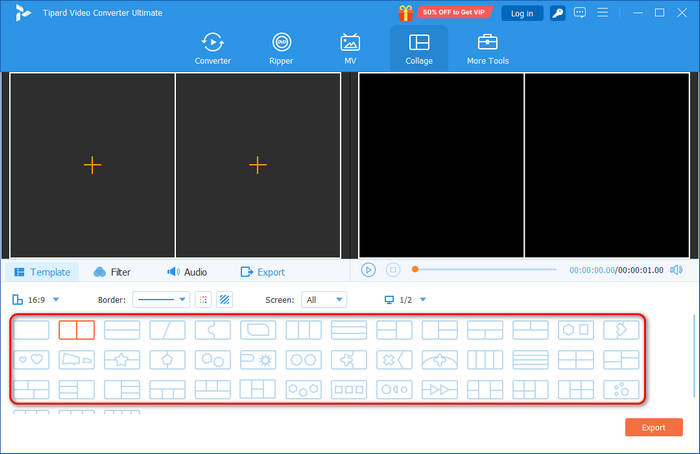
Step 2 Now, you can click the Add button on the left side to import videos. You can also add images.
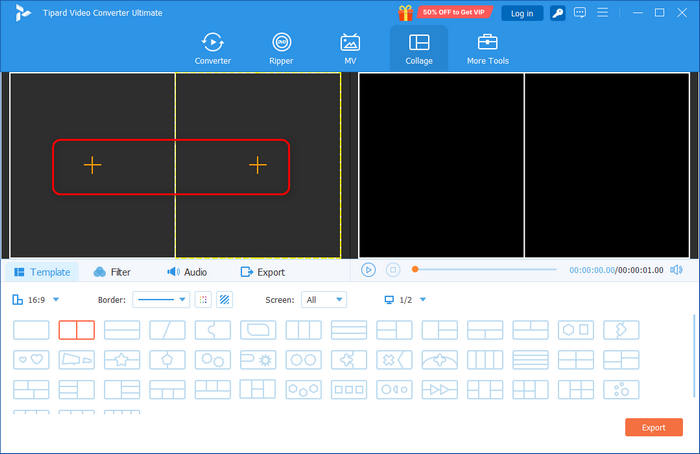
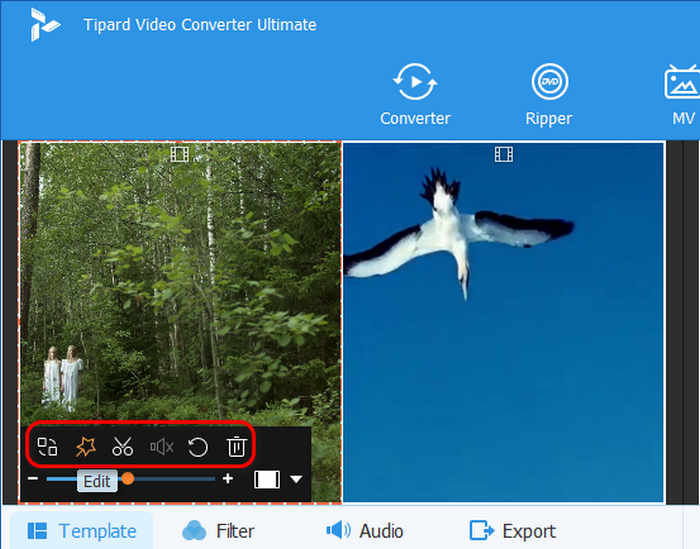
Step 3 After adding, you can use the editing tools on each video box to edit the video individually. For example, you can replace the video, clip, rotate, flip, or add a filter to your video, and manage the audio track.
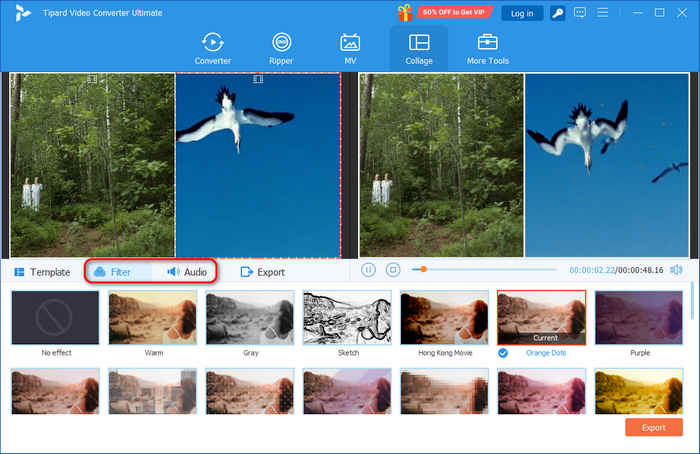
Step 4 You can also add a filter to the whole video collage for Instagram. The Audio feature can let you adjust the audio for the whole collage.
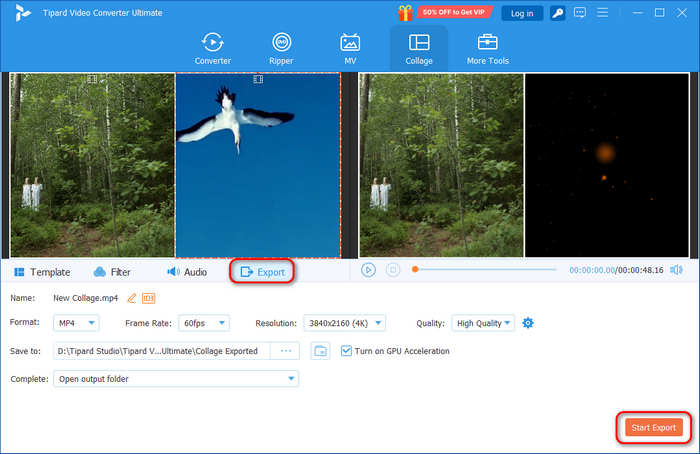
Step 5 Click the Export button to start exporting this video collage for Instagram. You can select the output video format for Instagram, frame rate, resolution, and video quality. You can even create a 4K video collage for Instagram. After that, click Start Export to start exporting the created video collage. Then, you can directly share it on Instagram.
Part 5. FAQs of Instagram Photo and Video Collage
What video formats are available for Instagram collage?
Instagram supports some popular video formats like MP4 and MOV. When you create a split screen video, you should save it in an Instagram supported format.Or, you can use video converters to convert to the supported format.
How do you make a video collage with music on Instagram?
To make an Instagram Story video with music, you can use the Reel function on Instagram. You can also rely on third-party video editing apps like Tipard Video Converter Ultimate.
How do I add 3 videos in one frame on Instagram?
You can follow the approach in Part 3. Instagram Reel allows you to add 3 or more videos as overlays. You only need to adjust the size of each video.
Conclusion
How to make a photo collage on Instagram? After reading this page, you can get the three best ways to combine pictures and videos and play them simultaneously. You can directly make a photo collage on Instagram with the Layout feature. However, Instagram cannot make a true video collage, so you can use Tipard Video Converter Ultimate to make video collage for Instagram with many excellent collage templates.
All-in-one video toolbox: convert, edit, upscale, enhance, and compress your videos easily
100% Clean & Safe
100% Clean & Safe

More Reading




About the Author

 Click here to join the discussion and share your comments
 Tipard Video Converter Ultimate