

What are the best MP3 cutters? Well, MP3 cutters can give you a lot of benefits when editing your audio. You can trim and cut any unnecessary parts from the audio easily and smoothly. It is perfect for various users, such as music lovers, podcasters, and content creators. In this article, we will provide all the most reliable MP3 cutters you can use on your browser and desktop. You will also explore their features, pros, cons, and more information. With that, learn everything about the best MP3 cutters. Read this article immediately.

Part 1. What is an MP3 Cutter and How Does it Work
An MP3 cutter or trimmer is an excellent tool that helps you cut, trim, split, and shorten audio from MP3 format without compromising the audio quality. The tool is commonly used to eliminate unwanted sections from the audio track, extract highlights, or make custom ringtones. Plus, an MP3 cutter is popular among podcasters, musicians, and casual users since it can offer a quick and efficient method to edit audio without advanced technical skills. The best part here is that almost all MP3 trimmers are lightweight, simple to use, and often come with additional features, allowing you to improve your audio for a better listening experience.
How Does an MP3 Cutter Work?
An MP3 cutter lets users define start and end markers for the desired part by reading the digital structure of an MP3 file. After that, the cutter slices the file appropriately, keeping the chosen section and deleting the remaining track. Since re-encoding is not required, most audio cutters employ a lossless method, which preserves the audio quality. With this, the workflow is quick, effective, and perfect for creating clear, usable audio clips.
Part 2. Top 5 MP3 Cutters Offline and Online
Do you want to explore the best MP3 cutters you can access on your desktop and browser? In that case, you can check all the tools you can use, along with their features, pros, and cons.
1. Tipard Video Converter Ultimate
Platform: Windows and Mac
Features:
- Cut audio smoothly.
- Offers various audio editing features to improve audio.
- Convert audio to different audio formats.
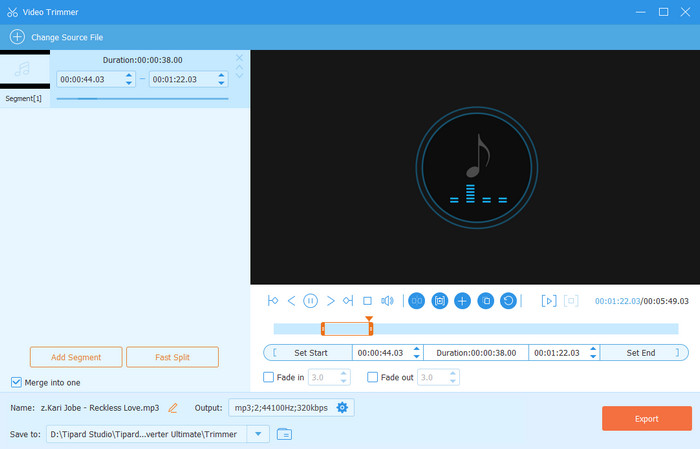
If you need a free MP3 trimmer, we suggest using Tipard Video Converter Ultimate. With its audio trimmer feature, you can easily and smoothly trim any audio from your MP3. The good thing here is that you can trim audio quickly, allowing you to get the result in just a second. In addition, you can split and merge the trimmed tracks, which is perfect for saving more output. Plus, besides MP3, you can save the audio to various formats, such as FLAC, M4A, WAV, WMA, AAC, AC3, OGG, and more. There are also various audio enhancement tools you can use to improve your overall video. With that, we can tell that cutting your audio track using this program is the right choice.
- The program can offer a simple UI for an easier trimming process.
- It offers AI-powered technology for an accurate result.
- The program has a smooth export process.
- You can use some of the advanced features on the paid version.
2. Audacity
Platform: Windows and Mac
Features:
- Trim audio in any area.
- It can offer audio editing tools.
- Offers an audio recorder for recording and customizing audio.
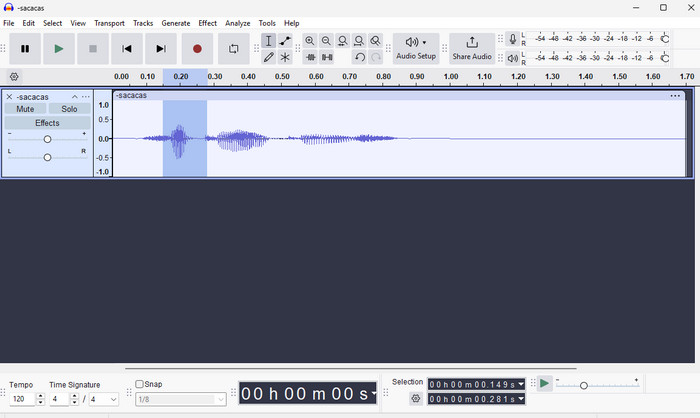
Another audio trimmer you can access on your computer is Audacity. This program has all the features you need that can help you cut or trim your audio. Aside from that, after trimming the audio, you can enhance it by using various features. It includes changing the tempo and pitch, adjusting playback speed, merging audio with different audio, and more. With that, you can tell that this software is perfect for trimming and editing audio on your computer.
- The software can trim and edit audio effectively.
- The main interface of the program is simple to understand.
- It supports numerous audio formats, such as AAC, MP3, FLAC, WAV, M4V, etc.
- There are times when the software crashes or closes for no reason.
3. Clideo
Platform: Browser
Features:
- It can extract and delete selected tracks easily.
- The tool can offer an intuitive user interface.
- Accessible to all web platforms.
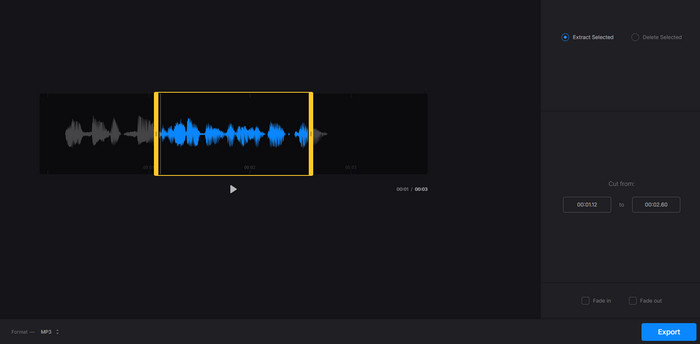
If you need an MP3 cutter online, we recommend using Clideo. With this web-based MP3 cutter, you can ensure to remove and eliminate any unwanted parts from your audio tracks. What we like here is that you can even attach fade-in and fade-out effects to the audio. With that, you can expect a better listening experience. What's more, the tool has a comprehensive interface, making it perfect, especially for non-professional users. Lastly, Clideo can save your audio to various formats. You can export the audio as MP3, AIFF, AAC, AC3, FLAC, WAV, and more.
- The tool can give you a fast audio trimming process.
- It doesn't show any annoying ads on the screen.
- It lets users cut the audio manually.
- You must have a stable internet connection to get the tools' smooth performance.
4. Audio Cutter
Platform: Browser
Features:
- It can cut an audio track from any area.
- It offers a helpful audio editor to improve the audio.
- The tool can boost the audio volume.
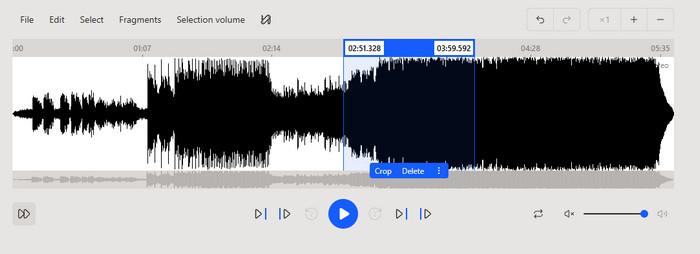
Audio Cutter is another MP3 trimmer online that you can rely on to cut any parts from the audio track. What we like here is that the main layout is comprehensive, letting you cut an audio track without encountering any issues. The best part here is that it can help you edit the audio in many ways. You can add frequency filters, adjust volume, and more. The only problem here is that it still lacks some necessary audio editing features for obtaining the best audio output.
- The layout of the tool is straightforward.
- It has a fast audio trimming process.
- It lets you zoom in and out of the audio to see and cut the track accurately.
- Sometimes, the tool can save the audio with poor quality.
5. Audio Cut
Platform: Browser
Features:
- Focuses on trimming/cutting audio.
- Offers a straightforward user interface.
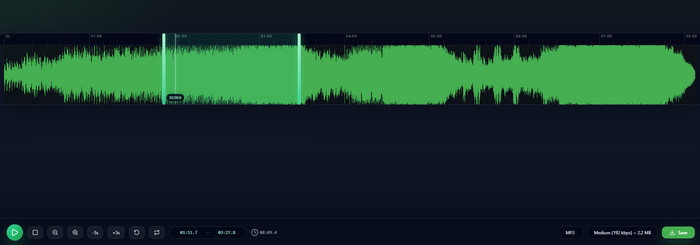
If you are still looking for another online-based MP3 cutter, you can try accessing Audio Cut. This tool focuses on trimming your audio, making it the ideal tool that can give an immediate result after the process. What we like here is that you can operate the tool smoothly, thanks to its simplicity. Plus, it lets you save the final audio at a higher audio quality for up to 320 kbps. Thus, use this tool and your online MP3 clipper.
- It can support various output formats, like MP3, M4A, WAV, FLAC, etc.
- It has a fast audio cutting process.
- It doesn't offer any basic audio editing tools.
Beyond MP3 cutting, there are times when you need another feature that you can access to improve your overall video. If that is the case, it would be better to use Tipard Video Converter Ultimate since it can give you all the features you need. It includes
- Audio Merger - This feature is perfect if you want to combine and merge audio files to create a single file.
- Volume Booster - If you want to increase the volume of your audio, you must access the Volume Booster feature.
- Fade Effects - You can use this feature if you want to add more flavor to your audio for a better listening experience.
If you want more details about the online and offline MP3 cutters, feel free to check the table below.
| MP3 Cutters | Tipard Video Converter Ultimate | Audacity | Clideo | Audio Cutter | Audio Cut |
|---|---|---|---|---|---|
| Audio Quality | Up to 320 kbps | Up to 320 kbps | Up to 320 kbps | Up to 256 kbps | Up to 320 kbps |
| Ease of Use | Simple and feature-rich | Easy to follow | Simple | Standard | Very Easy |
| Audio Cutting Speed | Fast and accurate | Fast | Depends on the internet. | Depends on the internet. | Depends on the internet. |
| Supported Formats | MP3, AAC, AC3, M4A, WAC, FLAC, OGG, and more. | M4A, MP3, WAV, OGG, AIFF, and more. | MP3, WMA, OPUS, OGG, M4A, etc. | MP3, WAV, OGG, FLAC, AAC, and AIFF. | WAV, MP3, M4A, AAC, FLAC, and OFF |
| Best for | Skilled and Non-professional users | Skilled and Non-professional users | Non-professional users | Non-professional users | Non-professional users |
| Show MoreShow Less | |||||
Part 3. Why Some MP3 Cutters Damage Audio Quality
There are times when the audio quality gets damaged after cutting them using an MP3 cutter. Well, there are various reasons behind that. Some of the reasons are:
- Re-encoding during trimming - some of the MP3 cutters don't perform lossless cuts. It only re-encodes the file, which can reduce the audio clarity.
- Limited codec support - an MP3 cutter with a weak codec support can distort the sound when saving the cutted file.
- Low bitrate settings - if the cutter has poor default settings, then it can result in low-quality output. With that, always check the settings before the final saving process.
Conclusion
With the help of these MP3 trimmers, there is no doubt that you can trim and cut your audio based on your preferred result. Each cutter can even give you the best performance, such as a fast cutting process, smooth performance, and good audio quality. In addition, if you need the most powerful audio cutter, we prefer using Tipard Video Converter Ultimate. It can even offer various advanced editing tools with AI power, ensuring to give you the best result for satisfying audio playback.
More Reading

About the Author

 Click here to join the discussion and share your comments
 Tipard Video Converter Ultimate