

- Part 1. Shortlist of Top Specialized DVD Rippers
- Part 2. How We Tested the 10 DVD Rippers
- Part 3. Side-by-Side Comparison of the 10 DVD Rippers
- Part 4. Editor's Top 3 Best DVD Rippers
- Part 5. 7 Other Competitive DVD Rippers
- Part 6. Expert Comparison: Free vs. Pro DVD Rippers
- Part 7. FAQs of DVD Ripper
Key Takeaways:
We've tested 19 DVD ripping software programs and finally selected the 10 best ones in this article. If you want to rip encrypted commercial DVDs, Tipard DVD Ripper is your best resort. To keep the original DVD structure and content, MakeMKV can help you remux a DVD to an MKV file. If you need to customize the output file like a pro, select HandBrake.
Digitizing a DVD collection is no longer just about file conversion; it’s about preserving quality. We've dedicated 72 hours to benchmarking the top rated DVD rippers, focusing on critical performance metrics: decryption reliability, hardware efficiency, and AI image restoration. Explore our comprehensive reviews to discover which DVD ripper software excels at bypassing complex protections while delivering stunning 4K clarity.

- Part 1. Shortlist of Top Specialized DVD Rippers
- Part 2. How We Tested the 10 DVD Rippers
- Part 3. Side-by-Side Comparison of the 10 DVD Rippers
- Part 4. Editor's Top 3 Best DVD Rippers
- Part 5. 7 Other Competitive DVD Rippers
- Part 6. Expert Comparison: Free vs. Pro DVD Rippers
- Part 7. FAQs of DVD Ripper
Part 1. Shortlist of Top Specialized DVD Rippers
Best for AI Upscaling and Decryption: Tipard DVD Ripper - It utilizes advanced Level-3 GPU acceleration and integrated AI upscaling to transform low-resolution DVD content into 4K-quality digital files with remarkable visual clarity.
Best for Occasional Entry-Level Use: Freemake Video Converter - It provides a simplified, beginner-friendly interface that allows users to perform basic DVD extractions and video conversions without needing to navigate complex technical settings.
Best for High-Speed Hardware Acceleration: WinX DVD Ripper - It features a unique Level-3 hardware acceleration engine that leverages the full power of modern GPUs to rip an entire DVD in just a few minutes while maintaining high stability through its "Safe Mode".
Best for Open-Source Customization: HandBrake - It serves as the industry standard for free, cross-platform video transcoding, offering enthusiasts granular control over every technical parameter such as bitrates, filters, and chapter markers.
Best for Multiregional Playback Issues: Leawo DVD Ripper - It specializes in bypassing region codes and common CSS protections, ensuring that physical discs purchased from different global territories can be easily digitized and played on any device.
Best for 1:1 Disc Backup: MakeMKV - It focuses on lossless DVD ripping and remuxing to MKV container, allowing users to create perfect digital copies of their movie collection, including all original menus and bonus features.
Best for AI-Powered Image Restoration: DVDFab DVD Ripper - It integrates a sophisticated "Enlarger AI" module that uses deep learning to repair scratched video data and reconstruct missing textures for a polished, modern cinematic look.
Best for Legacy VOB Extractions: DVD Shrink - It remains a favorite for nostalgic users who need a lightweight, no-cost tool to quickly compress dual-layer DVDs and rip them into raw VOB files for archival purposes.
Best for Automated Batch Ripping: Magic DVD Ripper - It offers a streamlined, "set-it-and-forget-it" workflow that automatically detects the main movie title and removes encryption to facilitate rapid backups of large physical libraries.
Best for Storage-Optimized Encoding: WonderFox DVD Ripper - It employs a smart detection engine and efficient compression algorithms that significantly reduce the file size of digital copies while preserving sharp image quality for mobile devices.
Part 2. How We Tested the 10 DVD Rippers
To provide an objective review, we treated each DVD ripper as a mission-critical tool, evaluating its performance across different hardware tiers and physical disc conditions.
1. Testing Environment
We utilized two distinct hardware configurations to measure how each DVD ripping software scales with modern technology versus legacy hardware:
- High-End Station: Windows 11 Pro, Intel Core i9-14900K, NVIDIA RTX 5080 (16GB), 64GB DDR5 RAM, and a high-speed external ASUS Blu-ray/DVD drive (BC-12B1ST).
- Legacy/Mobile Station: macOS Sequoia, MacBook Air (M2 Chip), 8GB RAM, and a generic portable USB 3.0 DVD drive.
2. Test Materials (the Discs)
We curated a diverse library of physical media to challenge the decryption engines:
- Encrypted Commercial Titles: Frozen (99-title protection) and Spider-Man (ARccOS protection).
- Damaged/Scratched Disc: A heavily used copy of The Matrix with visible surface circular scratches.
- International Media: Region 2 (Europe) and Region 3 (Asia) discs to test region-code bypass capabilities.
- Episodic Content: V series DVDs containing multiple small titles (20-40 mins each) to test batch processing efficiency.
3. Testing Standards & Criteria
Each DVD ripper was evalued based on the following:
- Decryption Success Rate (30%): Can it bypass AACS, CSS, and Region Codes without crashing?
- Ripping Speed (25%): Measured as "Time to Digital" for a 90-minute feature film using standard H.264 and AI-enhanced HEVC profiles.
- Output Quality (25%): Comparison of the output file against the original source using SSIM (Structural Similarity Index) and VMAF scores.
- Resource Efficiency (10%): Monitoring CPU and GPU utilization to ensure the software doesn't "hang" the system.
- Ease of Use (10%): The number of clicks required from disc insertion to "Start" conversion.
4. Result Validation
We didn't just look at the ripped video; we performed a deep dive verification:
- A/V Sync Check: Watching the first, middle, and last 5 minutes of each rip to ensure audio doesn't drift.
- Metadata Accuracy: Checking if the software correctly identifies movie titles, cover art, and chapter markers.
- Subtitles & Audio Tracks: Verifying that forced subtitles (e.g., translation for foreign dialogue) and 5.1 Surround Sound tracks are correctly mapped and functional.
Verification & Transparency
Independence Disclosure: All 10 software products were tested using retail versions. We do not accept "sponsored results" to alter our ranking. All speed tests were performed three times, and the average value was recorded to eliminate statistical outliers.
Part 3. Side-by-Side Comparison of the 10 DVD Rippers
To ensure our recommendations withstand real-world demands, we conducted rigorous stress tests across a diverse range of media, from encrypted commercial titles and region-locked discs to standard homemade DVDs. By fine-tuning complex parameters such as codecs, bitrates, and resolution scaling, we evaluated each software's ability to handle both legacy formats and modern high-fidelity requirements. The following comparison table distills our findings, allowing you to identify the optimal DVD ripper that aligns with your specific workflow and quality standards.
| Software | Decryption Level | Hardware Acceleration | AI Upscaling | 1:1 Lossless Backup | Best For |
|---|---|---|---|---|---|
| Tipard DVD Ripper | Elite (99-Title/AACS) | Full (GPU-based) | Yes (4K AI) | Supported (MKV, ISO, Folder, MPG) | High-Def Transformation |
| Freemake Video Converter | Basic | Supported | No | No | Entry-level Users |
| WinX DVD Ripper | Pro (Safe Mode) | Full (Level-3) | Deinterlacing Only | Supported (Only ISO and Folder) | Speed & Reliability |
| HandBrake | Basic (Manual Setup) | Limited | No | No (Transcode Only) | Customization & Free Use |
| Leawo DVD Ripper | Pro (Stable) | Supported | No | Supported | Region Code Removal |
| MakeMKV | Basic | No | No | Supported | 1:1 Disc Backup |
| DVDFab DVD Ripper | Elite (Cloud-Sync) | Full (Level-3) | Yes (Enlarger AI) | Supported | AI Image Restoration |
| DVD Shrink | Legacy (Outdated) | No | No | VOB Only | Fast VOB Backups |
| Magic DVD Ripper | Standard (Pro) | No | No | Supported (Only ISO and Folder) | Quick Backup |
| WonderFox DVD Ripper | Pro (Smart Detect) | Supported | Image Sharpening | No | Compact File Sizes |
Part 4. Editor's Top 3 Best DVD Rippers
Based on our tests, the following three DVD rippers are our favorites due to their excellent performance, unique features, and broad stability and compatibility.
Top 1. Tipard DVD Ripper
Platform: Windows and Mac
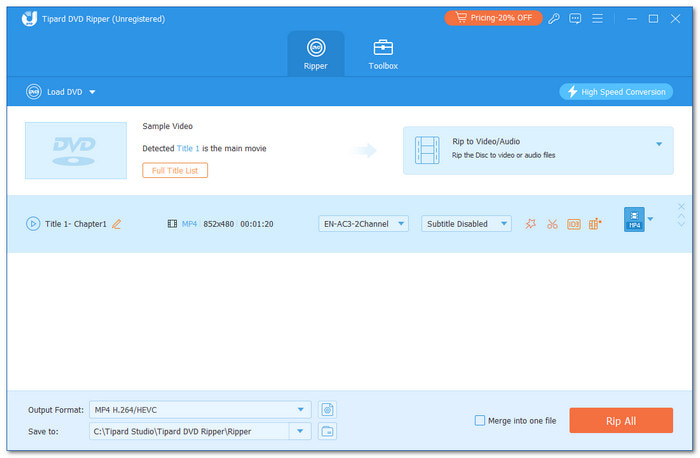
Tipard DVD Ripper stands as the definitive all-in-one DVD ripper solution for professional-grade DVD digitizing. Engineering a seamless bridge between physical media and modern digital libraries, it supports an expansive range of over 500 output formats, including MP4, MKV, and MOV. Whether handling complex commercial encryptions or delicate homemade discs, Tipard DVD Ripper ensures peak efficiency without compromising visual fidelity, delivering breathtaking output in 1080p and stunning 4K resolution.
In the latest version of Tipard DVD Ripper, you can rip DVDs to different types of ProRes videos, which are optimized for modern 4K and 8K displays. You can enjoy your DVD movies with the best visual experience and audio pass-through. Moreover, this best DVD ripper supports both DVD remuxing and transcoding. If you want to edit the raw DVD files, you can rip and remux the DVD to an MKV or MPG file. If you need to play DVD movies on iPhone, iPad, Samsung TV, Android phone, or for other purposes with a modern display, you can transcode DVDs to 1080p, 2K, and 4K MP4, MKV, MOV, WebM, and more video formats.
Key Features of Tipard DVD Ripper:
- Support full hardware acceleration (NVIDIA, Intel, AMD, and Apple Silicon) to greatly increase the ripping speed.
- Offer a powerful AI upscaling feature to upscale DVD movies to modern standard.
- Bypass all DVD copy protections, including 99-Titles, AACS, CSS, and Cinavia.
- Help you rip DVD to lossless MKV and MPG with original structure and content without quality loss.
- Let you rip DVD to MP4, MKV, MOV, and more formats with H.265, H.264, AV1, VP9, ProRes, and more codecs.
- Integrate AI upscaling technology to enhance video quality during ripping.
- Offers many practical video editing features, such as trim, clip, rotate, and aspect ratio change.
The hallmark of this industry-leading best rated DVD ripper is its advanced decryption engine, capable of effortlessly bypassing AACS, CSS, and Cinavia protections. Beyond its elite ripping power, Tipard offers sophisticated video compression that maintains exceptional clarity at reduced file sizes. To further refine your collection, it integrates professional toolkits for adding external audio tracks and subtitles, all wrapped in an intuitive interface that balances advanced power with elegant simplicity.
- Rips DVDs 30× faster for quick results
- Offers editing tools to customize your DVD collection
- It keeps all subtitles and audio tracks and allows the addition of external ones
- Bypasses DVD encryption and region codes to easily rip DVDs to popular media files
- Support full hardware acceleration to digitize and enhance your DVDs to 4K, 5K, and even 8K without losing quality
- The free version limits the ripping duration for each file
Top 2. HandBrake
Platform: Windows, Mac, and Linux
Supported DVD regions: HandBrake does not support bypassing DVD region codes. It can rip DVDs from any region. But if the DVD is copy-protected or locked to a specific region, you might need additional programs to remove the protection.
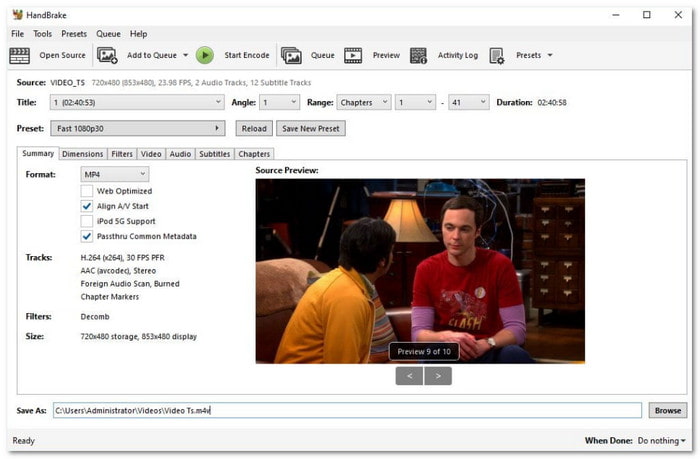
As a definitive icon in the open-source community, HandBrake remains a must-have tool for users seeking a powerful, cost-free solution. This robust DVD-ripping program excels in high-volume tasks through its efficient batch processing capabilities. For optimal results, HandBrake is widely regarded as the industry standard for transcoding DVD content into highly compatible MP4 or MKV containers.
This best free and open source DVD ripper offers exceptional cross-platform versatility, delivering a consistent experience across Windows 10/11, macOS, and Linux. While its performance is highly reliable for standard transcoding, users should be aware of its inherent limitations: as an open-source project, it lacks dedicated technical support and native decryption for copy-protected discs, which may occasionally lead to stability issues or the need for third-party plugins.
Key Features of HandBrake DVD Ripper:
- Let you access and deeply customize each file in your DVD and Blu-ray.
- Provide many output codecs, including H.264, HEVC, AV1, MPEG-4, and more.
- Allow you to deeply customize video resolution, frame rate, bitrate, aspect ratio, deinterlacing, and more configurations.
- The flexible FPS customization features can help you reduce DVD file or significantly increase the fluency.
- Free to use and open source
- Supports batch processing
- Flexible parameter settings
- The interface is outdated
- Cannot handle copy-protected DVDs
- Video clarity may degrade during conversion
Top 3. MakeMKV
Platform: Windows Only
Supported DVD regions: MakeMKV supports all DVD regions, from region 1 to region 6.
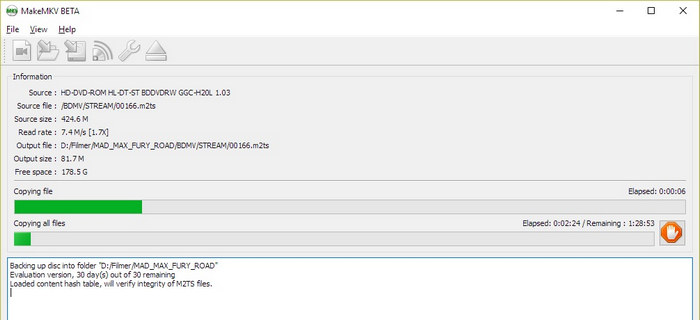
One of the primary reasons MakeMKV is considered our top-tier contender for the best DVD ripper is its ability to bypass hardware-level restrictions. It is designed to be Region Free, meaning it completely ignores the region coding enforced by DVD drive firmware and software players.
MakeMKV DVD ripper accesses the data on the DVD and Blu-ray disc directly at the sector level, bypassing the RPC2 region check of your DVD drive. This allows you to rip a Region 6 disc even if your drive is locked to Region 1, without consuming any of the limited "region reset" counts on your hardware.
In the hunt for the Best DVD ripper, MakeMKV holds a unique holy grail status for purists. It is not a transcoder; it is a disc remuxer, which makes it fundamentally different from most other software in this category. While most simple Blu-ray and DVD rippers can only transcode video (which shrinks the file but may lose quality), MakeMKV simply takes the original video, audio, and subtitle streams from the disc and wraps them into a modern .mkv container. The result is a digital file that is bit-for-bit identical to the original content on the DVD.
Key Features of Make MKV DVD Ripper:
- Rip and remux DVDs and Blu-rays to lossless MKV file with original disc structure and content.
- Easily handle most legacy and scratched DVDs.
- Access each file in your DVD and Blu-ray for you to select desired files.
- Remove all types of region codes.
- Loeelessly remux DVD and Blu-ray.
- Available on all Windows versions.
- Lightweight and work stably.
- It usually fail to load homemade DVDs and Blu-rays.
- The decryption power is weak.
Part 5. 7 Other Competitive DVD Rippers
1. Freemake Video Converter
Platform: Windows Only
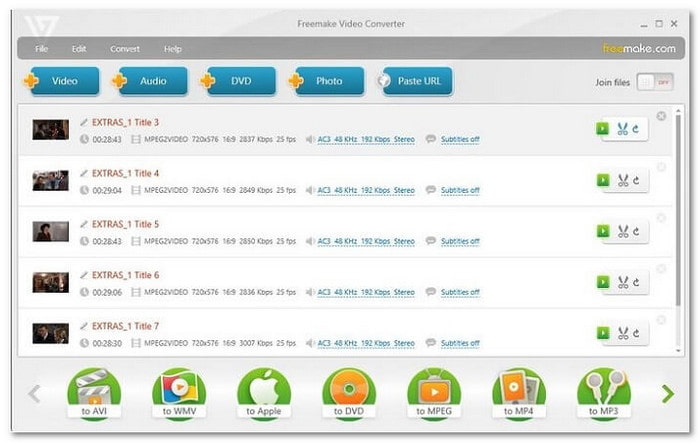
For users seeking a streamlined experience without the complexity of technical parameters, Freemake Video Converter is a highly recommended solution. Its minimalist interface is designed for effortless navigation, making it a premier choice for those transitioning from physical discs to digital libraries for the first time.
Freemake allows you to digitize content into over 20 popular formats with ease. While it serves as an efficient entry-level tool, many users often pair it with the best Blu-ray ripper for more demanding high-definition tasks. A key highlight of this software is its integrated hardware acceleration, which significantly optimizes the conversion speed, an essential feature for efficiently managing extensive DVD and media collections while maintaining a personalized viewing experience through external subtitle support.
- Add subtitles before ripping
- Supports 20+ popular video formats
- Supports hardware acceleration speed
- Fewer format support
- Not available for Mac or Linux users
2. WinX DVD Ripper Platinum
Platform: Windows and Mac
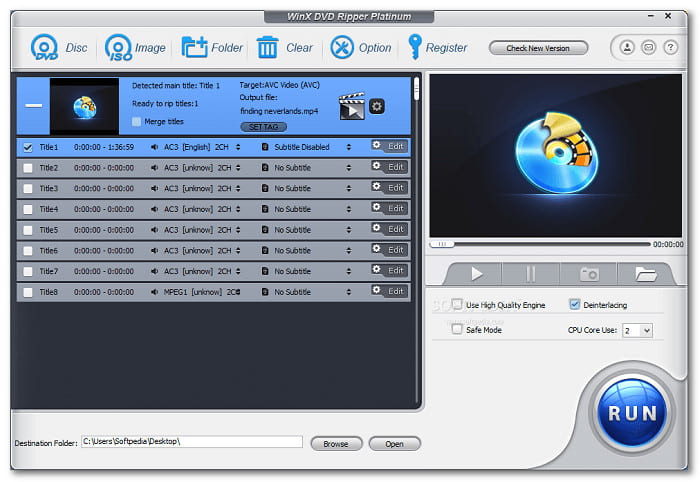
WinX DVD Ripper Platinum is a high-performance solution tailored for enthusiasts who demand granular control over the digitizing process. Recognized as a top-tier contender in the media conversion space, it offers extensive format support, including optimized MP4 profiles, ensuring your library is seamlessly accessible across a diverse ecosystem of smartphones, tablets, and high-resolution laptops.
Beyond simple conversion, WinX DVD Ripper integrates a professional-grade editing suite designed to refine your footage before the final rip. Users can leverage precision tools for trimming, cropping, and removing letterbox black bars to achieve a custom cinematic fit. While the DVD ripper software provides powerful compression algorithms for optimized storage, users should balance these settings carefully to maintain the peak clarity of the original source content.
- Fast ripping speed
- Handles homemade and encrypted discs
- Has presets that provide the best quality of sound output
- Not properly rename the output file
- The free version only allows five minutes of ripping per file
Further Reading:
3. Leawo DVD Ripper
Platform: Windows and Mac
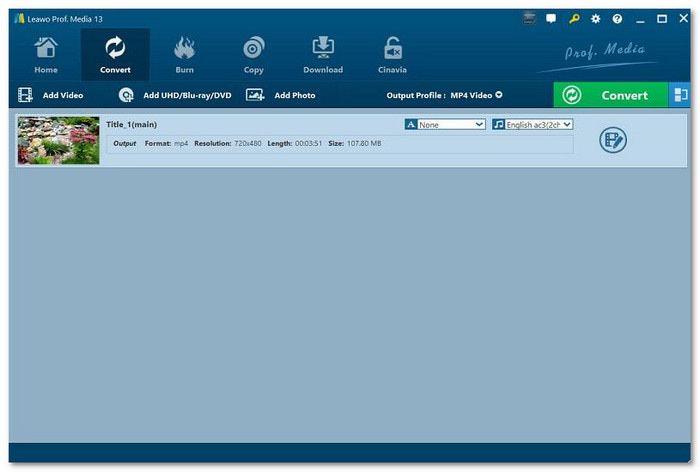
Renowned for its robust decryption engine, Leawo DVD Ripper (now Leawo Prof. Media) excels at eliminating regional barriers, allowing users to digitize content without the constraints of specific region codes. This Windows and Macintosh DVD ripper offers a comprehensive suite of output configurations, enabling seamless conversion from physical DVDs to high-quality MP4, MKV, and other industry-standard digital formats.
Beyond its core ripping capabilities, Leawo DVD Ripper integrates a versatile editing toolkit for personalizing footage prior to export. Whether the goal is offline viewing or long-term archival, this solution streamlines the entire workflow with optimized performance. Its consistent stability across both macOS and Windows systems solidifies its reputation as a top-tier contender for cross-platform media management.
- Removes copy protection easily
- High-clarity output with small file size
- Useful editing features to fine-tune videos
- The interface can be slightly confusing
- The free version has limitations on ripping duration
4. DVDFab DVD Ripper
Platform: Windows and Mac
Supported DVD regions: DVDFab DVD Ripper supports all standard DVD regions, including regions 1 through 6.
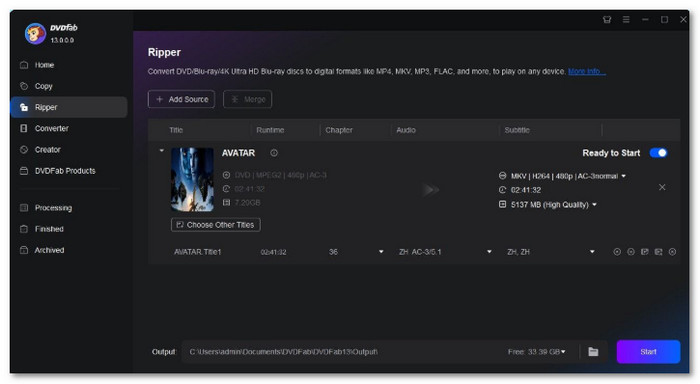
DVDFab DVD Ripper is a feature-rich DVD ripper that redefines expectations for visual fidelity. Its standout capability is the AI-driven Enlarger module, which can intelligently upscale standard 480p DVD content to crisp 1080p resolution. While the complimentary version provides a baseline entry point, the full suite of this DVD ripper unlocks these premium high-resolution enhancements, making it the premier choice for enthusiasts seeking to modernize their legacy media.
Engineered for maximum productivity, DVDFab boasts industry-leading ripping speeds, up to 50× faster than traditional tools, without sacrificing output excellence. This performance is complemented by extensive format versatility, including MP4, MKV, and AVI, alongside an integrated editing toolkit for precision trimming and merging. For those prioritizing time-efficiency and high-clarity restoration, DVDFab DVD Ripper remains a top-tier contender.
- High video clarity
- 50x ripping speed
- Reduces the file size
- No detailed chapter information before ripping
- Only up to 480 pixels-supported output clarity in the free version
5. DVD Shrink
Best for Quick Backup Tasks
Platform: Windows Only
Supported DVD regions: DVD Shrink supports DVDs from all regions. These include Regions 1, 2, 3, 4, 5 and 6.
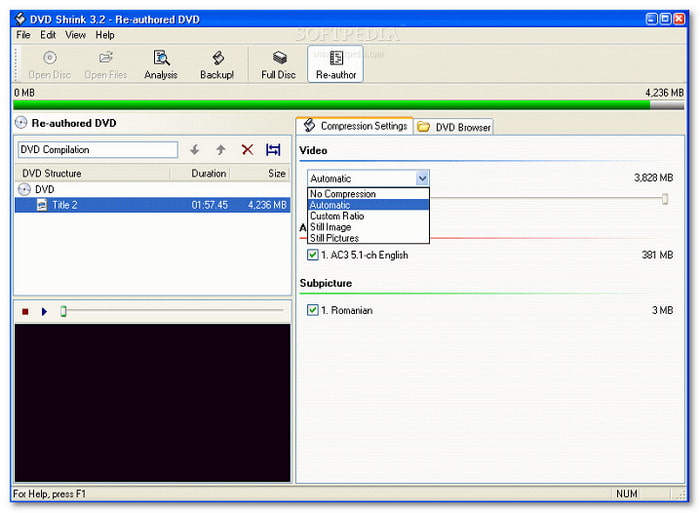
As a legacy solution in the DVD ripping software landscape, DVD Shrink remains a specialized choice for users focused on straightforward, high-speed backups. Its enduring appeal lies in its native ability to bypass classic encryption protocols such as CSS, RC, and RCE. For those prioritizing archival integrity, this DVD ripper excels at extracting raw content to VOB files, preserving the original video clarity by avoiding heavy re-encoding, though this results in significantly larger file sizes.
Despite its historical popularity, users seeking the best free DVD ripper should consider modern alternatives due to DVD Shrink's increasingly outdated architecture. It lacks support for contemporary formats and remains exclusive to the Windows platform. Furthermore, as an unmaintained tool, it poses potential security risks and lacks the sophisticated features found in modern competitors. For those requiring advanced efficiency and AI enhancement, exploring more current ripping solutions is highly recommended.
- Free to use
- Compatible with encrypted DVDs ripping
- Copy and backup DVD with original clarity
- Few video formats
- Slow ripping speed
- No video editing or adjusting toolkit
6. Magic DVD Ripper
Best for Creating Custom DVD Copies for Various Devices
Platform: Windows and Mac
Supported DVD regions: Magic DVD Ripper supports all DVD regions, including Region 1, Region 2, Region 3, Region 4, Region 5, and Region 6.
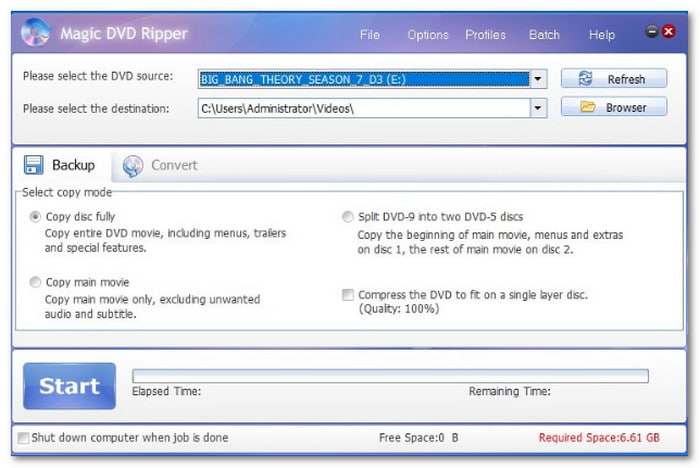
The most outstanding feature that should be mentioned about Magic DVD Ripper is the ability to choose the type of backup and conversion. This DVD ripper supports multiple options for copying your content. These are full disc copies, main movie rips, DVD9 to DVD5 splitting, and compression to fit a DVD5. Amazing, right? In addition, it supports conversion to digital formats such as MP4, AVI, and VCD/SVCD. It also has an easy DVD detection feature that makes the process easy. The DVD identifies and shows information about the disc as soon as it is inserted.
- Intuitive interface
- Start ripping DVD in batch mode
- DVD copier and ripper combined
- Work slowly
- Not updated since 2019
- No video editing features are provided
7. WonderFox DVD Ripper
Best for Multi-Device Playback Conversion
Platform: Windows and Mac
Supported DVD regions: WonderFox DVD Ripper supports DVD regions 1 to 6.
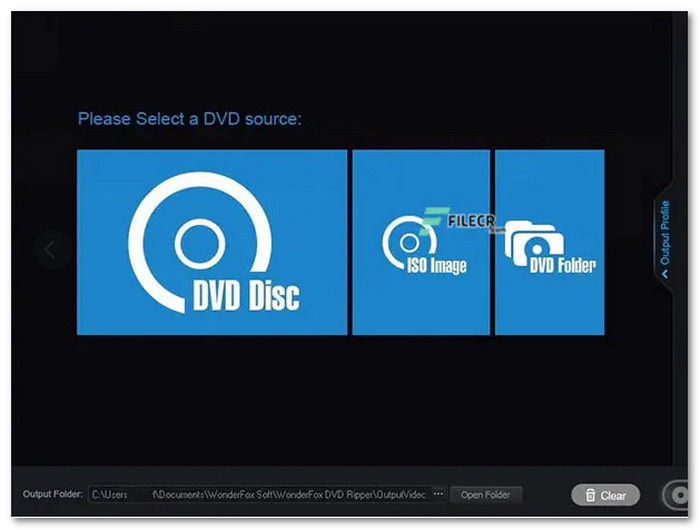
Works well with Windows 11/10, Magic DVD Ripper can help you rip DVDs quickly and efficiently. This ripper can handle encrypted DVDs, including CSS, RCE, and Sony ARccOS protection methods.
This best DVD ripper for Windows ensures the right balance between file size and video clarity. With that, you can store your videos without wasting too much space. In addition, it automatically detects the titles on the DVD. It makes it easier to select the right content for ripping.
- Good video clarity
- Fast DVD ripping speed
- Multiple output formats are available
- Only available for Windows
- It can be slow with larger files
Part 6. Expert Comparison: Free vs. Pro DVD Rippers
When selecting the best DVD ripper, the choice between open-source freeware and professional paid software often comes down to the balance between manual control and automated convenience. In 2026, the gap has widened, specifically in the realms of AI integration and decryption reliability.
1. Input Versatility: Homemade vs. Complex Structures
- Free Rippers: Blu-ray and DVD rippers like HandBrake excel at processing "homemade" DVDs (unprotected discs from camcorders or wedding videographers). However, they often struggle with complex commercial structures, such as discs with 99 titles or hidden playlist obfuscation.
- Pro Rippers: Professional DVD rippers like Tipard DVD Ripper provide a much broader intake, effortlessly handling highly customized homemade projects, episodic TV DVDs, and even slightly damaged physical discs that would cause freeware to "hang" during the scanning phase.
2. Output Presets: The Balance of Compatibility and Customization
- Free Rippers: Typically offer a blank canvas. While you can customize every detail, you must deeply understand codecs like H.265 or AV1 to ensure the file actually plays on your specific hardware.
- Pro Rippers: They provide professionally tuned, high-compatibility presets for the latest 2026 devices (e.g., iPhone 17, PlayStation 6, or specific 8K Smart TVs). These profiles allow you to flexibly tweak bitrates and resolutions while staying within the "safe zone" of the device's hardware decoder, preventing playback errors.
3. Decryption, Speed, and Stability
- The Decryption Gap: Pro DVD rippers include licensed, frequently updated decryption engines that can bypass the latest AACS, Cinavia, and ARccOS protections out of the box. Free tools often require the manual installation of third-party libraries (like libdvdcss), which can be unstable or fail on newer releases.
- Hardware Acceleration: While some free DVD rippers support basic GPU encoding, Pro rippers utilize Level-3 Hardware Acceleration. This means the software handles decoding, processing (deinterlacing/scaling), and encoding entirely on the GPU, often resulting in speeds 5x to 10x faster than free and open-source DVD rippers.
4. Security, Support, and Lifecycle
- Safety First: Professional DVD ripping software is digitally signed and regularly audited for security. Free "niche" rippers found on the web can occasionally be bundled with unwanted bloatware or gray-area tracking scripts.
- Hardware Acceleration: While some free DVD rippers support basic GPU encoding, Pro rippers utilize Level-3 Hardware Acceleration. This means the software handles decoding, processing (deinterlacing/scaling), and encoding entirely on the GPU, often resulting in speeds 5x to 10x faster than free and open-source DVD rippers.
Part 7. FAQs of DVD Ripper
Which DVD ripper is best?
User needs vary, but Tipard DVD Ripper is my top pick. It combines rock-solid stability with the rare ability to upscale legacy DVDs into high-bitrate 4K files. Its elite decryption engine handles any protected disc, ensuring a fast, high-fidelity digitizing process every time.
What is the best quality to rip a DVD?
Since native DVD resolution (720:480) looks pixelated on modern 4K monitors, the "best" perceived quality often requires AI-driven restoration. For example, you can use Tipard DVD Ripper to upscale DVD to 1080p or 4K, change video codec to HEVC or AV1, and set the bitrate to 8-12 Mbps for 1080p and 20+ Mbps for 4K. AI models can reconstruct missing pixels and remove interlacing artifacts (Deinterlacing), making the video look native on a Sony or Apple 4K display.
Are DVD rippers illegal?
If you are digitizing your own legally purchased discs for private, home use, it is generally considered a low-risk activity, but technically bypasses digital lock laws in several jurisdictions. You'd better check your local laws for regulated DVD ripping.
Conclusion
The market offers a diverse landscape of DVD ripper software, each engineered to address specific user demands. Whether your priority is long-term archival, seamless multi-device conversion, or bypassing complex copy protections, there is a dedicated solution tailored to every technical requirement.
For those seeking the most versatile and high-performance balance, Tipard DVD Ripper emerges as the premier choice. It masterfully bridges the gap between advanced decryption and an intuitive user experience. By offering an elite suite of tools to handle encrypted discs and ensure high-fidelity playback across all modern devices, Tipard remains the definitive standard for both enthusiasts and professionals alike.
More Reading


About the Author

 Click here to join the discussion and share your comments
 Tipard DVD Ripper