

- Part 1. Quicklist of the 10 Free DVD Rippers
- Part 2. Master Comparison of the 10 Free DVD Rippers
- Part 3. How We Tested the 10 Free DVD Rippers
- Part 4. My Top-4 Picks of the Free DVD Rippers
- Part 5. Review of Other 6 Free DVD Rippers
- Part 6. Free vs. Paid DVD Rippers - How Should You Choose?
- Part 7. FAQs of Free DVD Ripper
Key Takeaways:
This article introduces and reviews on 10 excellent free DVD rippers. MakeMKV is the best for lossless ripping if you want the original files in a DVD. If you want to transcode the DVD movie with standard video and audio parameters, select HandBrake. Sometimes, however, you'll need to deal with DVD encryptions some highly-customized homemade DVDs, you can select Tipard DVD Ripper.
Free DVD ripper software has seen a significant resurgence today as movie enthusiasts push back against streaming fatigue and the disappearing catalogs of digital platforms. Whether you're looking to preserve a rare collector's edition or simply want to access your physical library on a tablet without Wi-Fi, digitizing your discs is the most reliable way to ensure your favorite content is yours forever. In this comprehensive guide, we've rigorously tested and reviewed the top free DVD rippers to help you balance speed, output quality, and the ability to bypass modern encryption, ensuring you find the perfect match for your specific hardware and collection.

- Part 1. Quicklist of the 10 Free DVD Rippers
- Part 2. Master Comparison of the 10 Free DVD Rippers
- Part 3. How We Tested the 10 Free DVD Rippers
- Part 4. My Top-4 Picks of the Free DVD Rippers
- Part 5. Review of Other 6 Free DVD Rippers
- Part 6. Free vs. Paid DVD Rippers - How Should You Choose?
- Part 7. FAQs of Free DVD Ripper
Part 1. Quicklist of the 10 Free DVD Rippers
Tipard DVD Ripper: Best for high-speed, versatile output - It offers a perfect balance of fast conversion speeds and supports over 500 digital formats while maintaining excellent visual quality for modern devices.
MakeMKV: Best for lossless 1:1 backup - This tool is the industry standard for preserving the original video and audio quality of a disc in an uncompressed MKV container without any quality loss.
WinX DVD Ripper: Best for GPU-accelerated performance - It excels at utilizing Level-3 hardware acceleration to digitize long movies in minutes, making it ideal for users with large collections.
VidCoder: Best for advanced batch encoding - Built on the HandBrake engine, it provides a more intuitive interface for power users who need precise control over bitrate and batch processing.
DVD Shrink: Best for legacy compression - Although an older tool, it remains famous for its ability to "shrink" dual-layer DVD-9 content into smaller DVD-5 sizes for easier storage.
Freemake Video Converter: Best for casual users - It features a highly visual, user-friendly interface that simplifies the conversion process for those who want quick results without technical jargon.
Any Video Converter: Best for all-in-one media processing - This versatile software combines DVD ripping with basic video editing and downloading features, serving as a comprehensive media toolkit.
VLC Media Player: Best for occasional, no-install ripping - While primarily a player, it offers a hidden conversion feature that is perfect for users who need to rip a simple disc without installing dedicated software.
DVD Decrypter: Best for raw ISO extraction - This classic utility is still favored by hobbyists for creating exact disc images (ISOs) and removing older CSS protections from physical media.
Format Factory: Best for comprehensive format switching - It is a multi-functional file converter that handles everything from DVDs to images and documents, making it a handy "Swiss Army knife" for PC users.
Part 2. Master Comparison of the 10 Free DVD Rippers
| Product Name | Ripping Speed | Decryption | AI Upscaling | ISO/Folder Support | Output Formats | H.265 (HEVC) |
|---|---|---|---|---|---|---|
| Tipard DVD Ripper | Fast (GPU Accel) | Strong/Auto | Yes (Built-in) | Full Support | 500+ Formats | Supported |
| MakeMKV | Moderate | Excellent | No | Disc/Folder/ISO | MKV Only | Pass-through |
| WinX DVD Ripper | Ultra-Fast | Very Strong | No | Full Support | MP4, MKV, AVI, etc. | Supported |
| VidCoder | Fast | None (Requires Libs) | No | Full Support | MP4, MKV, WebM | Supported |
| DVD Shrink | Slow | Basic (Old) | No | Full Support | ISO, Video_TS | No |
| Freemake Video Converter | Moderate | Basic | No | Limited | MP4, AVI, WMV | Supported |
| Any Video Converter | Moderate | Standard | Limited | ISO Support | Comprehensive | Supported |
| VLC Media Player | Slow | Basic (libdvdcss) | No | Partial | MP4, TS, OGG | Supported |
| DVD Decrypter | Slow | Basic (Old) | No | Full Support | ISO, Video_TS | No |
| Format Factory | Moderate | None | No | Full Support | All Popular Formats | Supported |
Part 3. How We Tested the 10 Free DVD Rippers
Our Testing Integrity Statement
Our evaluations are 100% authentic and based on first-hand experience. Every speed metric, decryption success rate, and quality assessment in this review was generated by our editors in a controlled, real-world testing environment. We do not accept payment for rankings or rely on manufacturer-provided marketing data. If a free DVD ripper tool struggled with a specific encryption or crashed during a high-speed encode, we documented it here to ensure you have a transparent view of what to expect before you download.
Our Testing Methodology
To provide a fair comparison, we utilized a consistent benchmark: a 7.75GB commercially encrypted DVD-9 disc of a major Hollywood film. Each ripper was evaluated on the following criteria:
- Decryption Effectiveness: We tested each software’s ability to bypass common regional locks and advanced copy protections like CSS, Sony ARccOS, and the Disney 99-title system.
- Hardware Acceleration & Speed: We monitored whether the software correctly utilized GPU acceleration (NVIDIA NVENC, Intel QSV, or AMD VCE). We timed the conversion from the moment the "Start" button was pressed to the final file generation.
- Output Quality & Codec Support: We inspected the resulting files on 4K monitors, looking for artifacts, frame drops, or audio-sync issues. We specifically tested for H.265 (HEVC) encoding efficiency to see which tools saved the most storage space without losing detail.
- Resource Efficiency: We tracked CPU and RAM usage during the process to ensure the software wouldn't paralyze your computer, allowing you to multitask while digitizing your library.
Our Test Bench Specs:
- CPU: Intel Core i7-13700K / Apple M3 Pro
- GPU: NVIDIA GeForce RTX 4070 (12GB VRAM)
- RAM: 32GB DDR5
- Storage: 2TB NVMe SSD
- Operating System: Windows 11 Pro / macOS Sequoia
- Optical Hardware: ASUS 6x External DVD Writer (Connected via USB 3.2)
Part 4. My Top-4 Picks of the Free DVD Rippers
Top 1: Tipard DVD Ripper
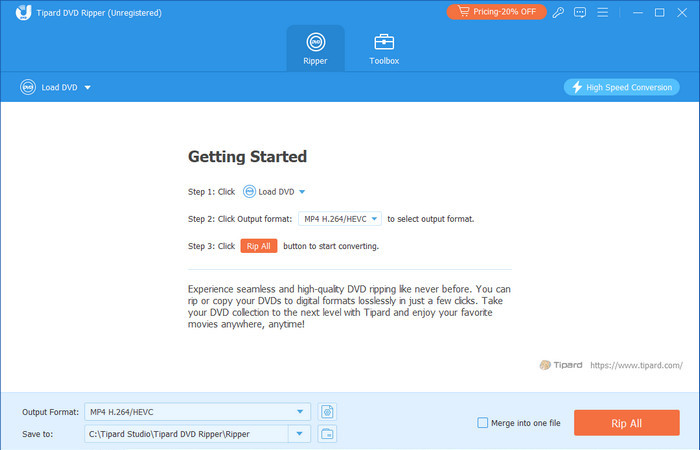
Tipard DVD Ripper stands as the best free DVD ripper for users who demand a balance between professional-grade output and extreme simplicity. Engineered to support both Windows 11 and the latest free DVD ripper for Mac OS environments, it seamlessly digitizes physical discs into universal formats like MP4, MKV, and AVI.
What sets this DVD ripper software free apart is its advanced Level-3 GPU acceleration, which ensures lightning-fast conversion without compromising visual fidelity, supporting everything from HD to 4K lossless quality. Beyond simple ripping, it serves as a comprehensive free DVD ripper program equipped with batch processing, multi-track audio/subtitle management, and built-in editing tools to trim, crop, or enhance your video files for any modern device.
Platform: Windows and macOS
Key Features of Tipard DVD Ripper:
- Offer level-3 hardware acceleration to fast decode, edit, and re-encode DVD to digital.
- Easily deal with legacy and the latest DVD encryption methods.
- Support lossless MKV/MPG remux or transcoding with AI upscaling.
- Rip homemade DVDs with high customization and encrypted DVDs.
- Offer many basic and necessary editing features like crop, clip, filters, and watermark.
- Currently supports over 500 output formats to fit almost any device you use.
- Maintains high-quality output, including 1:1 lossless copies.
- Provides a simple and easy-to-understand interface, whether for a novice or a professional user.
- A new version is also included for GPU acceleration for a faster ripping process.
- Includes basic features involving cropping, trimming, and even the inclusion of subtitles.
- It can efficiently solve the issue of DVDs that are locked by region.
- The free version would have some of the features eliminated or reduced functionality as to the paid version.
Bonus: How to Rip DVD with Tipard DVD Ripper
With the tutorial below, you can use the free DVD ripper supported on Windows and Mac by copying the steps below.
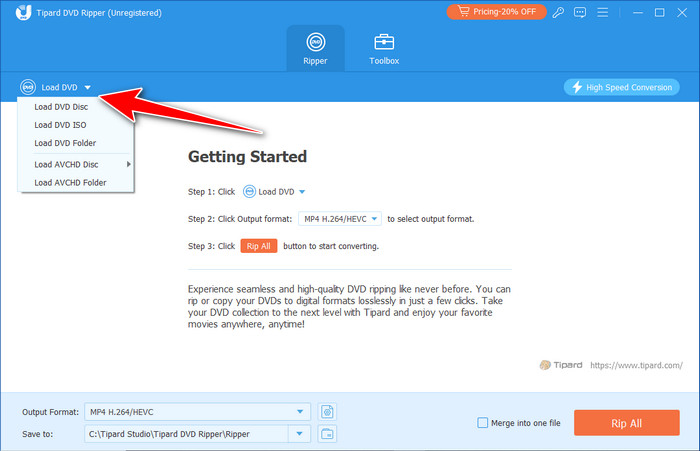
Step 1 After downloading the Tipard DVD Ripper, you need to open the app. In the main interface, click the Load DVD button to upload the DVD file from your inserted disc.
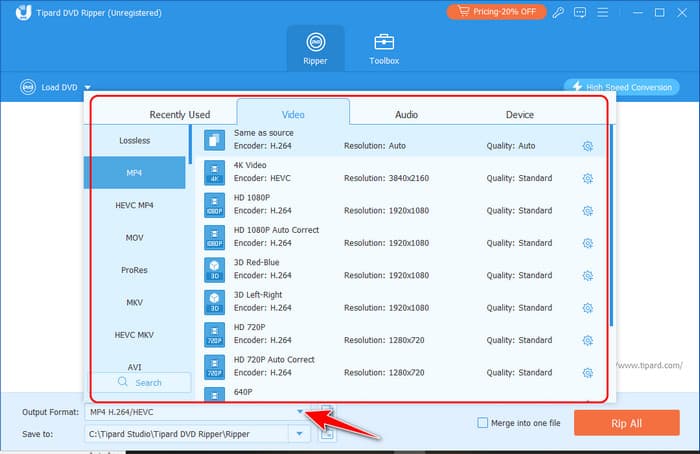
Step 2 Go to the Output Format and choose the video format you want to get based on the available selection.
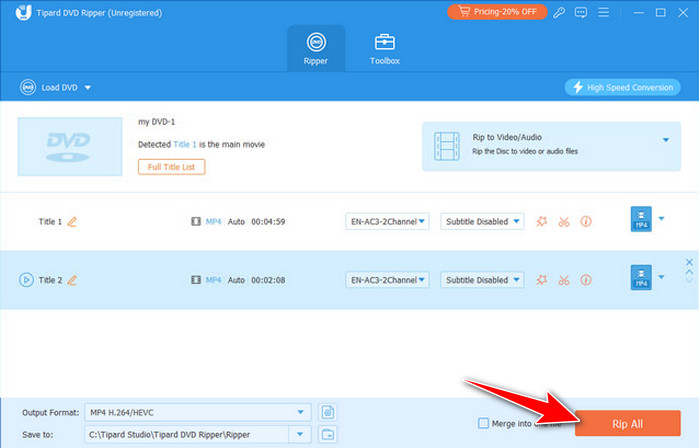
Step 3 To start the process, click the Rip All button. If your ripping is incomplete and the subtitle data is not included, tweak the settings to rip subtitles from the DVD.
Top 2. MakeMKV
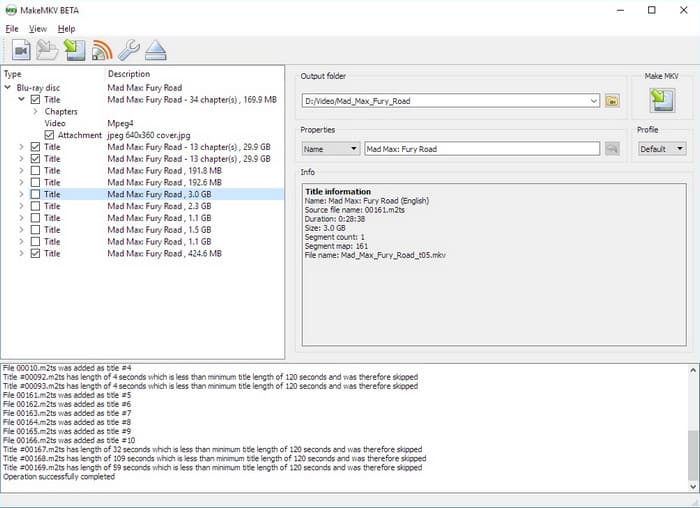
MakeMKV is a powerhouse for purists seeking a completely free DVD ripper no trial (while in its long-running beta) that prioritizes 1:1 fidelity. Its primary strength lies in "remuxing" - extracting disc content into an MKV container while preserving every original video frame, HD audio track, and subtitle without any re-encoding.
This makes it the best free DVD ripper for users archiving high-end physical media who refuse to compromise on quality. While it skips the bloat of editing or compression tools found in other DVD ripper software free options, its streamlined interface ensures a lightning-fast, lossless backup process. Whether you need a reliable free DVD ripper for Mac OS or Windows, MakeMKV remains the industry standard for bit-perfect digital preservation.
Platform: Windows, macOS, and Linux
Key Features of MakeMKV:
- Extract DVD content to lossless MKV via remuxing.
- Bypass some common DVD encryption methods like CSS.
- Rip DVDs with subtitles, audio tracks, and other files.
- Fast and simple to use.
- Completely free without a payment.
- Both DVD and Blu-ray are compatible.
- No complex settings are required.
- Limited to MKV output format - only remuxing.
- No video editing features.
- Cannot input some homemade DVDs with high customization.
Top 3. WinX DVD Ripper
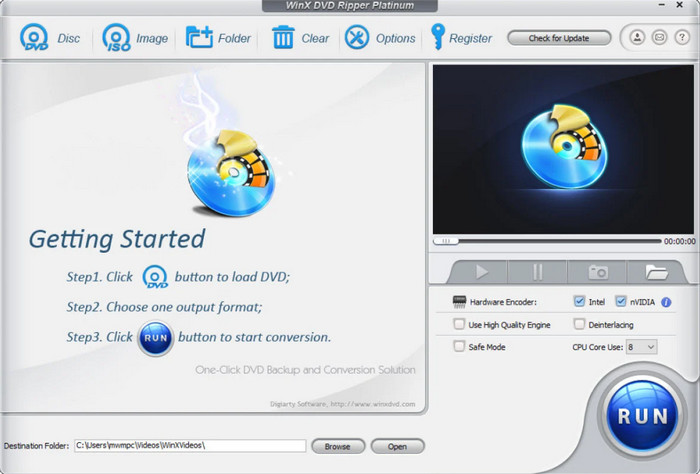
Thanks to its powerful engine, the WinX DVD Ripper is one of the fastest free DVD rippers on Windows 10 for ripping while remaining quite versatile. It improves GPU acceleration for swift conversions and has more than 350 output profile choices, including MP4, AVI, and MOV. It also means that app developers can design their app to work well on a smartphone or tablet screen while still being easily usable on devices such as a gaming console. The software also stands out in scratched or damaged DVDs; therefore, it will be suitable for a collection that seems old. Hence, it comes with extra features such as basic editing tools and personalization options that are useful for both new and professional users.
Platform: Windows and macOS
Key Features of WinX DVD Ripper:
- Support GPU acceleration for fast DVD decoding and re-encoding.
- Offer different output presets for common or rare devices or online platforms.
- Deal with common and old DVD encryption codecs.
- Support simple and basic video editing.
- Fast ripping is carried out by GPU acceleration.
- They support a wide number of output formats and device profiles.
- It is quite effective in repairing or repairing require damaged or scratched DVDs.
- User-friendly interface.
- Doesn't support the MKV output format.
- Packed with many other unnecessary features.
Top 4. VidCoder
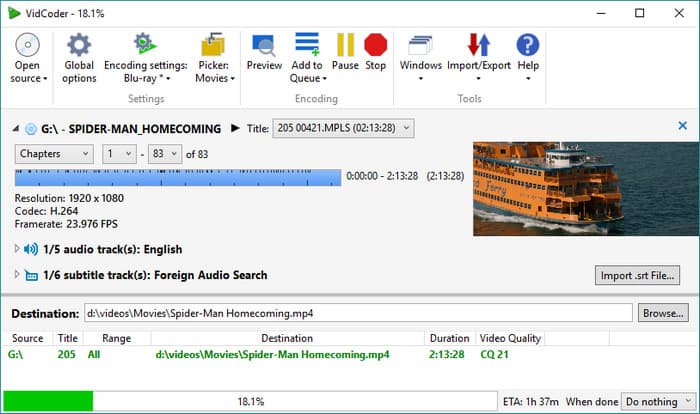
VidCoder is a high-performance free DVD ripper program built on the powerful HandBrake encoding engine, offering a more intuitive and modern interface. It serves as an exceptional free DVD ripper for Mac OS (via compatible builds) and Windows, providing a streamlined workflow for both novices and power users.
VidCoder excels at delivering high-definition output with granular control over bitrates, modern codecs (like H.265/HEVC), and multi-track subtitles. While it simplifies the conversion process for beginners, its advanced customization options make it a top-tier dvd ripper for free for technophiles who demand precision. For anyone seeking a DVD ripper software free of advertisements or bundled bloatware, VidCoder remains the gold standard for reliable, open-source media archiving.
Platform: Windows
Key Features of VidCoder:
- Support DVD ripping and video conversion with GPU acceleration.
- Offer basic video editing features like trimming, merging, and adding subtitles.
- Offer common and standard H.264 presets and lossless remuxing.
- Free and open-source.
- The interface is also much simpler than that of HandBrake.
- It enables higher-quality output with customization enhancements.
- Lacks the ability to decrypt encrypted DVDs.
- Some features are only available if you have technical knowledge about the software.
Part 5. Review of Other 6 Free DVD Rippers
1. DVD Shrink
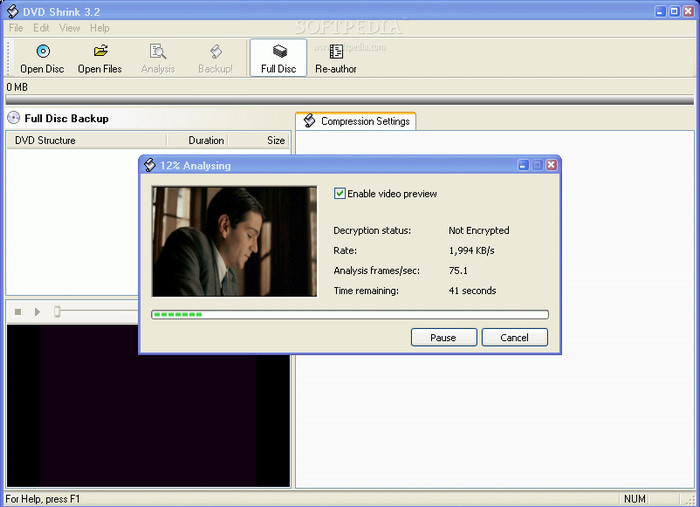
While active development has ceased, DVD Shrink remains a legendary, completely free DVD ripper with no trial for enthusiasts prioritizing storage efficiency. It is uniquely engineered for transcoding, allowing users to shrink a massive 9GB dual-layer disc (DVD-9) to a standard 4.7GB (DVD-5) with impressive visual fidelity.
This DVD ripper for free is particularly valued for its "Re-author" mode, giving you the surgical precision to strip away unwanted menus, trailers, or audio tracks to save maximum space. Although it may struggle with modern DRM (copy protection) without external assistance, it remains a fast and lightweight DVD ripper software free of bloat. For classic movie collectors looking for a nostalgic yet functional free DVD ripper program, DVD Shrink is still a cornerstone of the physical-to-digital workflow.
Platform: Windows
Key Features of DVD Shrink:
- Compress DVD content to fit on smaller discs or storage devices.
- Re-authoring mode to select specific titles, audio tracks, and subtitles for backup.
- Support for older DVD encryption methods like CSS.
- Completely free to use.
- It has a compression feature to reduce size for storage purposes.
- Allows re-authoring of DVDs.
- There is no support for DVDs' newer copy protection technologies.
- Old design and many elements.
2. Freemake Video Converter
The Freemake Video Converter stands as a versatile free DVD ripper program designed for those who need an all-in-one media processing suite. Its primary strength lies in its extensive output library, allowing you to seamlessly convert physical discs for playback on modern smartphones, tablets, and gaming consoles.
More than just a standard DVD ripper for free, it offers integrated "one-click" editing features, enabling you to trim unwanted footage, merge multiple titles, or hardcode external subtitles directly into your video files. While it is a highly accessible free DVD ripper for Mac OS (via emulation) and Windows, users should note that the DVD ripper software free version applies a watermark to the output. However, for those seeking a quick, entry-level solution without complex encoding settings, Freemake remains a popular, visually intuitive choice.
Platform: Windows
Key Features of FreeMake Video Converter:
- Support DVD ripping and video conversion with GPU acceleration.
- Offer basic video editing features like trimming, merging, and adding subtitles.
- Offer common and standard H.264 presets and lossless remuxing.
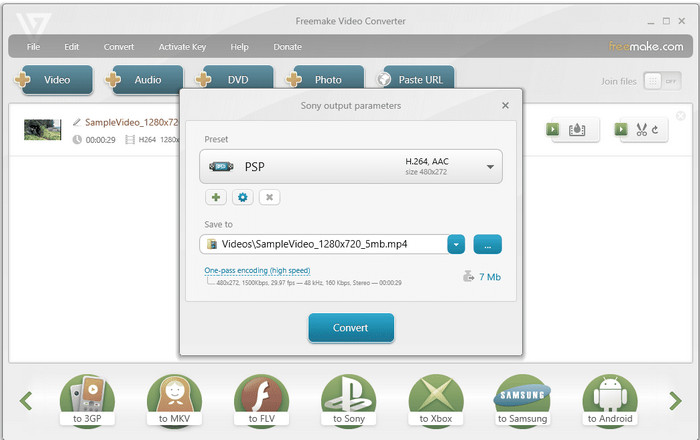
- Easy-to-use interface.
- Fast conversion speed with widely compatible output video files.
- Work stably on all modern and common Windows computers.
- The free version has a watermark on output files.
- Doesn't support the popular HEVC or AV1 codecs.
You May Also Like:
3. Any Video Converter
Any Video Converter is an adaptable, multi-purpose tool that excels as both a high-speed video processor and a reliable free DVD ripper program. This free DVD ripper for Mac OS and Windows offers an extensive library of output profiles, ensuring your digitized DVDs interface perfectly with modern smartphones, tablets, and home cinema systems.
As a versatile dvd ripper for free, it provides essential post-processing features—including precision trimming, cropping, and artistic filters, allowing you to refine your content immediately after ripping. While it is a completely free DVD ripper no trial for standard tasks, its intuitive UI hides a powerful engine capable of handling complex batch conversions. For users seeking a DVD ripper software free of steep learning curves, Any Video Converter remains a top-tier recommendation for everyday media management.
Platform: Windows and macOS
Key Features of Any Video Converter:
- Support DVD ripping and video conversion with GPU acceleration.
- Offer basic video editing features like trimming, merging, and adding subtitles.
- Offer common and standard H.264 presets and lossless remuxing.
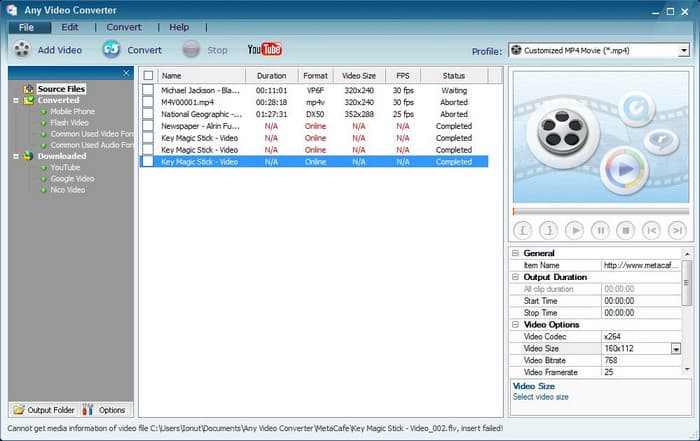
- Free and easy to use.
- It provides support for any type of output specification.
- It comes equipped with basic elements of video editing software.
- It cannot handle encrypted DVDs.
- Slower ripping speeds compared with the other tools.
4. VLC Media Player
While VLC Media Player is globally recognized as the ultimate universal player, it also functions as a surprisingly capable free DVD ripper program for casual use. It allows users to extract content directly from a disc and transcode it into versatile formats like MP4, WebM, or TS.
As a completely free DVD ripper for all desktop platforms, VLC is the ideal solution for those who prefer not to install single-purpose software. Its cross-platform nature makes it an essential free DVD ripper for Mac OS, Windows, and Linux. While it lacks the advanced decryption and post-processing features of a dedicated DVD ripper software free of limitations, its open-source reliability and straightforward Convert/Save workflow make it a dependable DVD ripper for free for quick, unencrypted backups.
Platform: Windows, macOS, Linux
Key Features of VLC Media Player:
- Transcode DVD to MKV with common and standard output formats and presets.
- Support different discs, ISO images, and folders.
- Offer wide and versatile output customization features.
- Provide a simple and intuitive user interface.
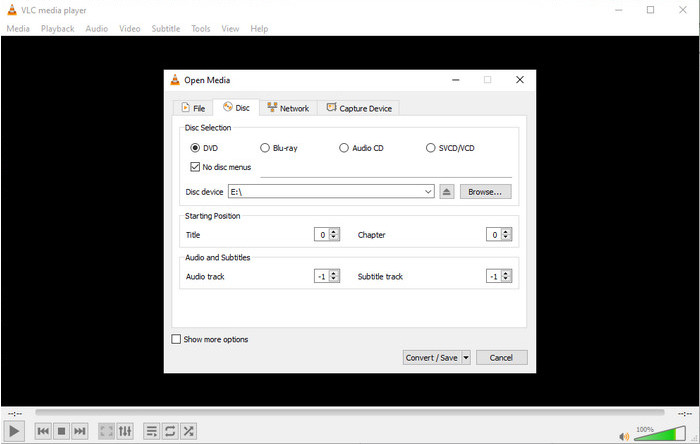
- Free and widely available.
- Gradient-oriented with an aptitude for various operating systems – Windows, macOS, Linux.
- Standard features such as ripping were incorporated, though their simplicity will be discussed in the next section.
- Cannot deal with encrypted DVDs.
- Slow ripping speeds - no GPU re-encoding.
- The ripping feature is not easy to find.
5. DVD Decrypter
DVD Decrypter is a legendary, lightweight free DVD ripper program specifically designed to bypass CSS copy protections and back up your physical media. Although it is no longer in active development, it remains a high-performance DVD ripper for free for those working with classic DVD collections. It allows for surgical precision during the extraction process, enabling users to select specific cells, titles, and audio or subtitle tracks for a customized backup.
As a completely free DVD ripper for Windows users, it is celebrated for its incredibly small footprint, ensuring smooth operation even on legacy hardware or low-specification systems. While it may not support the newest encryption schemes, its reliability in creating bit-perfect ISO images makes it one of the most trusted DVD ripper software free options for archiving a personal library of vintage movies. For collectors seeking a simple, no-nonsense free DVD ripper for Mac OS (via Wine) or Windows, DVD Decrypter is a timeless classic.
Platform: Windows
Key Features of DVD Decrypter:
- Remove DVD copy protections like CSS, region codes, and RCE.
- Support ripping specific titles, chapters, audio tracks, and subtitles.
- Offer a simple interface with basic ripping options.
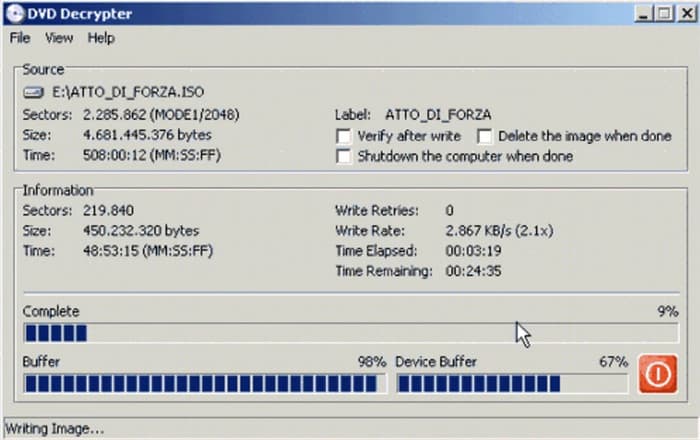
- Free and easy to use.
- Can avoid newer DVD copy protections.
- Lightweight and fast.
- There are no updates for modern encryption.
- A small set of writer instructions and output formats.
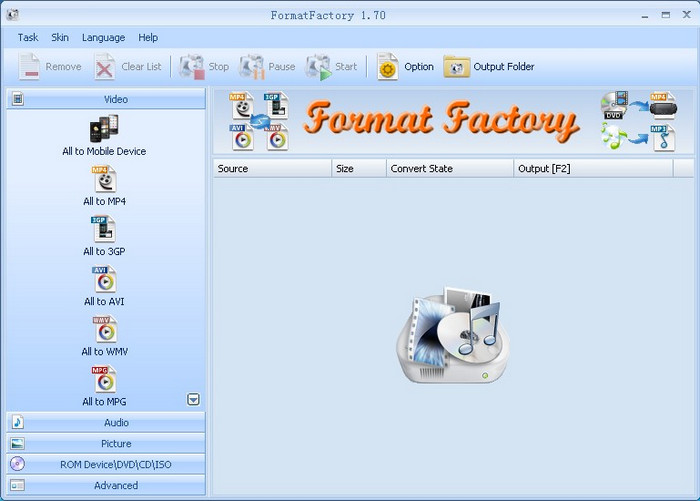
6. Format Factory
Format Factory is a comprehensive, all-in-one multimedia suite that serves as a powerful free DVD ripper program for diverse file management. Beyond its primary role as a universal converter, it features a dedicated module for digitizing physical media into virtually any video or audio format compatible with modern mobile devices and home consoles.
As a versatile DVD ripper for free, it brings unique added value through integrated utilities such as damaged file repair, high-volume batch conversion, and intuitive video joining tools. While it may offer a more deliberate processing speed compared to specialized MKV converters, its sheer multi-functionality makes it a top-tier DVD ripper software free of complexity. For Windows users seeking a completely free DVD ripper that handles images, documents, and discs in a single interface, Format Factory remains an indispensable utility.
Platform: Windows
Key Features of Format Factory:
- Support DVD ripping and video conversion with GPU acceleration.
- Offer basic video editing features like trimming, merging, and adding subtitles.
- Offer common and standard H.264 presets and lossless remuxing.
- It is free and compatible with many formats and file types.
- It has some fundamental modes, such as cut and splice.
- Some of them can fix corrupted video or audio files.
- As for ripping and converting media files, this tool is suitable for choice for various devices.
- Advertisements disrupt, occasionally interrupt, or intrude, seldom going unnoticed.
- Ripping time is a little longer than that of CDW’s competitors.
- It could be more effective when it comes to handling encrypted DVDs.
Part 6. Free vs. Paid DVD Rippers - How Should You Choose?
Choosing between free and paid DVD rippers depends on your collection size and technical comfort. While free tools are great for budget-conscious users, paid suites offer significant time-saving advantages.
Free DVD Rippers: Best for Simple Backups
Free DVD rippers like HandBrake or MakeMKV are ideal for hobbyists who don't mind a learning curve.
- Pros: Zero cost; excellent for 1:1 lossless copies (MakeMKV); wide community support.
- Cons: Often struggle with the latest Disney/Sony protections; slower conversion speeds (CPU-heavy); can be complex for beginners.
Paid DVD Rippers: Best for Efficiency & Quality
Premium software like Tipard DVD Ripper or WinX is built for users who want a "one-click" experience.
- Pros: GPU Acceleration for ultra-fast ripping; bypasses complex 99-title protections automatically; includes AI Upscaling to improve 480p quality.
- Cons: Requires a one-time purchase or subscription.
| Feature | Free Rippers | Paid Rippers |
|---|---|---|
| Decryption | Manual / Limited | Automatic / Advanced |
| Speed | Slow to Moderate | Ultra-Fast (GPU Accelerated) |
| Ease of Use | Technical / Steep learning curve | Intuitive / One-click solutions |
| AI Enhancements | None | AI Upscaling & Denoising |
| Technical Support | Community forums only | Dedicated 24/7 customer service |
Part 7. FAQs of Free DVD Ripper
Are DVD rippers illegal?
DVD rippers themselves are legal, but ripping copy-protected DVDs or distributing copies is illegal in most countries. You can use DVD rippers only for personal backups of legally owned, unprotected DVDs.
Can I rip DVDs for personal use?
You can rip DVDs for personal use if they are legally yours and you don't sell or distribute the copies, but bypassing DRM is illegal in many countries.
Will ripping a DVD ruin it?
Ripping a DVD is safe and does not ruin the disc because it only reads the data. You just need to make sure the disc is physically in good condition.
Conclusion
You can select your best free DVD ripper from the 10 DVD ripper programs mentioned in this article. A free DVD ripper may have the capabilities of ripping different types of discs and offer many standard output presets. However, they cannot deal with the latest encryption techniques. Therefore, you can resort to Tipard DVD Ripper to easily deal with all types of DVDs with level-3 GPU acceleration and powerful decryption methods.
More Reading


About the Author

 Click here to join the discussion and share your comments
 Tipard DVD Ripper