

Key Takeaways
We've tested 20+ DVD burning software on Windows and Mac and finally collect 10 stable and workable ones. Tipard DVD Creator is the best for creating standard DVD and Blu-ray with advanced authoring and editing features; DVDStyler is the best open-source DVD burner with high customization options (difficuult for beginners); Ashampoo is the best CD and DVD burner with only on Windows.
Looking for the best DVD burner to write media files to DVD for TV playback? While streaming is ubiquitous, physical media remains the gold standard for collection and sharing. Whether you’re creating a family video gift or archiving digital assets, choosing the right tool is critical. This guide reviews the top 10 DVD burning software solutions currently available for Windows and Mac, highlighting key features, pricing, and performance to help you make an informed choice.

Part 1. Shortlist of the Best DVD Burning Software
Best for Professional Customization: Tipard DVD Creator
Tipard DVD Creator offers an easy and intuitive solution for burning any video format to DVD, Blu-ray, or ISO images, and folders (Video_TS or BDMV). This DVD burner features a rich library of customizable menu templates and advanced editing tools to ensure your physical media has a professional, studio-quality finish.
Best for Open-Source Flexibility: DVDStyler
As a powerful free and open-source DVD burner, DVDStyler empowers users to create uniquely interactive DVD menus using scalable vector graphics, providing the technical freedom to manage multiple titles and audio tracks without the constraints of proprietary software.
Best for All-in-One Data Management: Ashampoo Burning Studio
This comprehensive Windows DVD burning software goes beyond simple burning by integrating smart features like disc spanning for large data backups, scratch protection for enhanced durability, and a modern interface designed to streamline complex multimedia projects into a few simple clicks.
Part 2. How We Tested the 10 DVD Burners
To provide you with the most reliable DVD burner recommendations, our editorial team conducted a rigorous, hands-on evaluation of over 20 burning tools. Our goal was to simulate real-world scenarios to ensure each software delivers on its promises.
1. The Test Environment
Consistency is key to a fair comparison. All DVD burning software were tested on a high-performance workstation to eliminate hardware bottlenecks:
- Operating System: Windows 11 Pro and macOS 26
- Memory: 24GB DDR4 RAM
- Optical Drive: External ASUS ZenDrive U9M (USB 3.2 Gen 1)
2. Test Materials
We used a diverse set of media files to test compatibility and compression efficiency of the DVD burning software:
- Video Samples: A mix of 4K MP4 (H.264/HEVC), 1080p MKV, and legacy AVI files.
- Storage Limit: Standard Single-Layer DVD-R (4.7GB) and Dual-Layer DVD+R (8.5GB).
- Project Complexity: A full-length family documentary featuring interactive menus, 5.1 surround sound tracks, and SRT subtitles.
3. Our Testing Criteria
Each DVD burner software was graded based on a weighted scorecard focusing on:
- Burning Velocity: The actual time taken to encode and write a 4GB project to disc.
- Success Rate: Zero tolerance for "coasters" (failed burns) or synchronization issues between audio and video.
- Menu Customization: The flexibility of UI design and the aesthetic quality of provided templates.
- Resource Impact: CPU and RAM consumption during the heavy encoding phase.
4. Statement of Authenticity
Each DVD burning software featured in this guide has been personally installed, configured, and operated by our technical editors. We do not rely on manufacturer-provided marketing claims or synthesized benchmarks. Each recommendation is the result of burning multiple physical discs and verifying their playback compatibility across various devices, including standalone DVD players, gaming consoles (PS5/Xbox), and legacy laptop drives. We guarantee that the performance data and user experience insights shared here are based on 100% authentic laboratory testing.
Part 3. Comparison of the 10 DVD Burning Burners
| DVD Burning Software | Supported Operating System | Fit-to-Disc | Video Editing Tools | DVD Menu Templates | Burn DVD Folder | Additional Features |
|---|---|---|---|---|---|---|
| Tipard DVD Creator | Windows & Mac |  |
|
|
|
Burn DVDs/Blu-rays, video editing, customizable menus & high-quality output |
| Ashampoo Burning Studio | Windows | |
|
|
|
Burn DVDs, Blu-rays, CDs, create data discs & ISO files |
| Power2Go | Windows & Mac | |
|
|
|
Burn, copy, and rip DVDs/Blu-rays & create multimedia discs |
| WinX DVD Author | Windows |  |
|
|
|
Burn DVDs, support for subtitles & chapter menu creation |
| Roxio Easy CD & DVD Burning | Windows | |
|
|
|
Burn audio, data, and video discs & backup files |
| AnyBurn | Windows | |
|
|
|
Burn CDs, DVDs, Blu-rays, create and edit image files & convert files |
| Express Burn | Windows & Mac | |
|
|
|
Burn DVDs, ISO images, UDFs, and Hybrid files & create bootable discs |
| InfraRecorder | Windows | |
|
|
|
Burn CDs and DVDs, create multi-session discs, & ISO/BIN image support |
| DVDStyler | Windows, Mac & Linux | |
|
|
|
Burn DVDs, customizable menus & photo slideshow creation |
| BurnAware | Windows | |
|
|
|
Burn DVDs, CDs, Blu-ray, create ISO image & bootable discs |
Part 4. My Top Pick DVD Burning Software
Top 1. Tipard DVD Creator
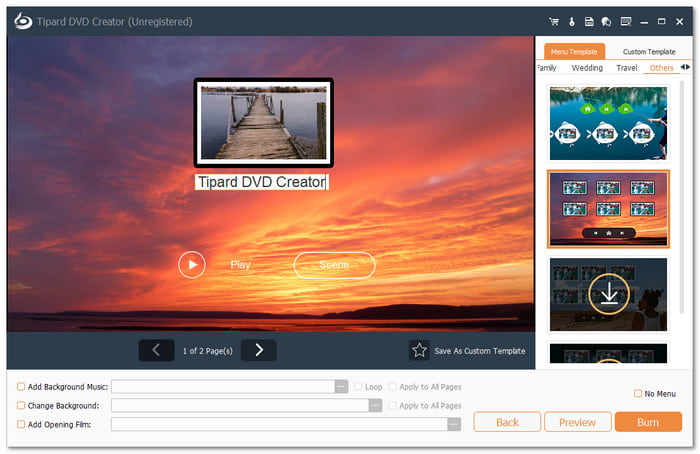
If you want to burn professional-grade discs, Tipard DVD Creator is the best DVD burner to convert digital files into physical media. It seamlessly supports writing various video formats (MP4, MOV, AVI, MKV, etc.) to multiple disc types, including DVD-5, DVD-9, and Blu-ray. Whether your source is a camcorder or a mobile device, Tipard provides flexible menu styles that are free to modify, ensuring your content is both organized and aesthetic. With its optimized hardware acceleration, you can enjoy rapid burning speeds without compromising stability, ensuring every disc is 100% playable on home DVD/Blu-ray players.
Beyond basic burning, this DVD burning software supports a wide array of inputs, including digital video/audio, ISO images, and folder structures (Video_TS and BDMV), making it the best DVD burner for Mac and Windows users who need versatile inputs. The software features built-in editing tools to refine your footage, along with title and chapter management for seamless clipping and merging. Most importantly, Tipard DVD Creator features "Fit-to-Disc" technology, which automatically optimizes and converts your videos to compatible DVD or Blu-ray formats. Unlike free Blu-ray and DVD burning tools that require tedious manual pre-conversion, Tipard handles the technical complexity for you, ensuring a perfect fit every time.
- Creates high-quality DVD/Blu-ray discs, DVD folders, and ISO images seamlessly.
- Leverages GPU hardware acceleration to ensure lightning-fast burning while minimizing CPU usage.
- Automatically converts and scales videos to DVD-compliant formats for a guaranteed perfect fit.
- Offers a diverse library of free, professional DVD menu templates with extensive customization options.
- Refines your media with intuitive editing tools, including trimming, cropping, and visual enhancements.
Effortlessly burn professional-grade DVDs and Blu-ray discs that are fully compatible with any disc player, gaming console, or media software. Tipard DVD Creator ensures your projects are optimized for all displays, including high-definition TVs and computer monitors. By supporting lossless video quality and crisp audio pass-through, it guarantees that your digital memories are preserved with the highest fidelity for any playback environment.
Benefits: It supports various video formats and offers easy-to-use customization options for creating personalized DVD/Blu-ray discs. Moreover, from our tests, Tipard DVD Creator is the only one that can easily create DVD folder (Video_TS) from media files, which means you can directly access video content without a disc drive or mounting. Other DVD burning programs can only burn DVD discs or ISO.
Drawbacks: You must subscribe to the paid version to enjoy all the advanced features.
Why Choose Tipard DVD Creator?
Choosing Tipard DVD Creator means prioritizing reliability over the trial-and-error often found in basic CD and DVD burners. It eliminates the technical hurdles of disc authoring by combining professional-grade features, like intelligent "Fit-to-Disc" automation and full GPU hardware acceleration, with a minimalist interface that ensures a 100% success rate. Whether you are preserving precious family memories or creating professional media, this DVD burner on Mac and Windows guarantees universal playback compatibility and stunning visual fidelity, delivering a seamless, studio-quality result that free DVD burning software simply cannot match.
How to Burn DVD and Blu-ray with Tipard DVD Creator
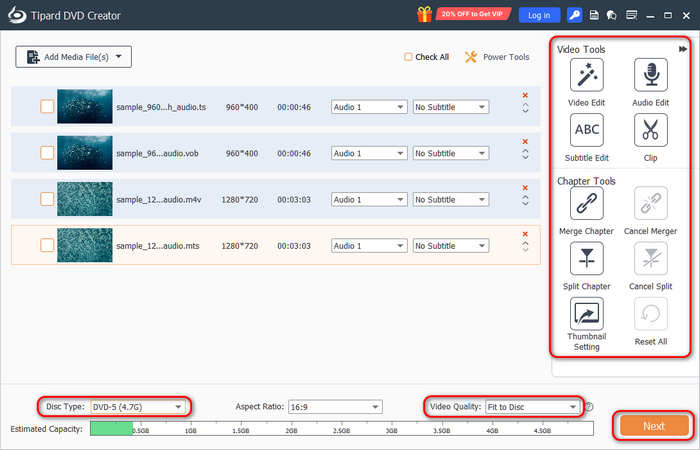
Step 1 Insert DVD and Add Media Files
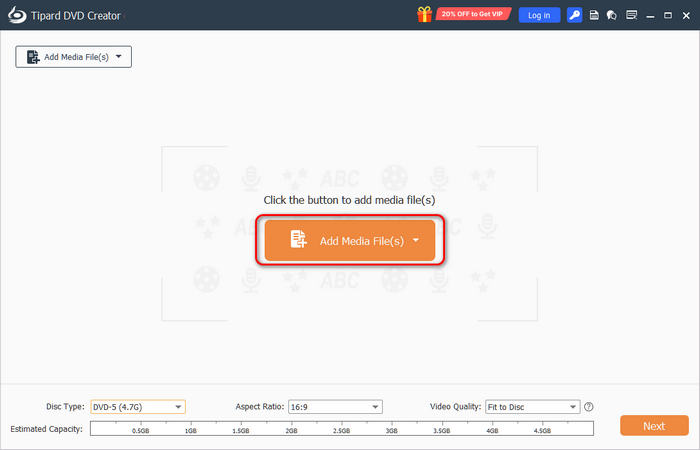
Download, install, and launch Tipard DVD Creator on your Windows or Mac computer. Connect your disc drive to your computer (or your computer has a built-in disc drive) and insert a blank or re-writable DVD. Click the Add Media Files button to import videos to Tipard DVD Creator.
Step 2 Edit Videos and Arrange Titles and Chapters
You can use the Video Tools to edit your input videos. For example, you can trim each video, edit and customize subtitles color, size, and font, add filters to videos, etc. You can also use the Chapter Tools to merge and split chapters. Then, you can select DVD-5 or DVD-9 disc type based on your DVD disc capacity.
Remember to select Fit to Disc in the Video Quality tab. This option can automatically convert your input videos to the format that DVD supports. Otherwise, the output DVD may fail to play on standard DVD players. Then, click the Next button to go on.
Step 3 Add a Free DVD Menu
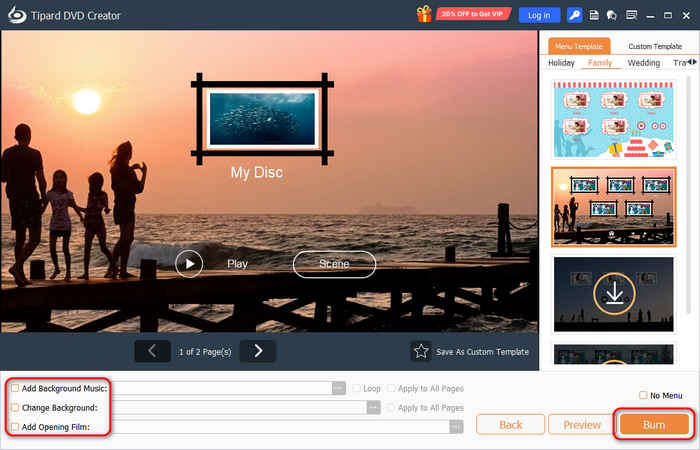
Here, you can select a free DVD menu template. You can select a desired free DVD menu template. You can also custmize the background image audio from your own collection. You can also rename the titles and control buttons if you want. For beginners, the Opening Film feature is also a nice option to experience a vintage DVD playback. Then, click the Burn button to go on.
Step 4 Start DVD Burning and Authoring
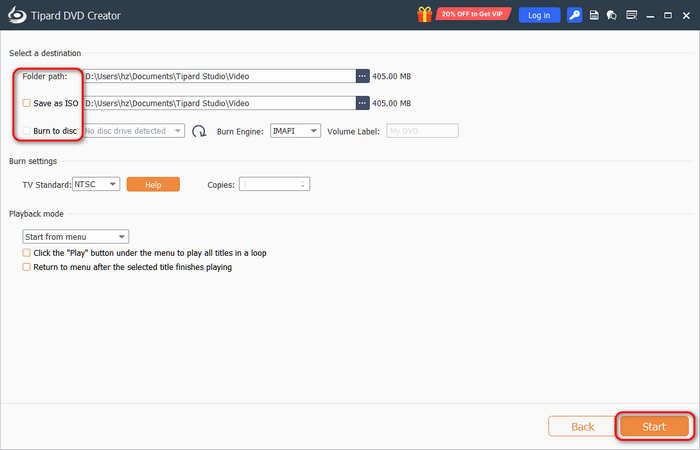
Now, select an output destination. You can select Burn to disc to burn vidos to your disc. You can also select Burn to ISO to create an ISO image file. YOu can also select a Folder path to burn a DVD Video_TS folder or BDMV folder. Finally, click the Start button to burn your DVD with this DVD burning software.
Top 2. Ashampoo Burning Studio
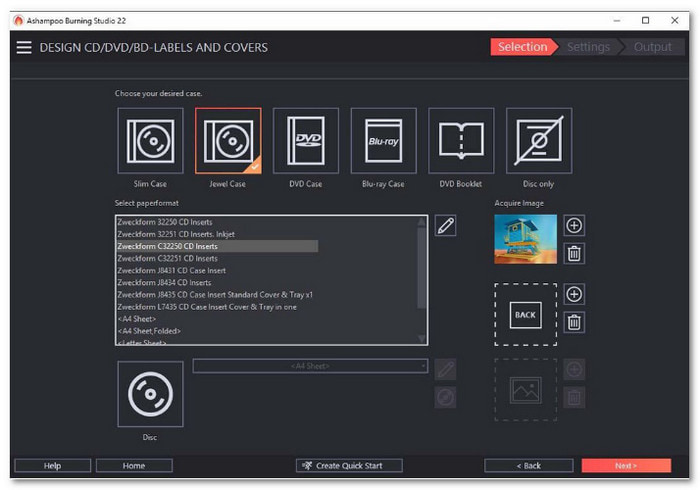
Coming in as a highly versatile second choice, Ashampoo Burning Studio is a comprehensive program that simplifies burning, copying, and archiving across all disc types. This open-source and free DVD to DVD burning software excels at data security, offering advanced compression and encryption for peace of mind during backups. The software also functions as a creative hub, allowing you to produce multimedia slideshows with custom graphics and music. Whether you are trimming clips or designing bespoke disc covers, Ashampoo combines professional utility with a user-friendly interface, making it a powerful DVD burner for Windows users.
Its standout features include smart disc spanning, which automatically splits large backups across multiple discs, and advanced scratch protection that ensures data readability even on damaged surfaces. This DVD burning software also offers unparalleled support for car audio systems with over 1,800 presets and a sophisticated audiobook module for seamless organization. However, its primary drawbacks are its Windows-only compatibility and a relatively bloated installation size due to its vast array of secondary multimedia tools, which may feel overwhelming for users seeking a simple, focused DVD burner.
Key Features of Ashampoo Burning Studio:
- ffortlessly burn, copy, and rip DVDs, CDs, and Blu-ray discs.
- Automatically split massive data sets across multiple discs for efficient backup.
- Utilize redundant data storage to ensure files remain readable on damaged surfaces.
- Access over 1,800 presets to ensure perfect compatibility with various vehicle audio systems.
- Protect sensitive information with high-level password encryption and compression.
- Create professional disc covers, labels, and booklets with built-in design tools.
Benefits: Ashampoo Burning Studio lets you create discs with built-in scratch protection. It helps your discs last longer and stay in good condition. It also offers special features like slideshow creation. You can even sort audiobooks with it, which is a handy extra.
Drawbacks: The free version lacks key features, like a Blu-ray burner. It can limit what you can do.
Why Choose Ashampoo Burning Studio?
We selected Ashampoo Burning Studio because it evolves beyond a simple DVD burner into a comprehensive data-preservation suite, making it the ultimate tool for Windows users focused on security and versatility. It addresses the most common limitations of physical media through its intelligent "Disc Spanning" feature, which automatically splits large backups across multiple discs, and its innovative "Scratch Protection" that ensures your data remains readable even if the disc surface is damaged. By combining these robust safety measures with specialized features like dedicated car radio presets and encrypted backups, Ashampoo offers a powerful, all-in-one utility that guarantees your digital archives are both organized and future-proof.
Top 3. DVDStyler
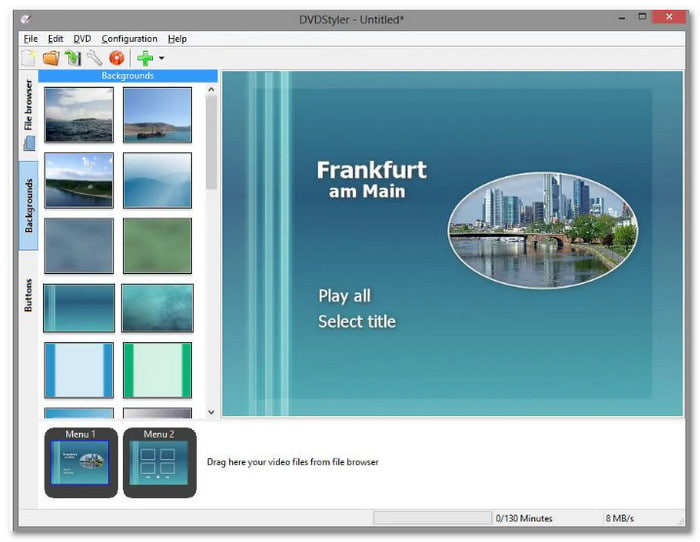
DVDStyler is a powerful, free, and open-source DVD burning and authoring application designed for creators who want to go beyond simple burning and craft truly interactive media. Unlike basic tools, it provides a sophisticated platform to design professional-grade DVD menus from scratch.
While DVDStyler free DVD burner offers dozens of ready-to-use interactive templates, the real power lies in its flexibility. You can customize every element—buttons, text, and graphic objects—or even import your own photos to create bespoke high-definition backgrounds.
For advanced designers, DVDStyler supports Scalable Vector Graphics (SVG), allowing you to use high-quality, resolution-independent buttons and icons for a sharp, modern interface on any screen.
This DVD burning software can let you take full control of the user experience with DVD authoring. You can define complex navigation paths, create multi-layered sub-menus, and seamlessly combine various audio and video formats (such as MP4, AVI, and MKV) onto a single disc.
As a truly versatile DVD burner, it operates smoothly across Windows, macOS, and Linux, ensuring that your creative workflow remains consistent regardless of your operating system.
Key Features of DVDStyler:
- Create interactive DVD menus with fully customizable buttons and elements.
- Access a variety of ready-to-use templates for quick and easy menu design.
- Use built-in scripting to gain precise control over playback and chapter logic.
- Operate seamlessly across Windows, macOS, and Linux systems.
- Import your own high-definition images to craft personalized menu backdrops.
- Cross-platform compatibility for Windows, macOS, and Linux users.
Benefits: DVDStyler supports many formats and provides customizable menu templates. It is easy to use, and you can add a personal touch by uploading your images for the menu background.
Drawbacks: Although DVDStyler is open-source and offers high customization, it doesn't support Fit-to-Disc. In our tests, we adjusted our VOB videos many times to make them compatible with DVDStyler. That will be very frustrating for beginners.
Why Choose DVDStyler?
We selected DVDStyler because it provides a level of creative agency and technical depth that is virtually unmatched in the open-source community. Unlike basic DVD burning program freeware that locks users into rigid, pre-set layouts, DVDStyler empowers creators with a "blank canvas" approach, allowing for the design of truly bespoke interactive menus using high-resolution Scalable Vector Graphics (SVG). Its support for advanced DVD scripting further distinguishes it, offering power users the precision to customize complex navigation logic and multi-layered sub-menus that typically require premium software. By combining this professional-grade authoring flexibility with full cross-platform compatibility for Windows, Mac, and Linux, DVDStyler stands as the definitive choice for those who demand total control over their media presentation without the cost of a commercial suite.
Part 5. Review of Other DVD Burners
1. Power2Go
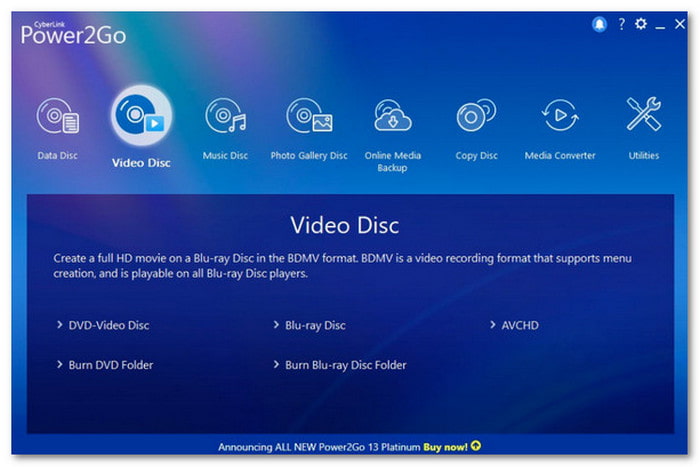
CyberLink Power2Go is a premier, all-in-one DVD burning program that streamlines the process of creating, converting, and safeguarding your digital media. Beyond its intuitive drag-and-drop desktop gadget, which allows for near-instant burning to DVD, Blu-ray, and even high-capacity BDXL, the software offers professional-grade disc authoring tools. You can design sophisticated menus using premium templates tailored for special occasions like weddings or birthdays, and further enhance the viewer experience by adding custom background music, seamless fade effects, and interactive playback loops.
Beyond creative tasks, Power2Go ensures your data remains protected with military-grade 256-bit encryption, while its Smart Detect technology automatically optimizes video files for playback on various mobile devices, making this DVD burner a truly comprehensive toolkit for modern media management.
Key Features of Power2Go:
- Supports burning data, photos, music, and videos to CD, DVD, Blu-ray, and high-capacity BDXL discs.
- A handy drag-and-drop desktop widget for instant, one-click file burning without opening the full software.
- Create high-quality movie discs with customizable interactive menus, premium templates, and free background music.
- Features Smart Detect technology that automatically identifies mobile devices and converts media to the optimal format (up to 4K).
- Protects sensitive data with 256-bit industrial-strength encryption and digital signatures on burned discs or USB drives.
Benefits: It is easy to use, thanks to its drag-and-drop interface. It supports many file types so that you can burn almost any data. The video tools allow you to trim clips and improve clarity while the encryption keeps your files safe.
Drawbacks: It is only available for Windows, so Mac and Linux users cannot use it. Some advanced features feel overwhelming for beginners.
You May Also Like:
2. WinX DVD Author
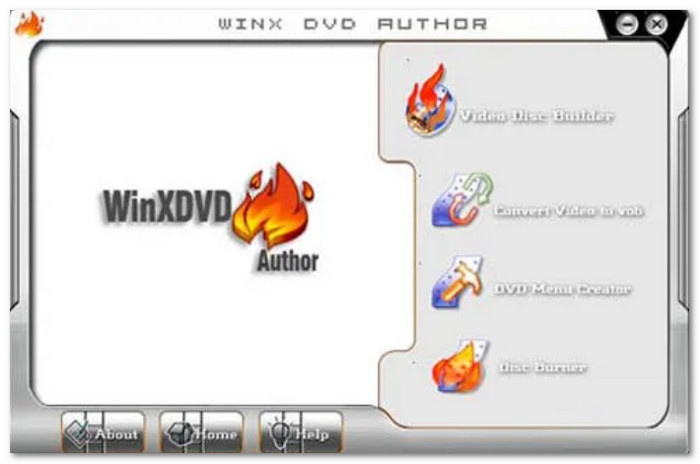
WinX DVD Author is a top-tier choice for content creators. It offers a seamless workflow to transform online media into physical archives. Beyond supporting standard video formats, this DVD burning software excels at compiling multiple high-definition clips into a single, cohesive disc. The software integrates essential post-production tools, allowing users to precisely trim footage, manage aspect ratios, and embed custom subtitles (SRT) for a polished finish. To ensure a studio-quality presentation, WinX DVD Author features a robust menu generator where you can craft interactive navigation interfaces with personalized background imagery and music. Whether you are archiving a video series or creating a professional portfolio, this DVD burner program provides the stability and creative flexibility needed for high-quality disc authoring.
Key Features of WinX DVD Author:
- Convert and burn a vast range of video formats, including MP4, MKV, AVI, WMV, and MOV, directly to high-quality DVD discs.
- Equipped with a powerful de-interlacing and high-quality encoder to ensure the output video remains crisp and clear with original audio fidelity.
- Build professional-grade DVD menus with custom background images, localized music, and easy-to-navigate chapter buttons.
- Includes built-in tools to trim unwanted video segments and adjust aspect ratios (4:3 or 16:9) to fit different screen displays.
- Seamlessly add external subtitle files (such as .srt) to your projects, making your DVDs more accessible and professional.
Benefits: It supports many file types and has a simple interface that is easy to use. The YouTube download feature is helpful for anyone who wants to create DVDs with online content.
Drawbacks: It does not support burning audio CDs or Blu-ray discs. It limits its usefulness if you need to burn other formats. Advanced users might find it too basic for their needs.
3. Roxio Easy CD & DVD Burning
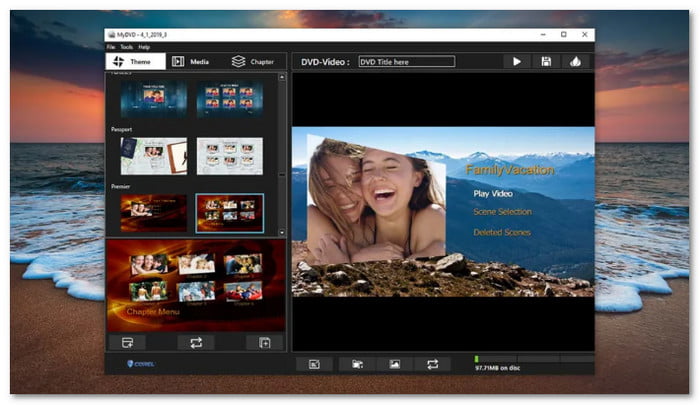
Roxio Easy CD & DVD Burning 2 is a premier solution for preserving life’s most cherished memories through high-quality video slideshows. This good DVD burning software provides a comprehensive creative suite that allows you to seamlessly integrate high-resolution photos, home videos, and personalized soundtracks. Beyond basic authoring, the software features advanced image correction tools, including precise cropping, rotation, and color enhancement, to ensure every frame looks its best. You can further elevate your projects with professional transitions, cinematic clip trimming, and custom voice-over narration. To complete the professional experience, this DVD burner offers a robust menu designer and an integrated Label Creator, allowing you to craft everything from interactive on-screen navigation to the physical disc artwork and jewel case inserts.
Key Features of Roxio Easy CD & DVD Burning:
- Create stunning multimedia slideshows with music, professional transitions, and custom text overlays
- Digitally enhance sound quality, edit audio clips, and record personalized voice-overs directly within the software.
- Built-in tools for color correction, red-eye removal, cropping, and rotation to polish your visual assets.
- Design and print professional disc labels, covers, and inserts with the integrated creative template library.
- Easily burn data to discs, copy unencrypted DVDs, and create ISO image files for long-term storage.
Benefits: It accurately creates DVD chapters, making navigating your projects easier. The editing tools, like transitions and voice-over recording, give you plenty of options to customize your discs.
Drawbacks: This program does not offer a dedicated free version, only a 30-day trial. The user interface must be updated and might feel less modern than similar tools.
4. AnyBurn
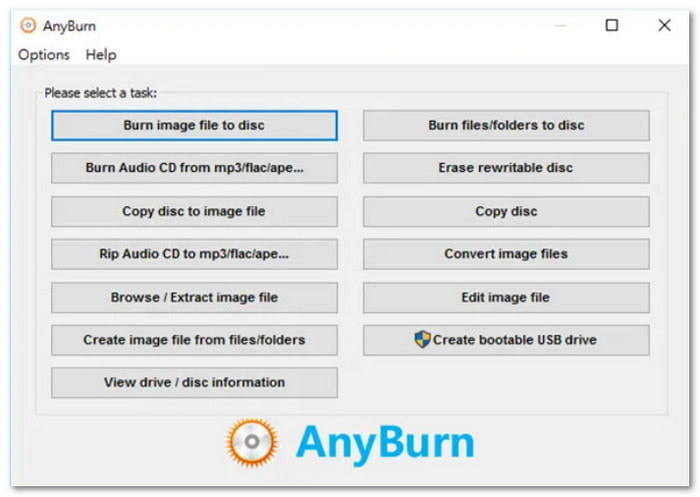
AnyBurn is a lightweight yet versatile free DVD burning software that excels in handling a wide array of optical storage tasks, including CD, DVD, and Blu-ray creation. Unlike many free tools that are limited to basic data storage, AnyBurn DVD burner serves as a comprehensive toolkit for sector-by-sector copying, data backup, and managing rewritable media. Its streamlined interface allows users to effortlessly create bootable USB drives, rip Audio CDs to lossless formats, and convert various disc image files (such as ISO, BIN, and DAA). While it prioritizes a clean, no-frills user experience over advanced video menu design, its reliability and support for both personal and commercial use make it an indispensable utility for users who value speed, precision, and broad format compatibility.
Key Features of AnyBurn:
- Burn files and folders to CD, DVD, and Blu-ray discs with full support for data, audio, and video formats.
- Create, burn, and convert various disc image files, including ISO, BIN/CUE, ASHDISC, and DMG.
- Easily create bootable USB drives and CD/DVDs for system recovery and OS installation.
- Rip Audio CDs to high-quality formats like MP3, FLAC, APE, and WMA for digital playback.
- Copy discs using a precise sector-by-sector method to ensure 100% data integrity.
Benefits: AnyBurn is free to use, making it accessible to everyone. It supports 32-bit and 64-bit Windows systems. It ensures compatibility with most computers.
Drawbacks: It does not include creative features like editing tools or menu creation for DVDs. The interface looks outdated and may not appeal to modern design users.
5. Express Burn
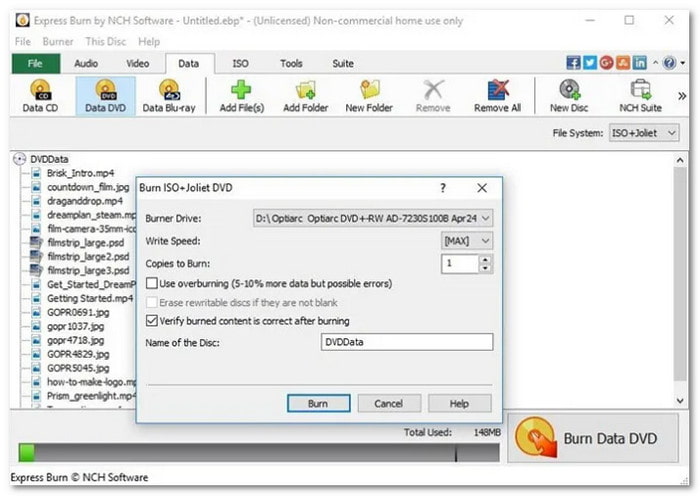
Express Burn is a high-performance free Blu-ray and DVD burning software that pairs an incredibly streamlined interface with broad format compatibility. Designed for efficiency, it enables users to seamlessly author both standard (4:3) and widescreen (16:9) videos, ensuring optimal playback on any display. While its minimalist layout is perfect for beginners, the DVD burner software does not compromise on power; it offers professional chapter management and a library of over 20 stylish menu templates that can be personalized with custom background imagery. For advanced users, Express Burn extends its utility by supporting high-capacity Dual-Layer DVD and Blu-ray recording, as well as the creation of bootable data discs, making it a versatile tool for both creative projects and essential system backups.
Key Features of Express Burn:
- Optimized engine uses direct digital recording to maintain perfect audio and video quality while saving time.
- Burn videos, music, and data to CD, DVD, Blu-ray, and HD-DVD, including high-capacity dual-layer discs.
- Create professional DVD menus with over 20 templates and customizable frames, titles, and background images.
- Support virtually all video inputs, including AVI, MPG, VOB, WMV, and MP4, with automatic conversion to DVD format.
- Create ISO image files and author bootable data discs for system recovery or software distribution.
Benefits: Express Burn supports various formats, including bootable discs and ISO images. It is recommended for beginners because of its simple interface and the ability to use menu templates.
Drawbacks: This program lacks many advanced features, so it might not meet the needs of users looking for professional-level DVD burning. It is also only available for non-commercial use in its free version.
6. InfraRecorder
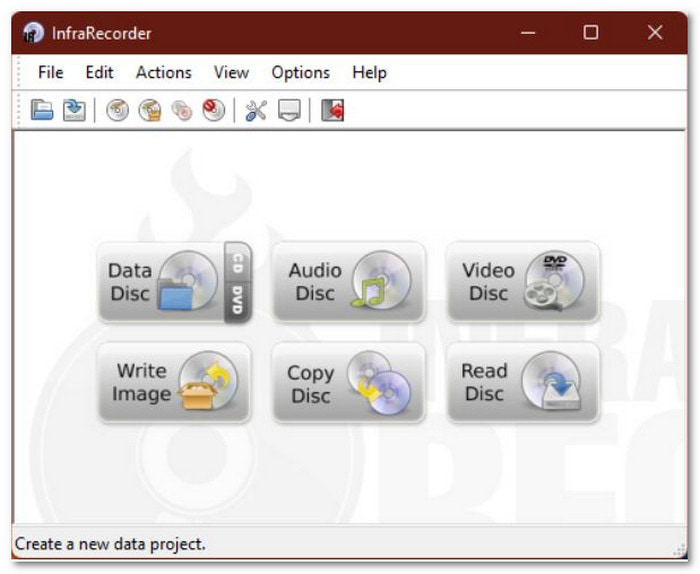
InfraRecorder is a high-quality, open-source, and free DVD burning software designed for users who seek a powerful yet lightweight utility without the bloat of commercial suites. It can work stably on legacy Windows 7 and XP versions. This excellent DVD burner offers full support for high-capacity Dual-Layer DVDs and provides flexible multi-session recording, allowing you to append new data to existing discs over time. Beyond physical media, InfraRecorder is a robust image management tool capable of burning and creating ISO and BIN/CUE images with precision. It also serves as a versatile audio workstation, enabling the creation of custom Audio CDs from various formats, including MP3, WMA, OGG, and WAV. While it maintains a clean, classic interface that is easy to navigate, its ability to perform advanced tasks, such as bus encryption and various disc erasing methods, makes this CD/DVD/Blu-ray burner an exceptionally reliable and "no-nonsense" choice for everyday burning needs.
Key Features of InfraRecorder:
- A completely free, transparent burning tool with no hidden plugins, trackers, or commercial restrictions.
- Burn data and audio to CD and DVD, including seamless support for Dual-Layer (DL) discs.
- Easily manage and import previous sessions to add more files to your discs later.
- Burn ISO and BIN/CUE images to disc, or create ISO images from existing discs and local files.
- Create traditional Audio CDs from MP3, WAV, WMA, and OGG files with automatic format handling.
Benefits: It is simple and easy for beginners to use. It supports recording to dual-layer DVDs and works in 45 languages.
Drawbacks: It is no longer updated, and customer support is unavailable. It also lacks many advanced features found in other DVD burners.
7. BurnAware
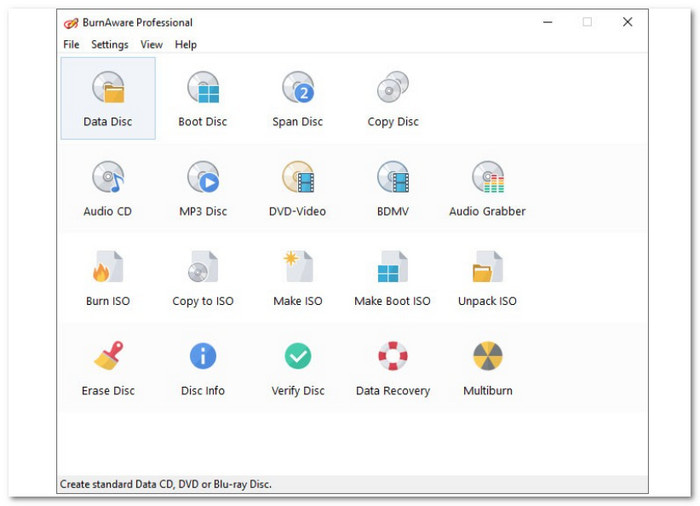
Specifically engineered for the Windows ecosystem, BurnAware is a high-performance Blu-ray and DVD burning program that balances a clean, modern interface with a professional-grade feature set. It stands out for its extensive media compatibility, allowing users to burn data to CD, DVD, and Blu-ray, as well as high-capacity Double-Layer and archival-grade M-Discs for 1,000-year data preservation. Beyond basic tasks, BurnAware provides a sophisticated toolkit for creating ISO images, executing bit-by-bit data backups, and authoring bootable discs for system recovery. With its intelligent built-in presets and a low-CPU-usage engine, this DVD burner offers a frictionless experience for beginners while remaining powerful enough to handle complex multi-session and multispan burning projects.
Key Features of BurnAware:
- Burn data, audio, and video to CD, DVD, Blu-ray, and high-capacity Double-Layer discs with support for M-Disc archival media.
- Create ISO images from files or discs, and burn ISO/BIN/CUE images to physical media with precision.
- Perform bit-by-bit disc copying and create bootable discs for system recovery or software distribution.
- Intelligent presets optimize burning settings based on the selected media type and content.
- Low CPU usage during burning allows for smooth multitasking without performance degradation.
Benefits: BurnAware is beginner-friendly with an easy-to-navigate interface. It uses minimal system resources, so your computer will not slow down.
Drawbacks: It may ask you to install extra software during the download process.
Part 6. Which DVD Burner Should You Choose?
Choosing the right DVD burning software depends on balancing your technical needs with your creative goals. Here is a comprehensive guide to the essential criteria for selecting the best DVD burner:
1. Purpose and Functionality
The most critical factor is identifying your primary use case:
- Video Authoring: If you want to create cinematic discs for home movies, prioritize software with Menu Designers, chapter management, and template libraries.
- Data Backup: If you are backing up documents or photos, look for features like Disc Spanning (splitting large files across multiple discs) and Multi-session support.
- System Maintenance: For tech enthusiasts, the ability to create Bootable Discs or handle complex ISO/BIN/CUE images is indispensable. DVD burner like AnyBurn can help you do this task.
2. Media and Format Compatibility
A versatile Blu-ray and DVD burner should handle a wide range of inputs and outputs:
- Disc Types: Ensure support for standard DVD±R/RW, Dual-Layer (DL), and Blu-ray (BD).
- Archival Support: For long-term storage, check for M-Disc compatibility, which ensures your data lasts for centuries.
- Input Support: The DVD burning software should accept modern video codecs (MP4, MKV, HEVC/H.265) without requiring external third-party converters.
Creative and Editing Tools
For those making video discs, look for built-in post-production features:
- Customization: Can you add background music, personalized images, and custom titles to your menus?
- Basic Editing: Does it include essential tools like trimming, cropping, and subtitle integration (.srt)?
- Real-time Preview: A "What You See Is What You Get" previewer is vital to avoid wasting blank discs on layout errors.
Part 7. FAQs of DVD Burner
What software can I use to burn a DVD?
Tipard DVD Creator is a good choice to burn standard DVDs and Blu-rays with clear interface and easy workflow. If you want to create a greatly customized DVD, DVDStyler is your best choice.
Does Windows 11 have DVD burning software?
While Windows 11 includes basic native DVD burning tools for burning simple data discs and audio CDs via File Explorer and Windows Media Player, it lacks a dedicated suite for professional DVD authoring and menu creation. To bridge this gap, Tipard DVD Creator is the premier choice, offering a streamlined, high-performance solution that transforms digital videos into polished, studio-quality discs. It supports over 500 formats and provides a wealth of customizable menu templates, allowing Windows 11 users to achieve professional results with significantly faster burning speeds than standard system tools.
Can I use VLC to burn DVDs?
VLC Media Player is a versatile playback tool, but it lacks native DVD burner functionality and cannot author the complex menu structures required for standard disc players. While it can transcode videos into DVD-compatible formats, you would still need a separate burning engine to finalize the disc. For a more direct and efficient solution, Tipard DVD Creator is recommended; it simplifies the entire process by offering an all-in-one platform to convert, author, and burn high-quality DVDs with professional menus in a single, high-speed workflow.
Conclusion
This article collects 10 excellent DVD-burning software that can precisely burn media files to DVD on Windows 11, 10, and macOS. Tipard DVD Creator is a great choice because it well support Fit-to-Disc and offers many beautiful DVD menu templates. You can easily and smoothly author a DVD disc, ISO, or DVD folder with simple workflow and fast speed.
More Reading
About the Author

 Click here to join the discussion and share your comments