

League of Legends is an exciting game full of unpredictable moments, and it's often only after a match ends that you realize what you could have done better. By watching League of Legends replays, your own or other players', you can gain deeper insights into decision-making, moves, and strategy.
But how do you use the replay feature in LoL? Where can you find your LoL replays, and how do you download them for offline viewing? This guide answers all of these questions in detail.

Part 1. What Is League of Legends Replay?
A League of Legends replay is a recording of a previously played match that allows you to watch the game again inside the LoL client. Unlike traditional video recordings, LoL replays are saved as game data files, not video files. These files contain information about player actions, movements, and in-game events, which the client uses to recreate the match exactly as it happened.
When watching a LoL match video replay, you can switch between different players' perspectives, track champion builds, review team fights, and analyze key decisions throughout the game.
LoL replays are especially useful for you to improve game skills, learn new strategies, study opponents, or simply worship memorable moments. However, because the LoL match video replays rely on the game client, they usually only work with the same or compatible game patch and cannot be played like standard video files outside the client.
Part 2. How to Access and Watch LoL Replays
The replay feature in LoL is enabled by default, so you don't need to set anything up like you would with a game recorder program. However, League of Legends only saves your most recent 20 replays. Don't worry, we'll walk you through the steps for different situations.
How to Download and Watch LoL Replays
Pro Tip: Since LoL Replays expire every patch (approx. every 2 weeks), the only way to save them forever is to record them into MP4 before the next update.
Step 1 Wait for your match to end. Then, go to the Profile menu in League of Legends client.
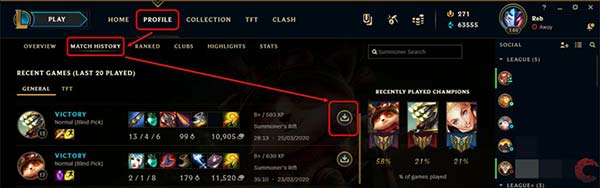
Step 2 Head to Match History and scroll down to find the League of Legends LoL replay that you want to watch.
Step 3 Click the Download button next to the replay to download the LoL game replay to your hard drive. By default, replays will be saved to C:\Users\\Documents\LeagueofLegends\Replays. Now, you can see the Download button has become a Play button. Click it to watch your LoL match video replay.
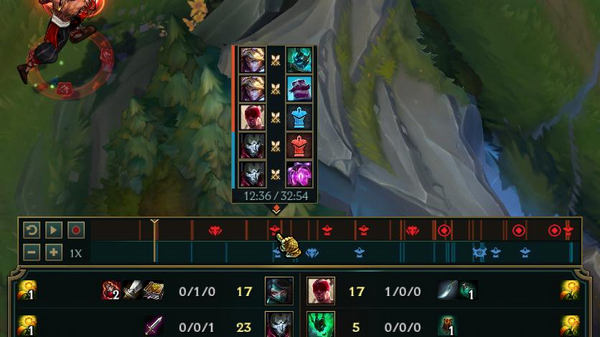
How to Use LoL Match Highlight
LoL Highlights is an in-game feature that automatically captures the best moments from your matches, so you don't have to record everything yourself. It automatically saves short clips in your match like kills, multi-kills, escapes, clutch moments, and more.
To access your LoL Highlights, you just need to go to the Profile / Career section. Some versions of the client include a Highlights section under your profile where you can view, rename, or delete clips you've recorded.
Unlike LoL replays, Highlights are saved in .webm format, which means you can play or share the videos directly. By default, LoL match highlights are stored at:
C:\Users\YourUserName\Documents\League of Legends\Highlights

How to Watch Shared LoL Match Video Replays
If you get a Twitch LoL match video replay shared by your friends that ended with rofl, follow the steps below to watch the LoL replay.
Step 1 Create a desktop shortcut for your LoL client. The path of LoL client is C:\Riot Games\League of Legends\RADS\solutions\lol_game_client_sln\releases\[version]\deploy. Right-click League of Legends.exe, choose Send to and then Desktop.
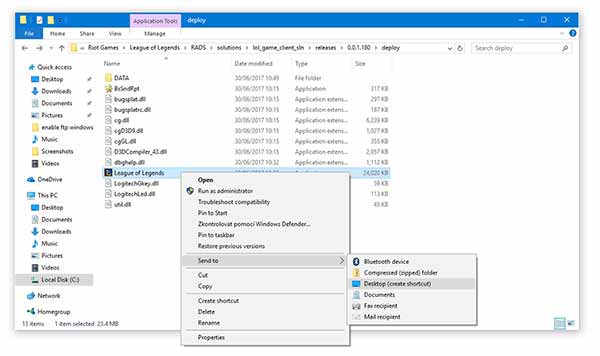
Step 2 Go to your desktop, drag and drop the LoL replay file into the shortcut. A few seconds later, it will begin playing.
This method only works if your League of Legends client is running the same game version as the LoL game replay.
How to Watch Expired LoL Match Video Replays
You might notice that you can't watch old LoL replays. In fact, you just need to use the LoL client version that matches the replay.
Step 1 Open a file Explorer window and find the old LoL replay.
Step 2 Right-click on the rofl file, select Open with and open it in any text editor, like Windows NotePad. Browse and find the LoL client version.
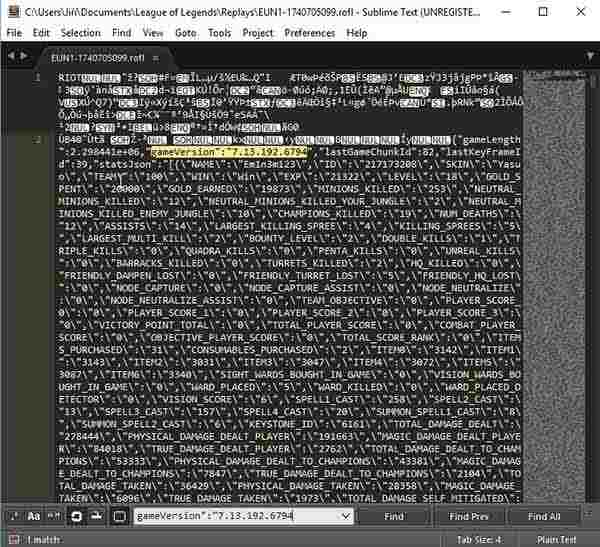
Step 3 Download the old version client and re-install it on your computer. Now, you can watch the old LoL replay on your computer.
Part 3. Best Alternative Way to Create LoL Replays
The replay feature in League of Legends has several limitations. First, it only keeps your most recent 20 replays. If you want to watch older or expired replays, you need to install the client version that matches those games. In addition, LoL replays are saved as encrypted ROFL files, which means they can only be viewed within the LoL client.
Want to save League of Legends replays as standard video files? The answer is Tipard Screen Capture. It lets you record matches directly, no in-game replay files required. You can also add your webcam and voice commentary. With a simple, beginner-friendly interface and flexible customization options, it works for both casual and advanced users.
Note: Our recommended tool is fully compatible with Riot Vanguard, ensuring no game crashes or account risks while recording.
Key Features of the Best LoL Replay Downloader

- Save LoL replays as MP4, MKV, MOV, and other standard video formats by recording it in real time.
- Enhance video quality and upscale recording to 4K automatically with advanced technology.
- Support AV1 and HEVC codecs to provide the best video quality.
- Well manage League of Legends and other game replays.
Needless to say, it is the best option to download LoL replays for watching later offline.
How to Download and Watch a LoL Replay
Step 1 Install LoL Replay downloader
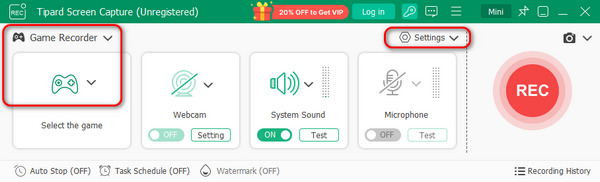
It supports Windows and Mac. Install the right version on your computer and launch it. Then choose the Game Recorder option to open the main interface. By default, it will save the LoL replay as an MP4 in your media library. You can change it on the Output dialog by clicking the Settings button.
Step 2 Record a LoL replay
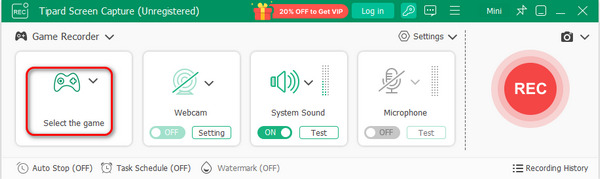
Open your game client or website and find the match you want to download as LoL replay. Turn to Tipard Screen Capture, click the Select the game button to choose your LoL game or the LoL replay. Then enable System Sound and adjust the volume. If you wish to add your face and voice to the LoL replay, enable Webcam and Microphone; otherwise, disable them.
Once the LoL match begins, click the REC button on the downloader to begin recording the LoL replay.
Step 3 Download LoL replay
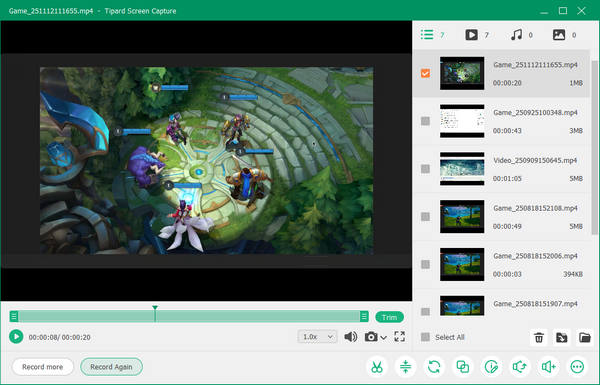
When recording LoL match, you can also edit it with the Edit button on the toolbar or take screenshots with the Camera button. When it is done, hit the Stop button to open the LoL replay in the preview window. Here you can see that your LoL replay is well saved and managed. You can click the Open Folder button on each recording to see your LoL replay, which is saved in standard video format.
Part 4. More Tips about LoL Replay
In addition to download LoL replay, there are more things you should know about it and we list them below.
- LoL replays vs. highlights. A replay is the copy of entire match, while the highlight allows you to choose specific scenes in the match. You can download and watch both LoL replays and highlights.
- How can you find the location of your downloaded LoL replays? Open the client, go to the Settings menu, and head to the REPLAYS tab. Here you can find and change the location of replays and highlights.
- To watch a LoL replay after downloading, open the client and find the replay in Match History. Now, the download button will turn to watch replay. Hitting the button and it will play immediately.
- LoL replays are encrypted. Even if you download it to your computer, you can only watch it in the client.
- In addition to the amount limit, the replays last for the length of a patch cycle. It means that your replays will be gone if you update your LoL client.
Part 5. FAQs of LoL Replay
What is a ROFL file?
A ROFL file is a replay file created by LoL. It contains a video of gameplay that has been downloaded from the match. Normal media players cannot play the ROFL files. You have to use the LoL client to watch them.
How do I save a LoL match video replay in MP4?
It is well-known that LoL replays are saved as ROFL format. If you want to produce MP4 video files from LoL match, you have to use a third-party game recorder like Tipard Screen Capture.
Can you watch LoL match video replays on your phone?
To watch LoL match video replays on your smartphone, you need to convert the ROFL files into standard video format, such as MP4. Then transfer them to your handset and watch them.
Conclusion
This guide covered everything you need to know about LoL match video replay. They let you download, watch, and share your matches with friends. To get around the limitations of the built-in replay system, we also showed how to save LoL replays as standard video files using Tipard Screen Capture, an easy-to-use tool that records any game as an MP4 file.

Record full screen, portion, window, game, and phone seamlessly without lag
100% Clean & Safe
100% Clean & Safe

More Reading




About the Author

 Click here to join the discussion and share your comments