

Both Android phones and iPhones come with many default ringtones that are simple and boring. It's easy to get tired of hearing the same ringtone as everyone else, especially for iPhone users. Custom ringtones are a great way to express your personality, yet even with plenty of built-in options, you may still struggle to find one you truly like. So, where can you download free ringtones for an Android phone or an iPhone?
In this post, we'll introduce 10 excellent websites and apps where you can download free ringtones for both iPhone and Android, along with easy ways to create your own ringtones on your phone. If you want to customize ringtones, especially on an iPhone, this guide will be a great help.
Part 1: Top 5 Sites to Free Download Ringtones for Android/iPhone
In the first part, we will show you 5 great websites for you to download free ringtones for Android phone and iPhone. Find your satisfactory ringtones from them.
1. zedge.net
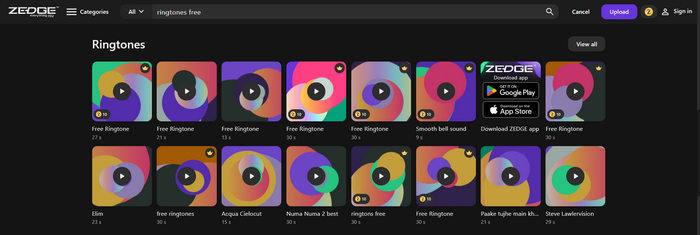
zedge.net is a very popular website for wallpapers, themes, and free ringtones for Android phones and iOS devices. It offers over 8.5 million files available for free download, making it a great place to browse when you want to change your Android or iPhone ringtone. You can find popular songs, funny sound effects, classic tracks, and ACGN music. However, Zedge free ringtones for Android and iOS frequently displays ads, and the audio quality may not always meet your expectations.
2. Tone7
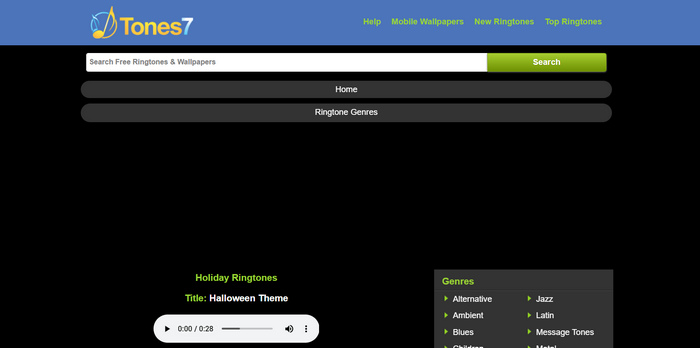
Tones7 is one of the most popular websites for downloading free ringtones for both Android and iPhone. You can easily search for your favorite music and download it at no cost. The site offers a wide range of genres to choose from and lets you preview each audio file before downloading, making it easy to find the perfect free iPhone ringtones. You can also choose between MP3 or M4R formats depending on whether you're using an Android phone or an iPhone.
3. MyTinyPhone
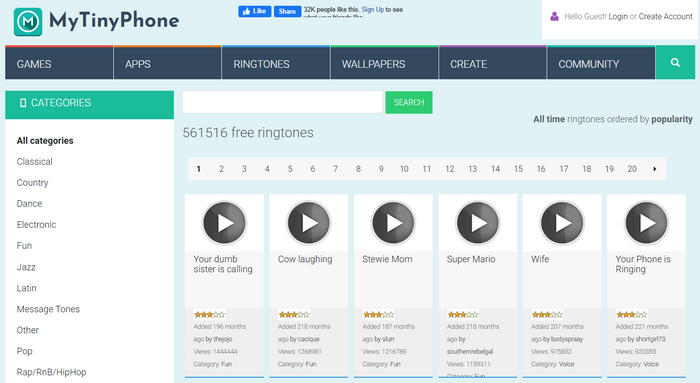
MyTinyPhone is a versatile ringtone-sharing website that lets you download free ringtones for both Android and iPhone. In addition to ringtones, it also offers a wide range of games, apps, wallpapers, and themes.
When you find a ringtone you like, you can send it to your phone or email, save it to your PC or iPhone, or download it via WAP. Although the interface may look outdated, the site makes up for it with a large ringtone library and user-friendly tutorials for saving free ringtones on Android and iPhone. Overall, it’s an easy and reliable place to find the ringtones you want.
4. Mobiles24
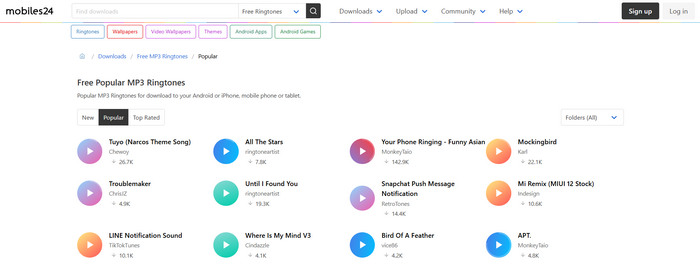
Mobiles24 is similar to MyTinyPhone and serves as a solid platform for sharing free Android ringtones. You can quickly preview ringtones before downloading them, and it even allows you to edit a ringtone prior to download. In addition, the site provides different ringtone download options tailored for both Android and iPhone users, making it convenient to get the right ringtone for your device.
In addition, it offers a wide variety of wallpapers, themes, games, apps, and videos for both Android and iPhone users. Each ringtone is available in two audio formats: free MP3 ringtones for Android phones and free M4R ringtones for iPhones.
5. ToneTweet
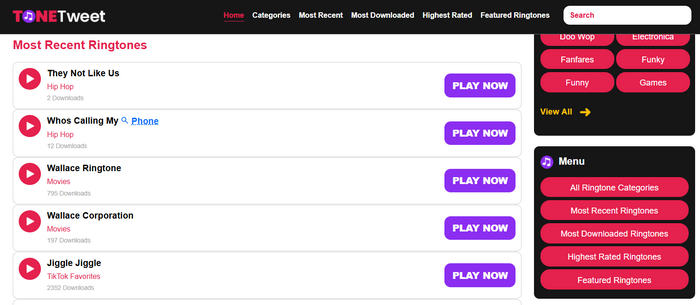
ToneTweet functions more like a free MP3 music download site, allowing you to search for and download your favorite songs as ringtones. It features a convenient search bar that makes finding the free telephone ringtones for Android and iPhone quick and easy.
The site also recommends a wide range of categories and genres, including alternative, animals, annoying, blues, country, hip-hop, and more. However, while it lets you download free ringtones for Android or iPhone, it doesn’t provide tools to transfer the ringtones directly to your phone.
When you get the M4R ringtones for iPhone, you may need to use the iPhone Ringtone Transfer to transfer them to your iPhone.
Part 2: Top 5 Apps to Download Fre Ringtones for iPhone/Android
If you want to download free ringtones directly to your phone, here are five excellent ringtone apps for both Android and iPhone.
1. ZEDGE
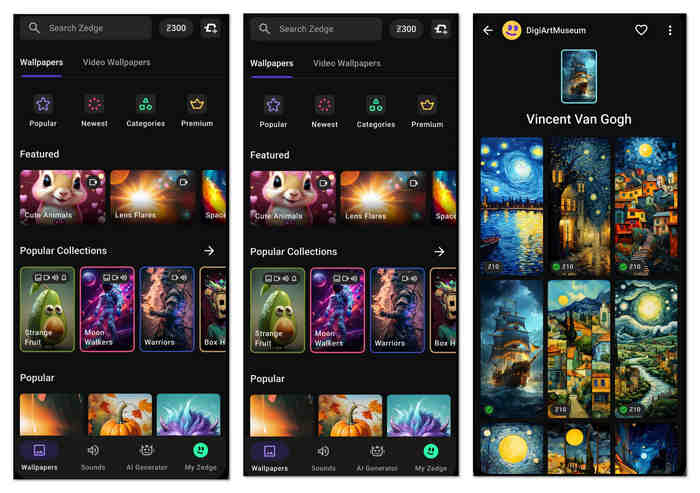
ZEDGE remains our top recommendation for downloading free ringtones on Android and iPhone. You can get the app from both Google Play and the App Store. It offers a wide selection of wallpapers, themes, and ringtones that you can easily browse, download, and save to your phone. What's more, the app lets you directly apply wallpapers and change ringtones within the app, making customization quick and convenient.
2. Audiko
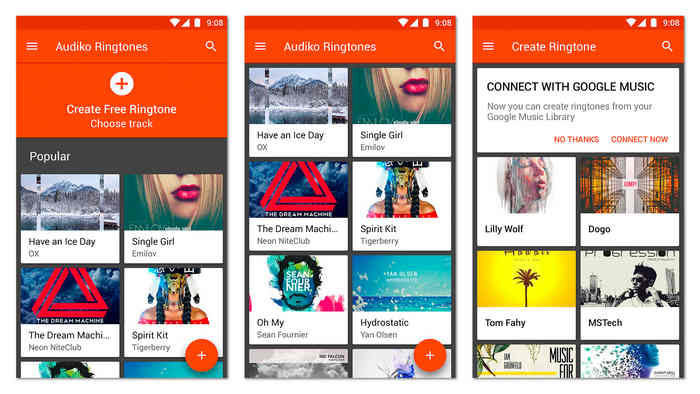
Audiko is a well-known ringtone app and website that lets you exchange ringtones and create your own for Android and iPhone. Millions of free music and ringtones for Android and iOS are available for download. Simply enter a track name or artist to quickly find the ringtone you want. The app offers a wide variety of genres for ringtones, message alerts, and notification sounds, including pop, rap, classic, party, rock, and more.
Although Audiko allows you to create ringtones, you cannot set them directly on iOS from the app. To use a ringtone on your iPhone or iPad, you need to go through GarageBand or iTunes to apply it.
3. Mobile9
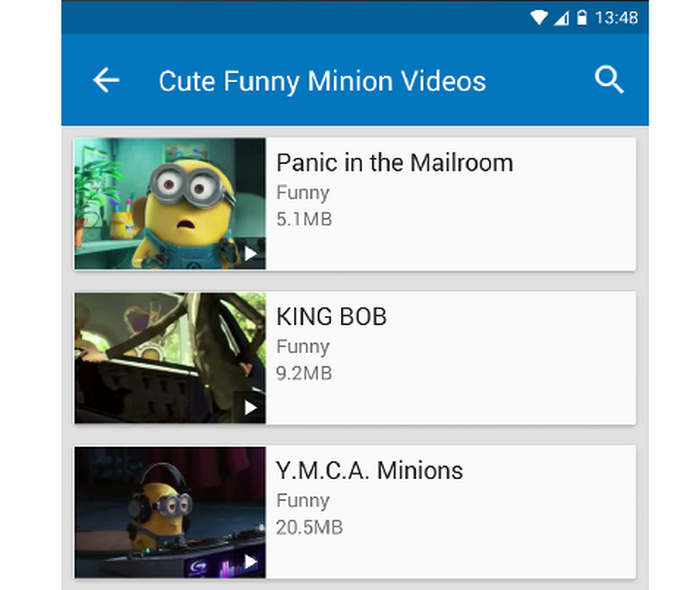
Mobile9 is a powerful ringtone download app for both Android and iPhone. Compared to other apps, it features a clean and elegant interface, making it easy to find and save the ringtones on iPhone or Android you want. The app updates daily, so you'll always have access to fresh ringtones, wallpapers, themes, and more. You can also share your favorite ringtones with family and friends on social networks.
4. RCP Tones
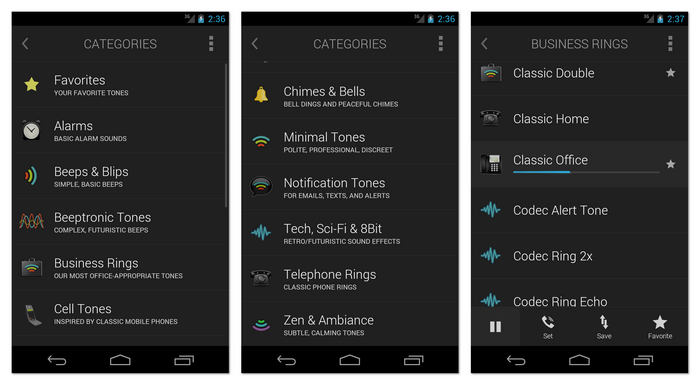
RCP Tones is an excellent choice if you're looking for a professional ringtone app for Android and iPhone. It offers a wide selection of classic ringtones for calls, texts, emails, voice messages, and more. The app ensures a safe and hassle-free experience with no hidden fees, recurring charges, spam, scams, malware, DRM, or ads. This free ringtone app delivers a comfortable and user-friendly experience.
5. Ringtones Maker
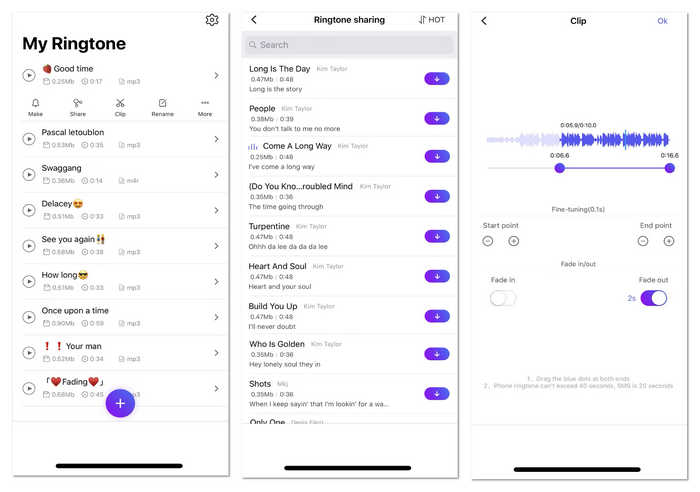
Ringtones Maker is an easy-to-use ringtone app for iOS. It allows you to add free ringtones to your iPhone 17/16 in multiple ways. You can choose from quick, pre-made ringtones or use the built-in ringtone maker to create your own. Additionally, the app lets you clip a section of any audio file to customize a ringtone to your liking. This free iOS ringtone app makes it simple to meet all your ringtone needs.
Part 3: How to Make Ringtones for Android and iPhone
You've explored 10 excellent free ringtone websites and apps for Android and iPhone, but what if you want to create a ringtone or convert a song into one? It’s just as easy as using a reliable ringtone website or app. Here, we'll show you 2 simple ways to create ringtones for both Android and iPhone.
How to Make a Ringtone for Android
Creating personal ringtones on an Android phone is very simple. On most Android devices, you can set one of your favorite songs as your ringtone. However, sometimes you may only want a specific part, like the chorus. We highly recommend Tipard Video Converter Ultimate to help you create custom ringtones. Follow the steps below to download and use this ringtone maker.
Step 1 Launch A Tipard Video Converter Ultimate
Click the Free Download button below to download and install Tipard Video Converter Ultimate on your computer. After installation, please launch Tipard Video Converter Ultimate on your PC or Mac.
Step 2 Add Video/Audio File
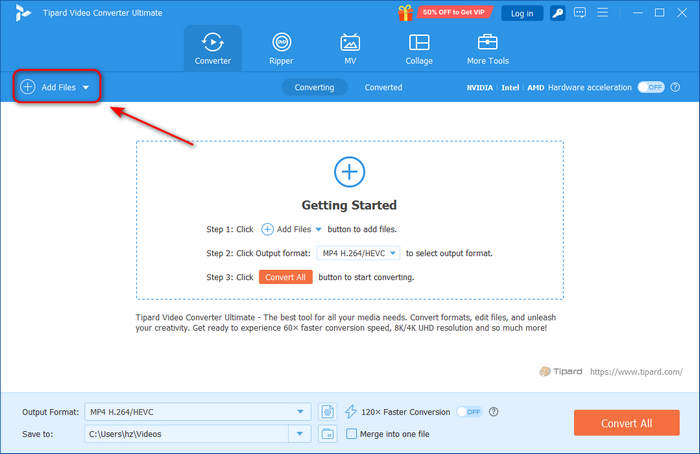
Whether you want to extract an audio track from a video or trim the audio file directly, you can import it into this software by clicking the Add Files button on the top left side.
Step 3 Edit File
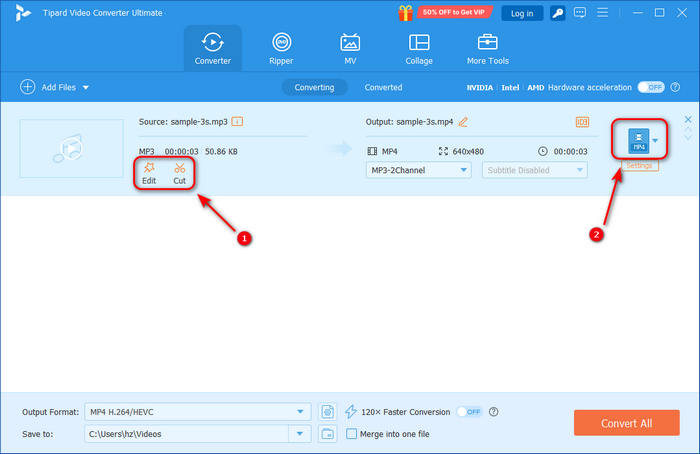
Click the Edit button to adjust the audio volume or the audio delay effect. You can also click the Clip button to clip the audio file. After that, you should click the Format button to choose a format that is compatible with Android ringtone.
Step 4 Make Ringtone for Android
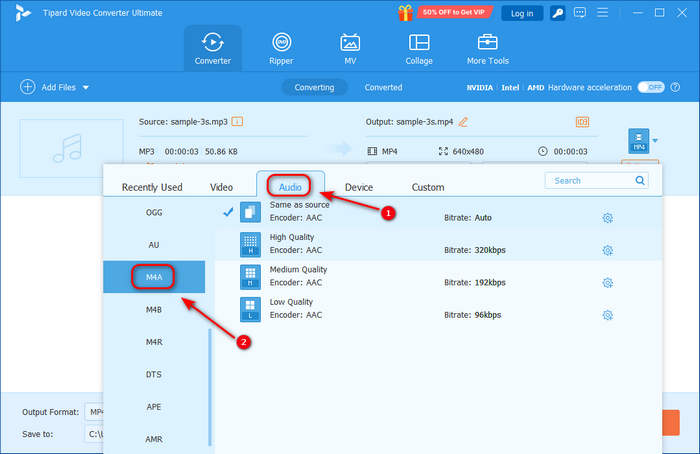
In this window, you should choose the Audio category first, and then, you can choose MP3 or M4A as the output format. Both of them can be set as Android ringtone. If you want to make ringtone for iPhone, choose M4R instead.
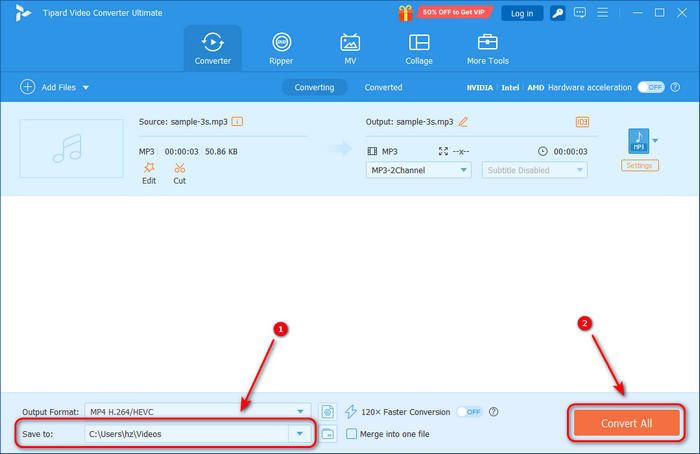
Choose a destination folder in the Save to section. Finally, click the Convert All button to convert the file to Android ringtone format. You can transfer the Android ringtone to your Android phone with a USB cable and set it as your ringtone.
How to Make a Ringtone for iPhone
While you can create iPhone ringtones using iTunes, the process is complicated and requires a computer. Fortunately, iPhones come with a built-in app called GarageBand, which makes customizing ringtones much easier. If you don't have it, you can easily download GarageBand from the App Store.
Step 1 Add Audio to GarageBand
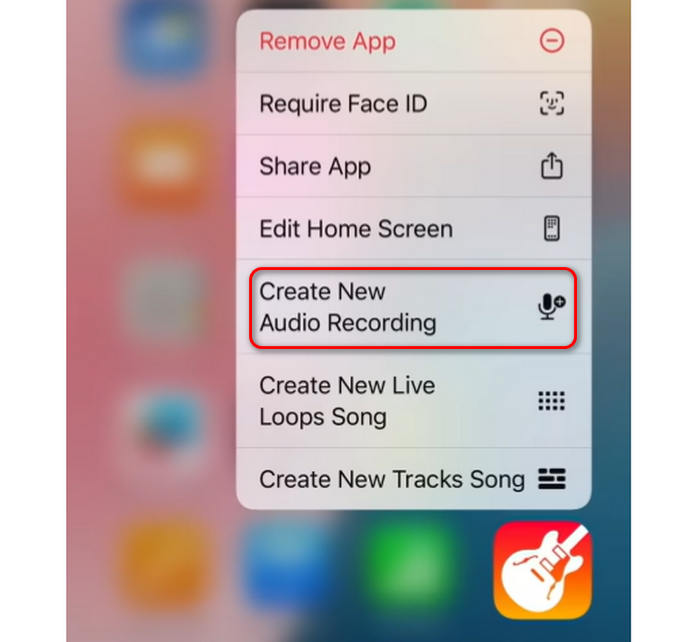
You can directly share an audio to GarageBand from a music player app (only local audio files can be shared) or add the audio file to this app. Tap and hold the GarageBand app and tap Create New Audio Recording.
Tap the Track button on the top left side, and then tap the Loops button on the top right to start choose an audio file to make iPhone ringtone.
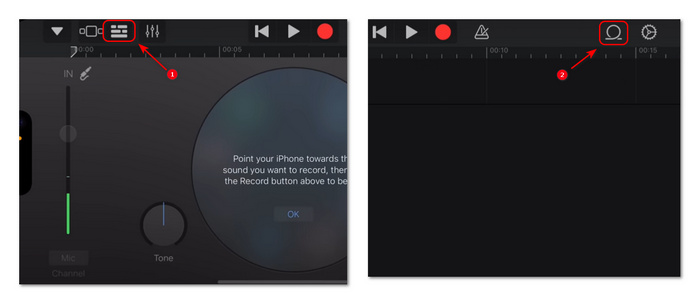
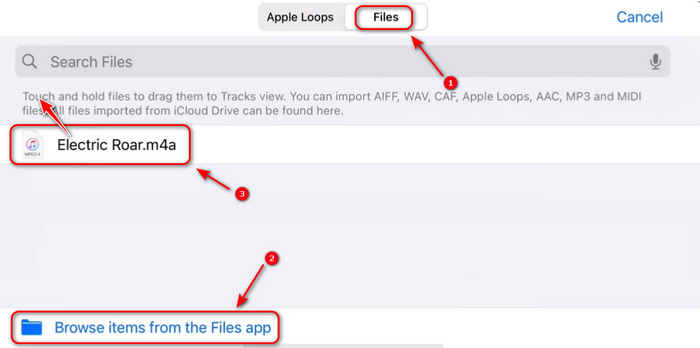
In this window, you should choose the File tap on the top side. If there's no audio file available, tap Browse items from the Files app to select your desired audio file to create iPhone ringtone. Then, tap and drag the audio file to the top left side to add it to GarageBand timeline.
Step 2 Clip Ringtone for iPhone
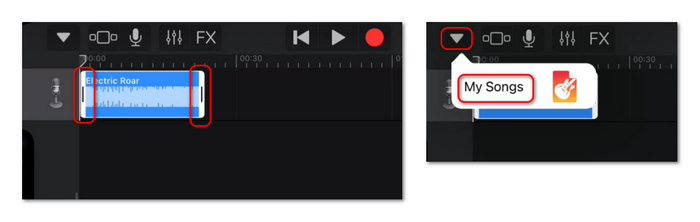
Your audio file is added. You can tap on it and drag the controllers on the edges to clip the ringtone audio file. Then, tap the Navigation button on the top left side and choose My Songs.
Step 3 Make iPhone Ringtone
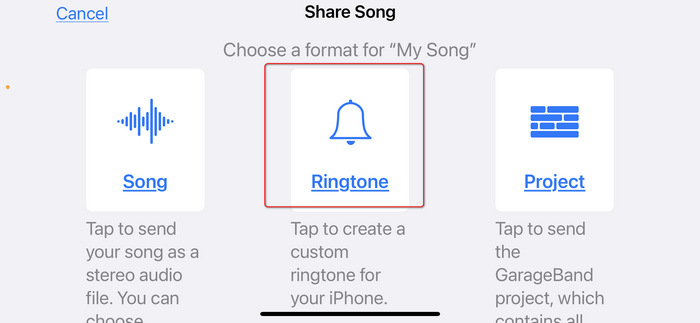
Locate the My Song audio file and tap and hold on it. Then, tap the Share button. Finally, choose Ringtone as the output format. Then, you can name this iPhone ringtone, and it will appear in Settings. You can go there to change your iPhone ringtone easily.
Conclusion
In this article, we've introduced 10 great websites and apps for downloading free ringtones for iPhone and Android phones and iPhones. We also show two simple ways to create your own Android or iPhone ringtones. You can choose the method that best suits your needs and finally replace your old ringtone with one you truly enjoy. If you want to create free ringtones for Android and iPhone on a computer, Tipard Video Converter Ultimate is a good choice. It can clip an audio and help you transfer it to a ringtong format for Android or iPhone.
More Reading



About the Author

 Click here to join the discussion and share your comments
 Tipard Video Converter Ultimate