

Key Takeaways:
Tipard Video Converter Ultimate is our top recommendation, offering the best balance of fast AI upscaling, zero learning curve, and built-in format conversion for everyday creators. If you need cinematic-grade restoration and have a high-end workstation, Topaz Video AI is the premium professional standard. For tech-savvy users on a zero-dollar budget, upscaling anime, Video2X provides a powerful but complex open-source alternative.
Whether you are salvaging low-res family footage, optimizing a vlog, or prepping a clip for social media, low video quality can instantly break audience engagement. But with hundreds of tools claiming to instantly upgrade your footage, finding software that actually delivers without crashing your computer or draining your wallet is a frustrating challenge.
In this unbiased guide, we benchmark the market's leading video enhancement software across real-world metrics: rendering speed, algorithmic clarity, and overall value. From heavy-duty cinematic engines to lightweight free tools, you will discover exactly which software fits your technical skill level, hardware setup, and budget.

Part 1. What to Look for in Video Enhancement Software
The selection of the appropriate video quality enhancer can also be very instrumental in making the difference in your final product. Not all the tools provide the same quality, speed and features. The following are the main parameters to be taken into account when assessing video enhancers:
- Look for software that can enhance resolution, sharpness, and color without adding noise or artifacts.
- Tools using AI or smart algorithms often deliver better upscaling, stabilization, and noise reduction.
- Check if the software supports your video formats and works on your device or OS.
- Faster processing saves time, especially for large files or batch enhancement.
- A simple interface with clear controls helps beginners and professionals work efficiently.
- The ability to enhance multiple videos at once is a big time-saver.
- Look for color correction, stabilization, denoising, and other useful tools.
- Ensure it offers flexible export settings for different platforms or devices.
- Compare free vs. paid versions and see which provides the best features for the cost.
- Reliable support and regular updates ensure the software stays compatible and efficient.
Part 2. Top AI Video Enhancers for Consumers & Creators
A video enhancer program can make your videos look better fast. Not all tools work the same. Here, we look at the four top programs. You will see how they perform, how easy they are to use, and which one fits your needs best.
1. Tipard Video Converter Ultimate
Tipard Video Converter Ultimate is a versatile AI video enhancer that boosts your footage quality while supporting a wide range of formats. It combines upscaling, noise reduction, and color correction in one easy-to-use platform. This is an effective tool both for the amateur and for the expert creator, as it is fast and clear in its results. Although it is not completely free, its trial offers access to major features to be able to test it before buying.
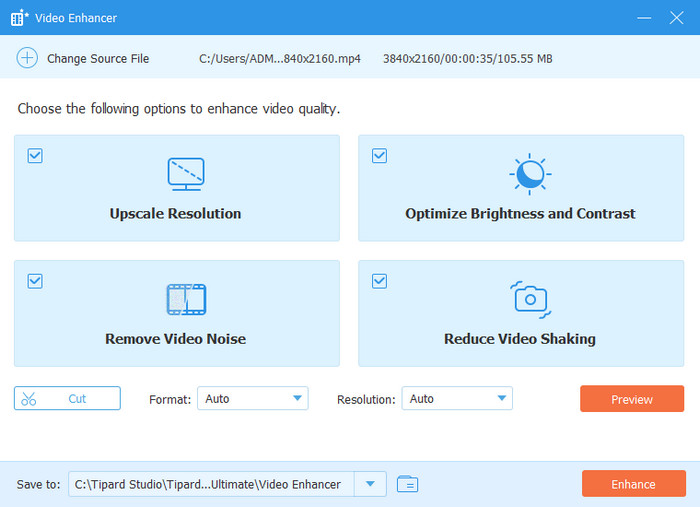
- Combine direct 4K upscaling, stabilization, and color tuning into a seamless 1-click workflow.
- Smoothly handle niche or older formats that specialized AI engines often reject.
- Fully optimized for hardware acceleration (NVIDIA, AMD, Intel), making batch processing remarkably fast.
- Support MP4, MKV, MOV, ProRes, AVI, WebM, and more than 1000 input formats.
- The interface can be more stylish.
2. Hitpaw VikPea
HitPaw VikPea is a beginner-friendly video enhancer free tool that focuses on clarity and color correction. The engine that is based on AI enables its users to enhance their video quality even without technical expertise. It suits well with the casual creators who require fast and quality outputs. Also, it offers simple editing so that it can be used as a versatile tool in short projects.
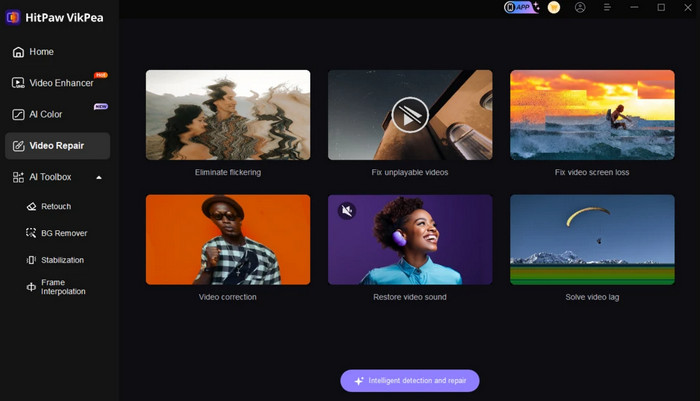
- A minimalist, visual interface tailored specifically for beginners and casual creators.
- Optimized for quick text, face, and anime enhancement before exporting to TikTok or Reels.
- Provide fast and seamless AI-based enhancement features.
- The free version aggressively watermarks exports, forcing a paid upgrade.
- No manual parameters for advanced users who want to tweak algorithmic depth.
You May Also Like:
3. Topaz Video AI
Topaz Video AI is a professional video enhancement software that offers multiple AI models for upscaling, deblurring, noise reduction, frame interpolation, and motion stabilization. It can produce very high-resolution results while preserving details. Processing may be a slow task depending on hardware, but the quality of output may justify the delay to the filmmaker and content creator.
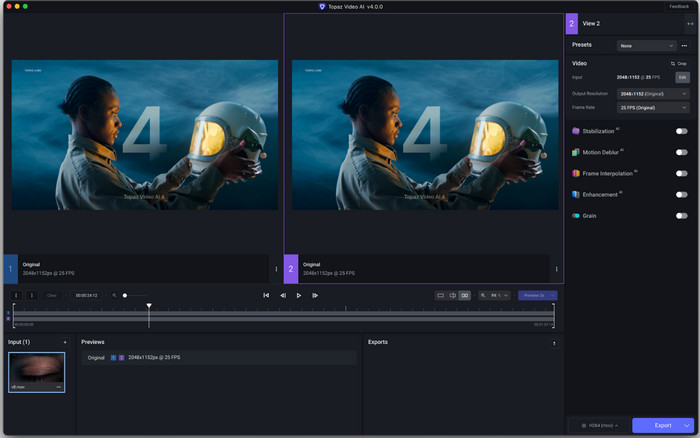
- Unmatched clarity in texture restoration, frame interpolation (60fps/Slow-Mo), and camera shake reduction.
- Feature dedicated models for interlaced footage, CG animations, and low-res compressed videos.
- Support high-performance batch processing with GPU acceleration.
- The price tag is steep ($299).
- There is a learning curve for adjusting AI artifacts on human faces.
4. AVCLabs
AVCLabs is an all-in-one video enhancer software that provides tools for resolution upscaling, denoising, colorization, and face enhancement. The interface is simple to use and easy to understand for those who are novices, and there are a number of AI models that enable users to balance speed and quality. There is a free three-day trial to try out the main features before buying.
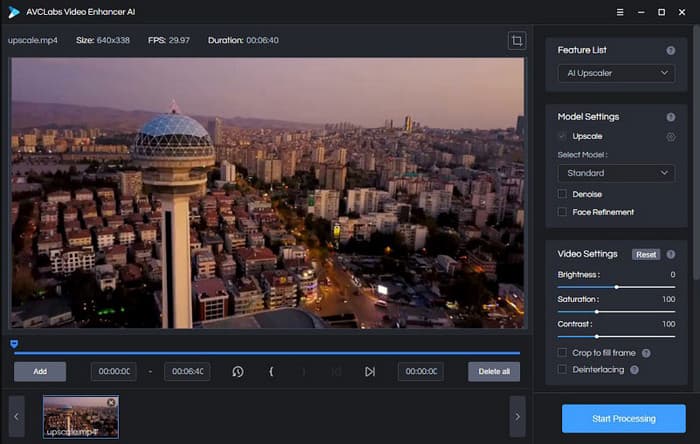
- Exceptional at detecting, tracking, and restoring human facial details in low-light environments.
- Offer short-term subscription plans, making it budget-friendly for one-off projects.
- Provide flexible pricing options for different user needs.
- Heavily optimized for NVIDIA; AMD and Mac users will experience noticeable rendering bottlenecks.
- Tend to over-smooth backgrounds, occasionally giving footage a "painted" or plastic look.
- The excessive processing can flatten faces or textures.
Part 3. Best Free Video Enhancement Software
Finding a free desktop tool to improve video quality can save time and money. Not all free programs work well. It is important to know which ones are reliable. Here, we review three top free desktop tools. We explain their strengths, limits, and why they are worth trying.
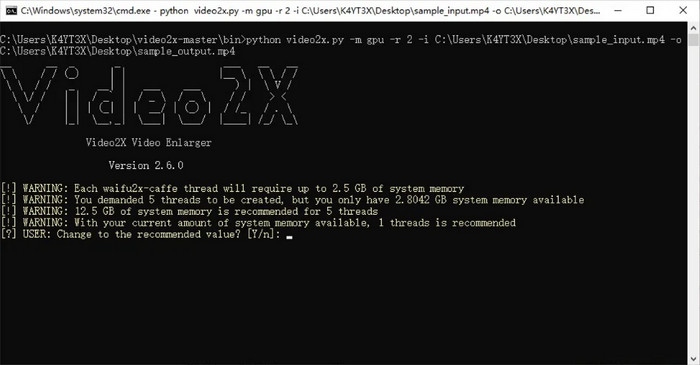
1. Video2X
Video2X is a powerful video enhancer that uses AI-based upscaling algorithms to boost video resolution and clarity. It operates by taking out frames, upgrading them through super-resolution frameworks, and reassembling the video. Plus, it is the most appropriate for users who are committed to meaningful quality improvement and are not afraid of configuring auxiliary applications such as FFmpeg.
- 100% Free & Open-Source: No hidden paywalls, subscription prompts, or watermarks.
- Niche Model Support: Integrates advanced super-resolution algorithms (like Real-ESRGAN) that excel at upscaling low-res anime and graphics.
- Complex Setup: Requires downloading external dependencies like FFmpeg; not friendly to non-technical users.
- Prone to Crashes: Lacks commercial stability optimizations; large queue files can cause sudden app crashes.
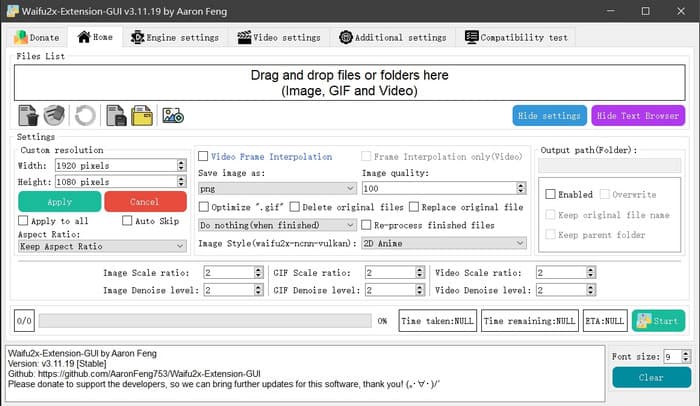
2. Waifu2x-Extension-GUI
Waifu2x-Extension-GUI is a video quality enhancer software used on Windows, which uses deep-learning models like Real-ESRGAN, Anime4K, and Waifu2x. It is also frame interpolating to smooth out video motion and is hence suitable to interpolate both anime and real-life videos.
- Anime Optimization: The absolute best free choice for upscaling illustrations, classic 2D animations, and low-bitrate clips.
- Batch Multi-Threading: Allows users to run multiple upscaling tasks simultaneously to maximize GPU utilization.
- Outdated UI: The dense, setting-heavy dashboard can feel overwhelming for everyday video creators.
- Variable Frame Rates: Occasional frame drops or desynced audio when processing complex real-life footage.
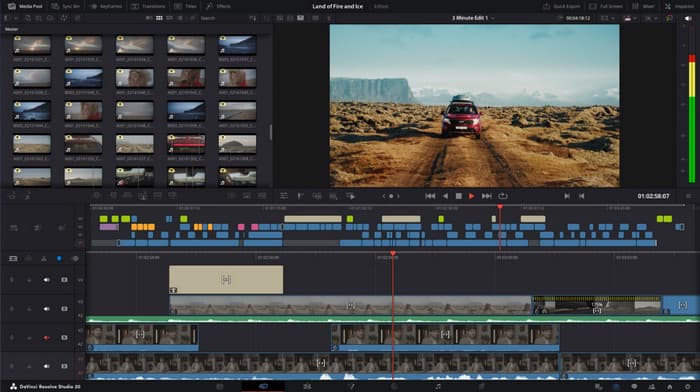
3. DaVinci Resolve - Free Version
DaVinci Resolve is an editing program with a professional level and doubles as a video enhancer program. Its free version includes strong color correction, noise reduction and basic up-scaling. Although it is mostly an editing tool, it has built-in effects with which it can be used to enhance the quality of the video at no cost.
- Hollywood-Grade Tools: Access to industry-leading spatial denoising, optical flow motion estimation, and professional color grading.
- Unrestricted Workspace: A complete, commercial-grade non-linear editor that does not restrict export length or add watermarks.
- Steep Learning Curve: Overkill for simple enhancement; requires hours of practice to master the interface.
- Feature Gating: Key AI-driven features (like Super Scale and Face Refinement) are exclusive to the $295 Studio version.
4. REAL Video Enhancer
REAL Video Enhancer is a free utility that is a desktop application that enhances video resolution and removes motion. It applies AI images to enlarge videos and put frames between the ones that are already present. Scene changes are also identified by the program to make the transitions clear. There is a preview of the results before the entire video process, which is time-saving.
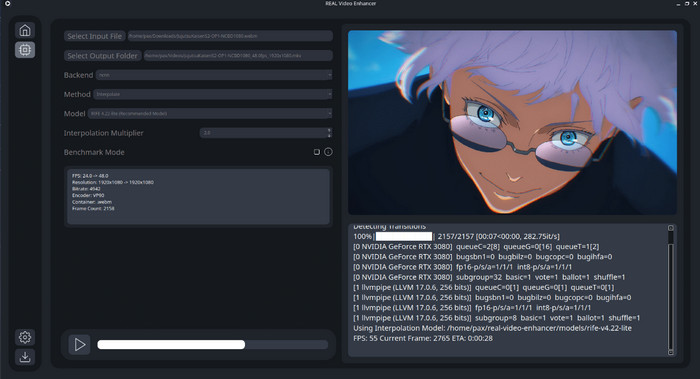
- Instant Live Preview: Allows you to test and view AI model results on a single frame before committing to a multi-hour export.
- No Configuration Needed: A standalone open-source app that packages all necessary AI components out of the box.
- Limited Presets: Fewer adjustment sliders compared to commercial alternatives; a true "take it or leave it" output.
- Slow Progress Updates: The rendering progress bar can be inaccurate, making it hard to estimate completion times.
Part 4. Comparison of the Top 8 Video Enhancement Software
Check a detailed master side-by-side comparison of the top 8 video enhancement software options. You can make your choice here.
| Product Name | Core Target Audience | AI Enhancement Strengths | Feature Versatility | Learning Curve & Price | Final Verdict |
|---|---|---|---|---|---|
| Tipard Video Converter Ultimate | All-in-One Users (Casual & Prosumer) | 4K/8K Upscaling, Auto-Brightness, Denoising, & Stabilization | Industry-Leading (500+ formats, GIF Maker, 3D Creator, Compressor) | Very Low / Budget-friendly; Best Value | Top Pick: The perfect blend of speed, ease, and extra tools. |
| HitPaw VikPea | Social Media Creators | One-click Face & Anime enhancement models | Basic (Focuses on quick AI repairs) | Low / Subscription-based (Expensive) | Best for quick TikTok/Reels fixes if you have the budget. |
| Topaz Video AI | Professional Filmmakers | Elite texture recovery & fluid 120FPS interpolation | Limited (Purely an AI engine, no editor) | High / Premium Price ($299) | The Heavyweight for cinematic results; requires a beastly GPU. |
| AVCLabs Video Enhancer AI | Portrait & Night Vloggers | High-end face refinement & old video colorization | Moderate (Focused on AI models) | Moderate / Subscription/Lifetime plans | Great for night shots, but background textures can look plastic. |
| Video2X | Tech-Savvy & Open-Source Fans | Multiple algorithms (Real-ESRGAN, Waifu2x) | Low (Requires external tools like FFmpeg) | Very High / 100% Free | Powerful but frustrating to set up for non-coders. |
| Waifu2x-Extension-GUI | Anime & ACG Enthusiasts | Specialized in 2D line art & batch image processing | Low (Focused on animation) | Moderate / Free | The gold standard for upscaling anime and 90s cartoons. |
| DaVinci Resolve (Free) | Aspiring Video Editors | Professional Spatial Denoise & Motion Estimation | Extreme (Hollywood-grade editing suite) | Extremely High / Free Version Available | Best for editors who want to learn a professional career tool. |
| REAL Video Enhancer | Lightweight Windows Users | Simple Super-Resolution & Scene Detection | Minimal (Basic UI) | Low / Free & Open-Source | A great no-frills entry point for free AI upscaling. |
Part 5. FAQs of Video Enhancement Software
Can an AI video enhancer really turn a low-resolution 480p video into true 4K?
Yes, but with an important distinction between traditional stretching and AI reconstruction. Traditional players simply stretch the existing pixels, resulting in a blurry, pixelated image. Modern AI video enhancers, like Tipard Video Converter Ultimate, use deep learning models to analyze the footage, predict missing details, and generate brand-new pixels.
Why do some AI video enhancers take hours to process a short clip?
AI video enhancement is incredibly resource-intensive because the software has to apply complex mathematical algorithms to every single frame of a video (a standard video has 24 to 60 frames per second). If a software relies purely on your CPU or is poorly optimized, rendering can slow down to a crawl.
Should I choose a dedicated AI engine or an all-in-one video converter suite?
For 95% of users, an all-in-one suite, like Tipard Video Converter Ultimate, is the smarter, more practical investment. Pure AI enhancement engines focus exclusively on upscaling algorithms. However, real-world video restoration rarely involves just one step. Old videos from camcorders, phones, or legacy discs often come in outdated formats (like AVI, WMV, or VOB) that specialized AI engines cannot read, forcing you to buy a separate converter anyway.
Conclusion
Choosing the right video quality enhancer comes down to balancing your creative goals, budget, and system hardware. If you are a professional filmmaker with a high-end workstation and an unrestricted budget, a specialized engine like Topaz Video AI offers exceptional texture recovery. On the other hand, if you are a tech-savvy user looking exclusively to upscale 2D animation, open-source options like Video2X provide a cost-free, customizable entry point.
However, for the vast majority of content creators, hobbyists, and editors, Tipard Video Converter Ultimate delivers the most practical and efficient solution. By combining powerful AI upscaling, denoising, and stabilization with an industry-leading format converter and compression toolkit, it eliminates the need to juggle multiple applications. It strips away the steep learning curves and heavy system rendering times of rival software, making professional-grade video optimization as simple as a single click.
More Reading




About the Author

 Click here to join the discussion and share your comments
 Tipard Video Converter Ultimate