


About | Privacy Policy | Terms of Use | Support | Contact Us
Copyright © 2026 Tipard Studio. All Rights Reserved.

Windows

Rip your favorite Blu-ray/DVD movies or videos to popular formats

Powerful software to play Blu-ray/DVD videos and audio

Create Blu-ray disc/folder/ISO file with your own video

Backup/Copy your favorite Blu-ray to disc/folder/iso files
Mac

Rip your favorite Blu-ray/DVD movies or videos to popular formats on Mac

Powerful software to play Blu-ray and popular video formats on Mac
Windows

Rip DVD to any popular video format quickly of full quality

Create DVD from videos and burn video to DVD/Blu-ray freely

Copy DVD to DVD disc/folder/ISO files in a 1:1 ratio
Mac

Rip DVD to any popular video format quickly of full quality on Mac

Burn or author a DVD from videos with subtitles and chapters on Mac

Copy DVD to DVD disc/folder/ISO files in a 1:1 ratio on Mac
Windows

Rip DVD, convert 4K video, edit, and upscale videos to 5K/8K

Repair broken videos with high accuracy and support many formats

Convert any video to MP3, MP4, MOV, WAV, and other 350 formats

Upscale resolution, optimize brightness and remove video noise

The easiest tool to capture screen, game, audio, etc. with high quality

Convert any 2D video to 3D video and convert 3D to 2D video

Convert 4K video to 4K/1080P and common videos

Convert TS video to various popular video/audio formats
Mac

Rip DVD, convert 4K video, edit, and upscale videos to 5K/8K on Mac

Repair broken videos with high accuracy and support many formats on Mac

Convert any video to MP3, MP4, MOV, WAV, and other 350 formats on Mac

Upscale resolution, optimize brightness and remove video noise on Mac

The easiest tool to capture screen, game, audio, etc. with high quality on Mac

Convert any 2D video to 3D video and convert 3D to 2D video on Mac

Convert 4K video to 4K/1080P and common videos on Mac

Convert TS video to various popular video/audio formats on Mac
Desktop

Rip and convert DVDs to MP3 and support other audio formats

Reset Windows Admin and Standard user account password in seconds

Accurately Convert any PDF file to Word with OCR

Convert PDF to Word, Excel, HTML and Image with OCR
Online

Easily remove watermarks from many image file formats free online

Points:0
Redeem




Instantly remove watermark from photo while keeping the image quality with high-end AI techniques.
 365 reviews
Want to remove watermark from video? Try it now!
Want to remove watermark from video? Try it now!

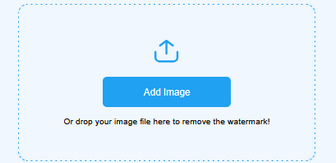
Add Image
Click Add Photo to import your photo.


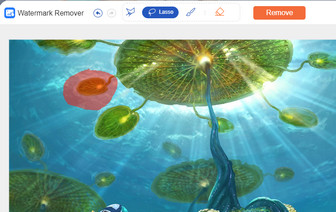
Select Area
Use tools to choose watermark area.

Remove Watermark
Click Remove or Save to finish.

Tipard Watermark Remover lets you quickly remove any watermark from your photos—including text, logos, and image overlays. This image watermark remover can also seamlessly remove date stamps, signatures, or geotags online while maintaining flawless image quality.
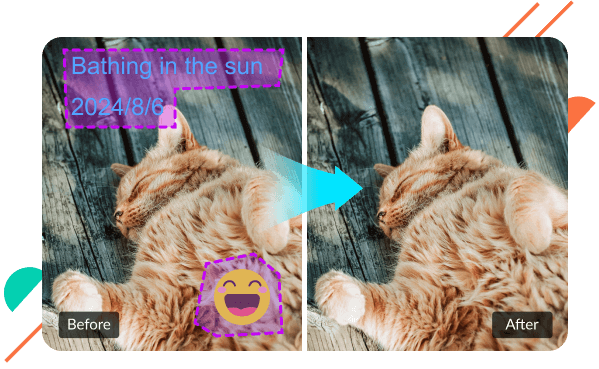

Images often feature watermarks in various shapes and sizes. To ensure a seamless removal, Tipard Online Watermark Remover offers three precision tools: Brush, Lasso, and Polygonal. By adjusting the selection size and utilizing the zoom feature, you can accurately define the removal area. Compared to the complexity of Photoshop, this free online tool delivers a significantly faster and more intuitive workflow.
Thanks to its universal compatibility, Tipard Watermark Remover supports all major photo formats, including JPG, JPEG, and PNG. You can erase watermarks with total freedom - whether they are from saved web images, product photography, or shots taken with cameras. No matter the source or format, Tipard ensures a seamless, restriction-free watermark removal workflow.


Fast Watermark Removal
One-click to remove the selected area from your image.

Remove Any Object
Get 4 tools to choose the watermark area in all shapes.

Easy to Use
It is easy to use because of its straightforward interface and clear guide.

Crop Images Freely
It enables you to crop images freely after removing watermarks.

No Quality Loss
After removing watermarks, you can get images without quality loss.

No Browser Limit
You can use Watermark Remover on Chrome, Microsoft Edge, Safari, etc.
Jenz
I made it to remove watermarks from downloaded photos with this watermark remover. It can keep the image quality with no distortion or pixelation. Very nice!
Riv4lization
The output image has no distortion after removing watermarks. That is so magnificent! I can get a nice anime photo and use it as my wallpaper.
Luvgusts
It took only 2 seconds to remove watermark from a 4K photo! I downloaded the pic from 500px and now I can set it as the wallpaper of my Mac.
Is Tipard Watermark Remover free?
Yes, it is. Tipard Watermark Remover is free to use. You can easily remove watermark from photos with it.
Is it safe to remove watermarks using Tipard Watermark Remover?
Yes, it is safe to use Tipard Watermark Remover. As you finish removing watermarks, this tool promises to erase your data in 24 hours.
How can I remove watermark from an image for free?
As Tipard Watermark Remover is a free watermark removing tool, you can use it to remove the watermark from an image without spending money.
Can I remove watermark from an image without compromising its resolution?
Yes. You can use Tipard Image Watermark Remover to remove watermarks without blurring or distorting. This program can reconstruct the background smartly.