

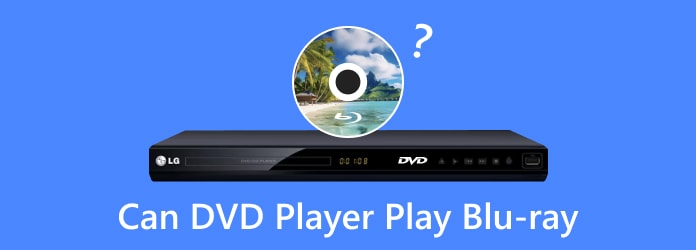
Can a DVD player play Blu-ray? No, DVD players cannot play Blu-ray discs for technological reasons, though Blu-ray players can play Blu-ray discs, DVDs, and other types of discs.
However, you can convert Blu-ray to a DVD player-supported video format so that your DVD player can play Blu-ray movies easily. This article will show you 2 ways to do that and help you understand why regular DVD players cannot play Blu-ray.
Part 1. Why Can't a DVD Player Play Blu-ray
1. Different Laser Technology
You can't play a Blu-ray disc on a DVD player because the two formats use different laser technologies. DVD players utilize a red laser with a wavelength of approximately 650 nm to read data, while Blu-ray players employ a blue-violet laser with a significantly shorter wavelength of around 405 nm. The shorter wavelength allows Blu-ray players to read the much smaller and denser data pits on Blu-ray discs. Since the red laser in a DVD player is not precise enough to read these tiny pits, DVD players cannot play Blu-ray discs.
2. Higher Storage Density in Blu-ray Discs
DVDs store data at a relatively lower density, with a capacity of up to 4.7 GB for single-layer discs and 8.5 GB for dual-layer discs. In contrast, Blu-ray discs can hold significantly more data—up to 25 GB on a single layer and 50 GB on a dual-layer disc. When comparing Blu-ray and DVD, it becomes clear that Blu-ray uses more advanced compression technologies and higher data density. As a result, DVD players are not equipped to decode the Blu-ray format, which makes the two formats incompatible with each other.
3. Different File Formats and Codecs
Blu-ray discs use advanced video compression formats such as MPEG-4 AVC (H.264), VC-1, and HEVC (H.265), which are not supported by DVD players. In contrast, DVDs rely on MPEG-2, a simpler and older compression format that Blu-ray players can easily decode. As a result, Blu-ray players are backward compatible with DVDs, while DVD players cannot handle Blu-ray discs.
4. Lack of Hardware Support
DVD players lack the necessary decoding hardware to process Blu-ray disc data. Blu-ray players, on the other hand, are designed to read DVDs and CDs in addition to Blu-ray discs. While a DVD player cannot play Blu-ray discs, you can play a DVD on a Blu-ray player without any issues if you own one.
Part 2. What If You Want to Play Blu-ray on a DVD Player
While a DVD player won't play Blu-ray discs, there are still several practical alternatives available.
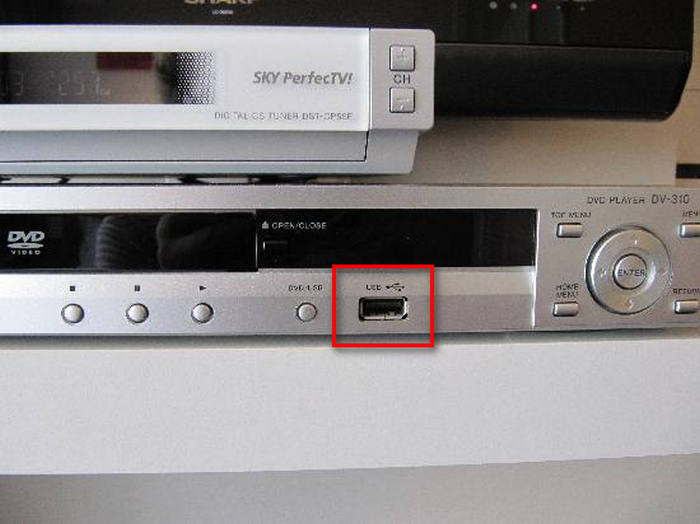
Today, most DVD players come with USB ports, allowing them to recognize and play digital files stored on a USB drive. For instance, if you want to play Blu-ray on an Xbox 360, you can extract the Blu-ray video and transfer it via USB. Similarly, to play a Blu-ray on a DVD player, you can convert the Blu-ray disc into a compatible digital format and play it using a USB drive.
What Video Formats Can DVD Players Play?
| DVD players | Supported video formats | Supported audio formats |
|---|---|---|
| Sony DVD player | MP4 (.mp4, .m4v) - Typically with H.264/AVC codec; WMV (.wmv) - Windows Media Video; AVI (.avi) - Usually with DivX or XviD codec; MPEG-1 and MPEG-2 (.mpg, .mpeg, .vob) - Standard for Video CDs and some DVDs | MP3 (.mp3), AAC (.m4a), WMA9 (.wma), LPCM (.wav) |
| LG DVD Player | MP4 (.mp4, .m4v) - Typically with H.264/AVC codec; WMV (.wmv) - Windows Media Video; AVI (.avi) - Usually with DivX or XviD codec; MPEG-1 and MPEG-2 (.mpg, .mpeg, .vob) - Standard for Video CDs and DVDs; MKV (.mkv) - Often with H.264/HEVC codec (supported on some newer LG players); MOV (.mov) - QuickTime format, usually with H.264 codec; TS (.ts) - Transport stream, often used for HDTV recordings | MP3, WMA, Dolby Digital 2 ch Downmixed |
| Samsung DVD Player | MP4 (.mp4, .m4v) - Typically with H.264/AVC codec; WMV (.wmv) - Windows Media Video; AVI (.avi) - Usually with DivX or XviD codes; MPEG-1 and MPEG-2 (.mpg, .mpeg, .vob) - Standard for Video CDs and DVDs; MKV (.mkv) - Often with H.264/HEVC codec (supported on some newer Samsung players); MOV (.mov) - QuickTime format, usually with H.264 codec; TS (.ts) - Transport stream, commonly used for HDTV recordings | MP3, WMA |
The above table lists some DVD players and the most common formats that a DVD player can support. However, if you want to play Blu-ray on a DVD player, you also need a reliable Blu-ray ripper to extract the Blu-ray videos. To convert Blu-ray discs to DVDs, Tipard Blu-ray converter can help.
How to Convert Blu-ray to DVD Supported Formats
Tipard Blu-ray Converter can rip Blu-ray discs into the digital formats that a DVD player can recognize and then just watch the digital files on a DVD player. It is a professional Blu-ray ripper to convert Blu-ray to MP4, MPEG2, WMV, AVI, MKV, and more formats on PC. Then, you can easily play Blu-ray on a DVD player.

- Convert Blu-ray to MKV, MP4, MPEG2, WMV, MP3, WMA, and more.
- Rip all types of Blu-ray discs even with encryptions.
- Quickly Rip Blu-ray to videos with original quality or upscale Blu-ray movies.
- Edit Blu-ray movies like subtitles, audio tracks, split, join, and more.

Step 1 Add Blu-ray discs
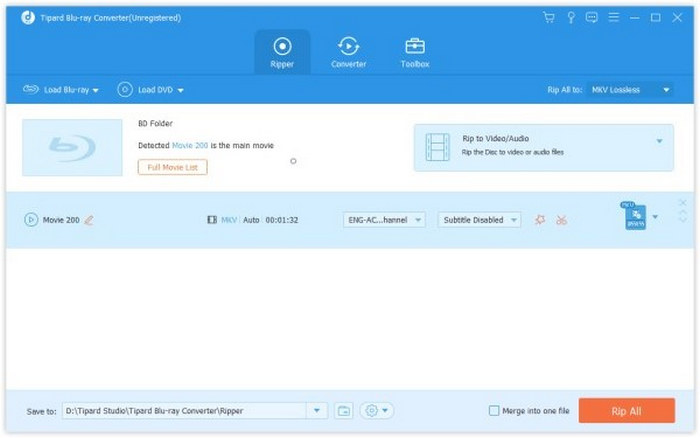
Free download this Blu-ray converter into your computer. Run it after the successful installation. Insert your Blu-ray disc into the Blu-ray optical drive on PC.
Click Load Blu-ray to find your Blu-ray disc. This tool also supports ripping Blu-ray folder and you can import them directly from your PC.
This software will recognize the main titles of a Blu-ray disc, and you are allowed to select more titles if you need them by clicking Full Movie List.
Step 2 Choose output format for DVD player
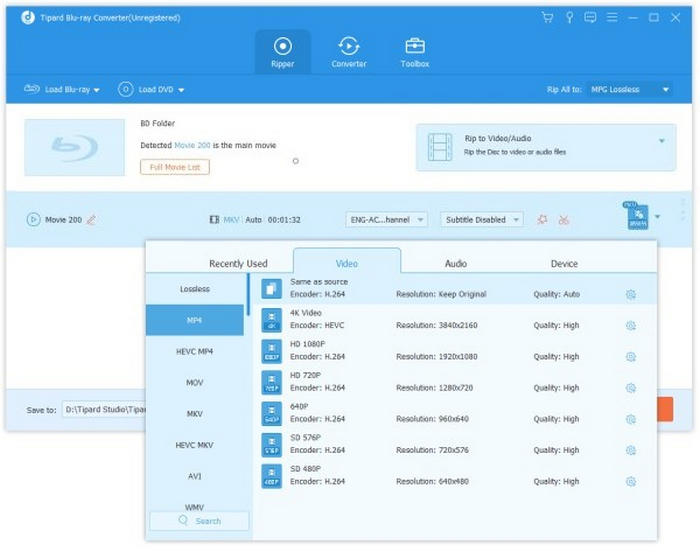
Click the Output Format drop-down button to select a format supported by your DVD player, such as MP4, MPEG-2, MKV, and more. Can the Wii play Blu-rays? The answer is yes if you convert the Blu-ray to a compatible Wii format. This demonstrates just how powerful the program is for converting Blu-rays.
Step 3 Convert Blu-ray to MP4 MPEG 2
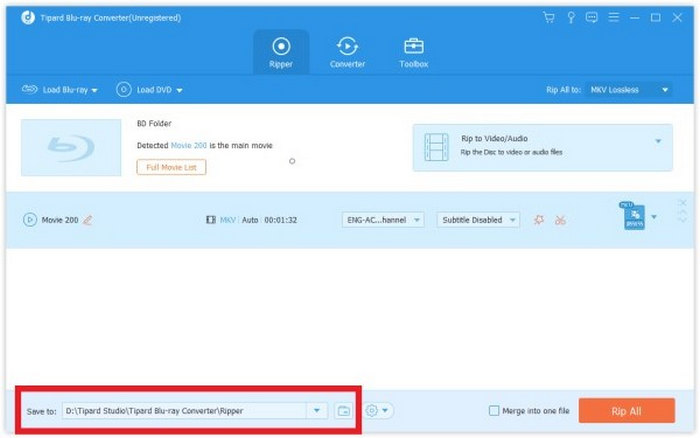
Click the Save to dropdown button to select a location to store the converted Blu-ray videos and click Rip All at the bottom-right corner to start converting Blu-ray to your desired format.
Step 4 Transfer the Blu-ray Video
Transfer your Blu-ray video to a USB drive on your computer. Then, connect the USB drive to your DVD player. Finally, you can easily play Blu-ray on a DVD player.
Part 3. How to Play Blu-ray on PC with Best Video Quality
Since a DVD player cannot play Blu-ray discs, why not play them on your computer instead? Tipard Blu-ray Player is a powerful Blu-ray player for both PC and Mac. It supports a wide range of Blu-ray disc types, including BD-5, BD-9, BD-25, BD-50, BD-XL, and even 4K UHD Blu-ray discs. In addition, it can play DVD movies and other digital video files on your computer with ease.
Main Features of Tipard Blu-ray Player:
- Play Blu-ray movies while managing chapters, media file tracks, and subtitles.
- Support hardware decoding, offering high quality with low CPU usage.
- Offer user-friendly controls and audio/subtitles customization options.
- Support many digital multimedia formats like MP4, MKV, MP3, MOV, and more.
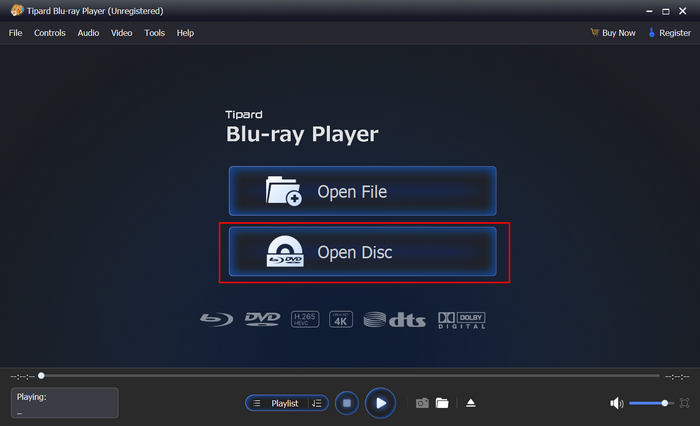
Step 1 Download and install this software on your computer and launch it. Click the Open Disc button to load your Blu-ray disc.
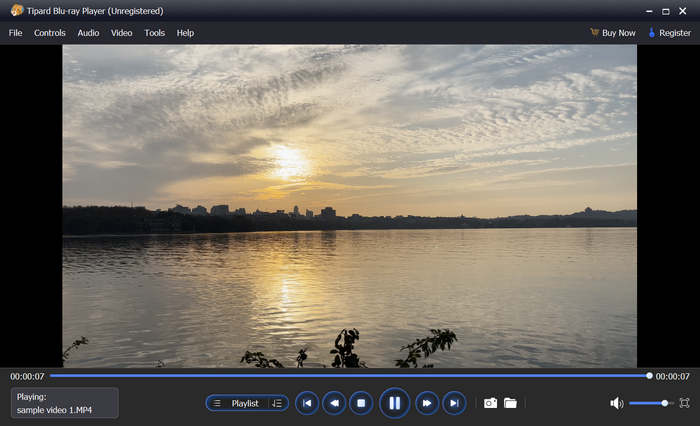
Step 2 Then, you can enjoy your Blu-ray video. You can also click the Playlist button to select different chapters from your Blu-ray.
Part 4. FAQs of Playing Blu-ray on a DVD Player
How to make a DVD player play Blu-ray?
Technically, you cannot make a standard DVD player play a Blu-ray disc by changing its settings or updating its software. The limitation is in the hardware: DVD players use a red laser with a wavelength of 650nm, which is too physically large to read the microscopic data pits on a Blu-ray disc. Blu-ray discs require a blue laser (405nm) to function.
What happens if you play a Blu-ray in a DVD player?
Nothing will happen. A DVD player cannot play Blu-ray disc, and even if you insert a Blu-ray disc into a DVD player, it will not be detected.
How do I know if my DVD player can play Blu-ray?
In general, a DVD player cannot play Blu-ray discs. However, you can easily check if your player is actually a Blu-ray player by looking for a Blu-ray logo on the device or simply inserting a Blu-ray disc to see if it plays.
Conclusion
Can DVD players play Blu-ray? The answer is no. A DVD player cannot open Blu-ray discs, though a Blu-ray player can open DVDs. This post explains the reasons and provides the solutions to play Blu-ray on a DVD player. You can use Tipard Blu-ray Converter to rip Blu-ray to any video format. Then, you can transfer the video to your DVD player with a USB drive. Then, you can watch Blu-ray on a DVD player.
More Reading



About the Author

 Click here to join the discussion and share your comments
 Tipard Blu-ray Converter