

Riverside.fm is an ideal tool for recording a crystal-clear, uncompressed audio and 4K video locally on each device. With this recorder, you can ensure a good media quality. However, since there are various recorders showing up in the market, is Riverside still the best recorder? In this comprehensive review, we will give you all the information you need. It includes pros, cons, ratings, users' reviews, and more. Thus, read this review and learn more about the Riverside recorder.
Part 1. Main Features of Riverside Recorder on Desktop and Mobile
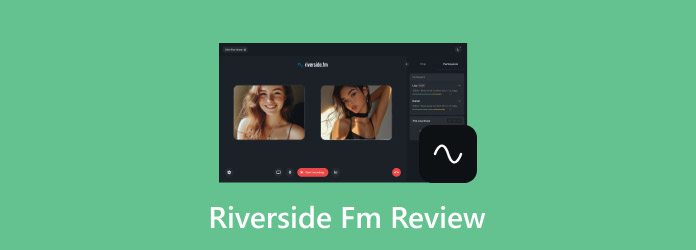
Riverside recording is a cloud-based tool that was created and designed for interviewers, podcasters, content creators, and other casual users. The tool focuses on giving a high-quality audio and video during the recording process. Compared with traditional recorders, this tool records locally on each device, ensuring a better and studio-grade quality even if the connection drops. What we like here is that it supports 4K video and uncompressed audio, making Riverside an ideal recorder for all users.
To get more insights about the recorder, you can check its key features below.
Desktop Features
Studio-Quality Local Recording
Riverside recorder can record both video and audio locally on each participant's device. With this feature, you can ensure that files are not affected by internet drops. It only means that you can get up to 4K video resolution and uncompressed audio, leading to better quality. You can record webinars, podcasts, and any content with a satisfying viewing experience. Plus, the tool is ideal for interviewers and podcasters who need a broadcast-level output without any expensive gear.
Text-Based Editing and AI Tools
Another good thing about the recorder is that it can provide a transcript of your recordings. It lets you edit by simply deleting text. Additionally, AI tools can instantly remove filler words, adjust eye contact, and deal with background noise. With this workflow, you can save more time and make editing simple and perfect for non-technical users.
Multi-Track Recording
What makes the recorder powerful is that it supports multi-tracking recording. Each participant's video and audio are saved separately, giving you a chance to edit and control post-production. You can instantly remove the background noise from the recorder without affecting other users. With this useful feature, you can expect a smoother and more precise editing.
Mobile Features
Quick Sharing and Upload
After the recording process, you can instantly upload your recordings to the cloud for distribution and editing. You can also share your recorded file on various platforms, such as YouTube, Spotify, and other social media platforms.
On-the-go Recording
Riverside screen recording is also an ideal tool if you want to record videos on an iPhone or Android. You can also record various content, such as meetings, podcasts, and interviews. The tool ensures that you can still get the best quality for both audio and video locally.
AI-Driven Transcription and Editing
The mobile app can also generate transcripts automatically. This feature allows you to eliminate filler words, cut sections, and enhance your recordings without relying on your desktop. This only shows how powerful the recorder is, especially for content creators, streamers, and other professionals.
Part 2. Detailed Review of Riverside Recorder
Want a detailed review of the recorder? Then, check everything in this section as we offer its advantages, drawbacks, users' reviews, and other information.
Good Things about Riverside Recorder
- The tool ensures to offer high-quality videos and uncompressed audio. It lets you play your recordings with satisfying video and audio playback.
- The main layout of the tool is comprehensive. There is no need for installation, and it has real-time status indicators.
- It offers AI-powered editing tools. It can automatically remove filler words, background noise, and eye corrections.
Drawbacks of Riverside Recorder
- The tool has editing limitations. It can only offer basic editing tools, making it not ideal for improving the overall appearance of the video and audio.
- Since it is a cloud-based recorder, you must have a stable internet connection.
- There is a Riverside recording limit when using the free version.
- There is no green screen, and the collaboration tools are limited.
- A poor internet connection can result in delayed upload.
Users' Feedback and Ratings
| Users from | Summary of Feedback | Ratings |
|---|---|---|
| G2 | The tool is simple to access and operate. It can even ensure that it can give you a satisfying audio and video quality. | 4.8 / 5 |
| Capterra | Riverside has been very positive. It's a powerful platform that delivers high-quality audio and video, which is essential for producing professional podcast and interview content. The ability to record locally and generate separate tracks makes a noticeable difference in the final product. | 4.8 / 5 |
| Toolradar | The recorder can perform well. It has an intuitive layout and can offer high-quality output. The only problem here is that its free plan has various restrictions. | 4.8 / 5 |
Part 3. Reliable and Local Alternative to Riverside Recorder
Looking for a reliable and local alternative to the Riverside Recorder? Then, we suggest using Tipard Screen Capture. This recorder is safe to use and can offer a smooth and stable performance. It can even provide a clear user interface with an easy workflow, making it ideal for all users. The best part here is that it can handle the AV1 codec, which is ideal for YouTube and other social media platforms. Aside from that, Tipard can support long-duration recording without any stutter or lag. Thus, if you need a powerful recorder that can outperform Riverside, look no further than Tipard Screen Capture.
- The recorder can record both audio and video with the best quality.
- The program can customize the screen to select the area to be recorded.
- It can offer editing tools to improve the recordings, such as trimmer, cropper, effects, filters, and more.
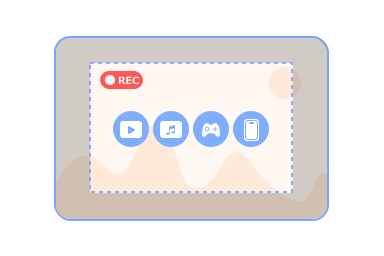
- It can record various contents, such as meetings, gameplays, instructional videos, text-based information, phone screens, music, and more.
To check its capability as an excellent recorder, follow the steps below.
Step 1 Access Tipard Screen Capture on your desktop. To easily get the recorder, you can use the buttons above.
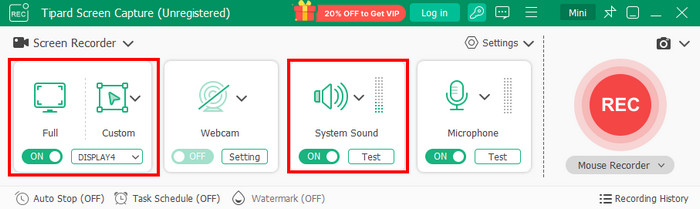
Step 2 From the interface, you can choose Custom or Full to select and customize your screen. Ensure that the System Sound function is turned on to record the audio.
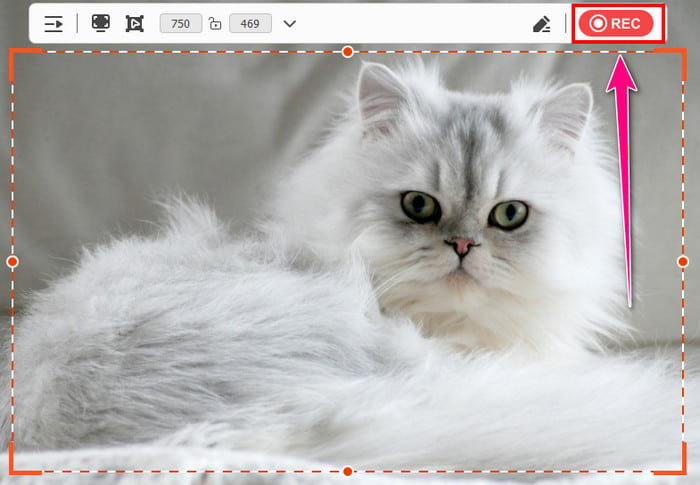
Step 3 To begin the recording procedure, tap the REC button from the right interface. To finish the recording, click the Stop button.
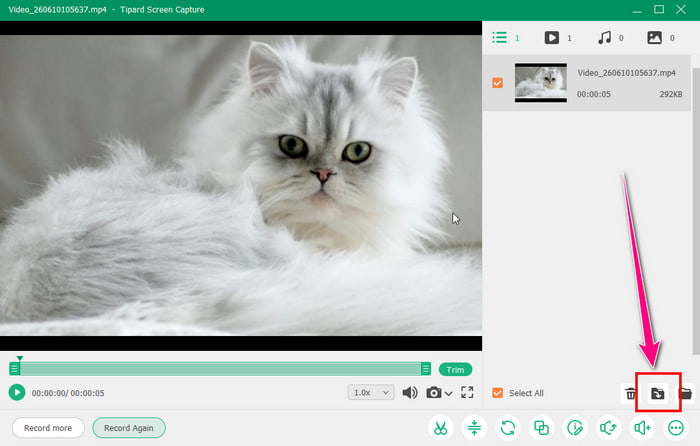
Step 4 When the preview shows up, you can play the video to check the result. Then, hit Export to save the recording on your computer.
Part 4. FAQs about Riverside Review
What editing tools can you use on Riverside?
Some of the basic editing tools you can access are text-based editing, audio and video cutter, and transcript editor.
Is the Riverside recorder perfect for beginners?
There is no doubt that the recorder is ideal for beginners, thanks to its intuitive user interface. You can record your video and audio without encountering any problems.
Is Riverside Recorder affordable?
If you are a serious podcaster or video creator, we can say that the platform is affordable. Its starting price is $29.00 per month. With this plan, you can access all the features of the recorder, ensuring that you can achieve the result you need after the recording and editing process.
Conclusion
With this detailed review of Riverside Recorder, you have found out that it is among the best recorders you can access on your browser. It can even give you the best video quality and uncompressed audio, resulting in better playback. Plus, if you need a better recorder that you can use on your desktop, we suggest using Tipard Screen Capture. This program can give a smoother recording process without relying on the internet. It can also offer more editing tools to improve and enhance our content, making it a top choice for all users.

Record full screen, portion, window, game, and phone seamlessly without lag
100% Clean & Safe
100% Clean & Safe

More Reading



About the Author

 Click here to join the discussion and share your comments