

- Part 1: Why Users Want a Free DVD Ripper on Mac
- Part 2: Quick Look at the 7 Best Free DVD Rippers for Mac
- Part 3: Side-by-Side Comparison of the 7 Free DVD Rippers on Mac
- Part 4: Detailed Review of the 7 Free DVD Rippers for Mac
- Part 5: How We Tested the 7 Free DVD Rippers on Mac
- Part 6: Troubleshooting Common DVD Ripping Issues on macOS
- Part 7: How to Choose Your Best Free DVD Ripper for Mac
- Part 8: FAQs of Free DVD Ripper for Mac
When you want to move old videos to your Mac, the right extractor can save hours. Many users search for a free DVD extractor Mac tool but end up with apps that lag, crash, or give low-quality results. This article sorts through the noise with clear tests and simple notes from real use. You will see which tools read discs well and which ones fail with long or scratched media. The goal is to help you pick a safe and steady option. Next, we review the top tools, the best free Mac choices, and a chart for quick checks.
- Part 1: Why Users Want a Free DVD Ripper on Mac
- Part 2: Quick Look at the 7 Best Free DVD Rippers for Mac
- Part 3: Side-by-Side Comparison of the 7 Free DVD Rippers on Mac
- Part 4: Detailed Review of the 7 Free DVD Rippers for Mac
- Part 5: How We Tested the 7 Free DVD Rippers on Mac
- Part 6: Troubleshooting Common DVD Ripping Issues on macOS
- Part 7: How to Choose Your Best Free DVD Ripper for Mac
- Part 8: FAQs of Free DVD Ripper for Mac
Part 1: Why Users Want a Free DVD Ripper on Mac
"I have a shelf of DVDs that I'd like to rip and store the main title or episodes on my Mini to play on my AppleTV. It would also be nice to archive them before the DVD media becomes unreadable."
A user in Reddit wants a DVD ripper on Mac to digitize DVD collections. As Apple hardware continues to evolve, Mac users increasingly need free tools to bridge the gap between their physical collections and digital lifestyles.
- Hardware Limitations: Modern MacBooks and iMacs lack built-in disc drives. Digitizing allows users to enjoy their library without tethering to an external USB SuperDrive.
- Apple Ecosystem Syncing: Converting DVDs to MP4 or MOV enables seamless playback across iPhones, iPads, and Apple TV via AirDrop or iCloud.
- Media Preservation: Physical discs are vulnerable to "disc rot" and scratches. Digital backups on a Mac or external SSD ensure long-term preservation of rare content.
- Retina Display Optimization: Standard 480p DVDs often look "muddy" on high-resolution Retina screens; ripping allows for deinterlacing and sharpening to improve visual clarity.
- One-Time Use: For users with only a few personal discs, a free, open-source tool like HandBrake is more practical than purchasing a commercial license.
Part 2: Quick Look at the 7 Best Free DVD Rippers for Mac
HandBrake: Best for comprehensive transcoding - This open-source and free DVD ripper for Mac offers the most granular control over video codecs and presets for converting unprotected DVDs.
MakeMKV: Best for lossless preservation - It specializes in quickly extracting the raw video and audio streams into a high-quality MKV container without re-encoding.
VLC Media Player: Best for quick, basic conversion - While primarily a player, it serves as a handy tool for ripping discs directly into various digital formats using its hidden conversion feature.
DVDFab HD Decrypter: Best for handling older protections - This free version of the premium suite can bypass CSS and Region Codes on most DVDs released more than a year ago.
MacX Free DVD Ripper: Best for Apple device optimization - It provides a streamlined interface with pre-configured profiles specifically designed for iPhone, iPad, and Apple TV users.
Tipard DVD Ripper for Mac (Free Edition): Best for beginner-friendly editing - It offers a simple workflow that includes basic built-in tools for trimming and cropping your video during the ripping process.
MacTheRipper: Best for legacy Mac systems - Though an older tool, it remains a classic choice for users on vintage macOS versions looking to extract raw DVD data.
Part 3: Side-by-Side Comparison of the 7 Free DVD Rippers on Mac
| Product Name | Best For | Decryption Capability | Output Format | Processing Speed |
|---|---|---|---|---|
| Tipard DVD Ripper for Mac | Beginner-friendly editing | Strong | MP4, MKV, MOV, AVI, ProRes, and 500+ | Super Fast |
| HandBrake | Comprehensive transcoding | None (Native) | MP4, MKV, WebM | Very Fast |
| MakeMKV | Lossless preservation | Excellent (AACS, BD+) | MKV | Fast (No re-encoding) |
| MacX Free DVD Ripper | Apple device optimization | Basic | MP4, MOV, M4V | Medium |
| VLC Media Player | Quick, basic conversion | Basic (CSS) | MP4, TS, OGG, etc. | Medium |
| DVDFab HD Decrypter | Handling older protections | Strong (Discs >1 yr old) | MKV, MP4, ISO | Fast |
| MacTheRipper | Legacy Mac systems | CSS only | VOB, DVD folder | Slow |
Part 4: Detailed Review of the 7 Free DVD Rippers for Mac
1. Tipard DVD Ripper for Mac
Tipard DVD Ripper for Mac earns the top spot because it works fast and stays stable. It reads discs with ease and keeps the video clear. In tests, it handled old and scratched DVDs better than most tools. It also worked well with long files and did not freeze.
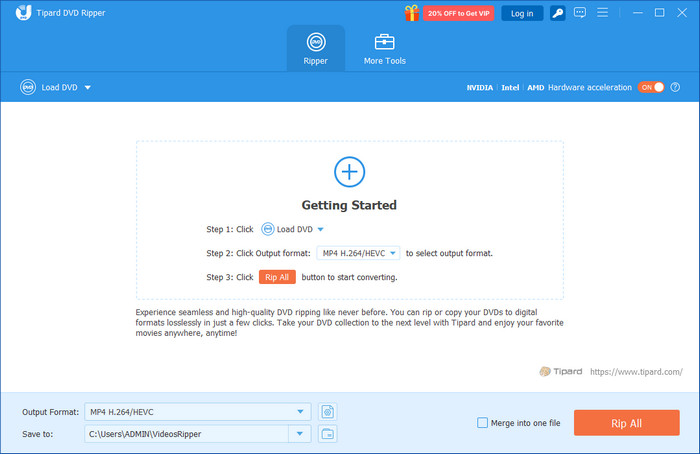
The simple layout makes it easy for any user to learn. You also get many formats and quick edit options. If you need a stronger tool than a free DVD ripper for Mac OS, this one is a solid and safe choice.

- Removes major DVD protections for smooth extraction from commercial discs.
- Uses advanced GPU acceleration to boost ripping speed up to 30×.
- Supports over 500 output formats for wide playback compatibility.
- Upscales DVD videos to 1080p or 4K for clearer viewing on modern screens
- Includes simple editing tools that let you trim, crop, merge, and adjust video effects

2. HandBrake
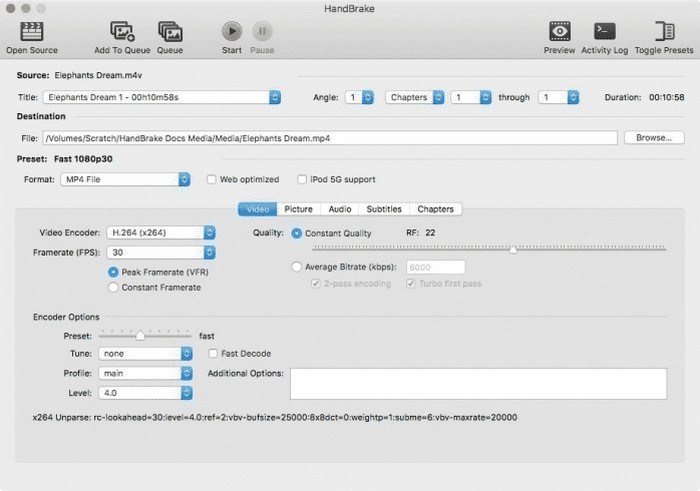
HandBrake is a trusted open-source tool that works well for non-protected discs. As a reliable DVD extractor for Mac for free, it converts VIDEO TS folders or ripped DVDs into MP4 or MKV quickly. With batch processing, hardware acceleration, and built-in presets for Apple and Android devices, HandBrake makes ripping and optimizing videos easy and efficient.
Key Features:
- Transcodes VIDEO-TS folders or unprotected discs into MP4 or MKV
- Batch processing and hardware-accelerated encoding
- Presets for Apple, Android, and other devices
3. MakeMKV
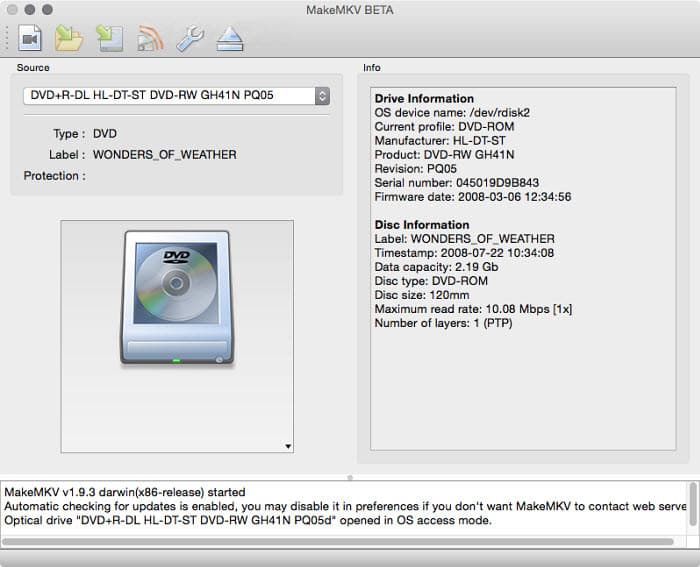
MakeMKV is perfect for lossless DVD backups. This DVD ripper for free Mac OS X bypasses protections on many commercial discs and converts full video content into MKV without re-encoding. It also maintains all audio tracks and subtitles so that they can be archived or converted to other formats at a later stage.
Key Features:
- Burns DVD and Blu-ray to MKV containing video, audio and subtitles
- By-passes general DVD security, such as AACS
- MacOS, Windows, and Linux are cross-platform
4. MacX Free DVD Ripper
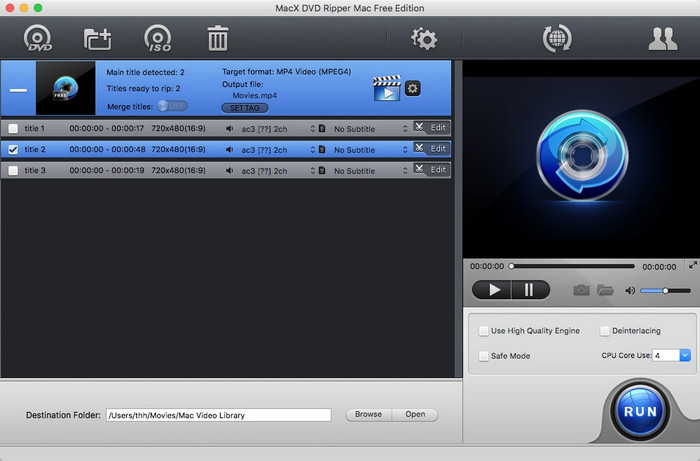
MacX Free DVD Ripper is able to deal with both secured and unsecured discs. Being a free Mac OS DVD ripper, it would convert DVDs to MP4 or MOV, or H.264 files, preserving the video quality. Mac users can easily back up DVDs using its easy-to-use interface and the preset profiles.
Key Features:
- Removes protections such as CSS, region code, and ARccOS
- Converts DVDs to MP4, MOV, H.264, and HEVC
- Simple interface for beginners and advanced users
5. VLC Media Player
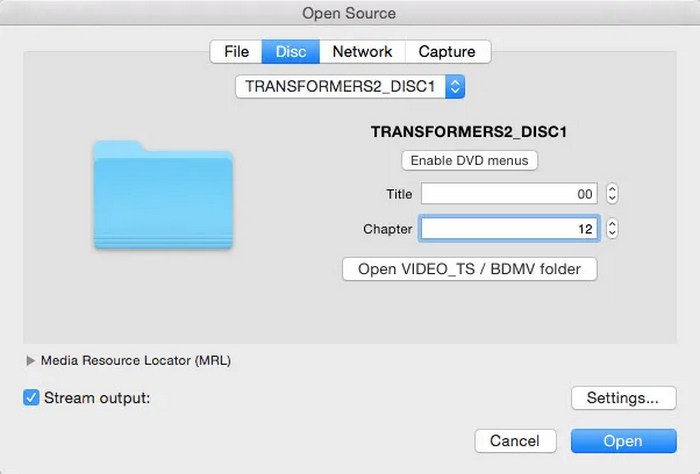
VLC Media Player is a widely recognized, free, and open-source multimedia tool for Mac users. While primarily known for playing almost any video format, it also includes a robust, albeit hidden, conversion feature that lets it serve as a capable free DVD ripper for Mac. It can convert DVDs into popular digital formats like MP4, MKV, and MOV while offering basic control over parameters such as bitrate and resolution.
Although it lacks the advanced hardware acceleration and deep decryption features of specialized rippers, VLC can handle some copy-protected discs, such as those with CSS, by manually installing the libdvdcss library. This makes it an excellent free DVD ripper for Mac users who need a quick, no-cost way to digitize their physical media without installing dedicated ripping software.
Key Features:
- Work on Intel and Apple Silicon Macs running macOS 10.7.5 or later.
- Support exporting to H.264, H.265 (HEVC), AVI, and MPEG-4.
- Allow users to select specific audio tracks and manually choose DVD titles or chapters to rip.
- Completely free to use with no advertisements, watermarks, or subscription fees.
6. DVDFab HD Decrypter
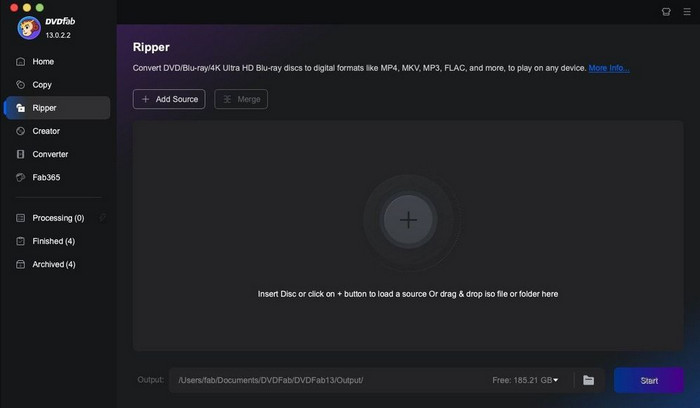
DVDFab HD Decrypter focuses on backing up DVDs to your Mac's hard drive. As a simple Mac DVD free ripper, it removes most DVD protections and lets you choose between Full Disc or Main Movie modes. Lightweight and free, it's ideal for straightforward ripping.
Key Features:
- Removes CSS, RC, RCE, APS, and other common protections
- Full Disc or Main Movie ripping modes
- Compatible with macOS (Intel and ARM)
MacTheRipper
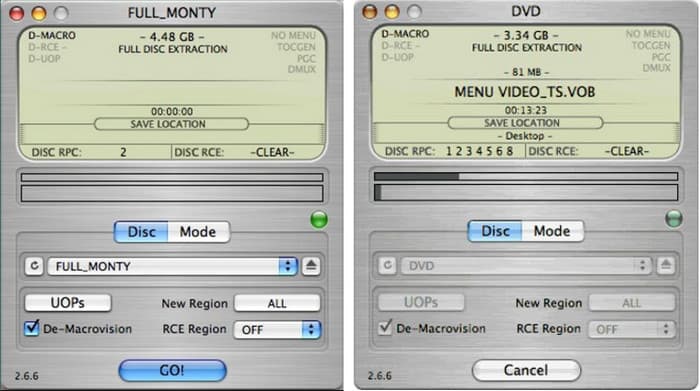
The MacTheRipper is an old version of Mac systems. This free Mac-based DVD rip program is a re-implementation of the DVD protections and is able to rip discs to ISO files or DVD folders without re-encoding. It retains the entire DVD format and can be used to store it or used later.
Key Features:
- Bypasses DVD protections like CSS and region coding
- Saves video as DVD folders or ISO images
- Free and stable for older macOS versions
Part 5: How We Tested the 7 Free DVD Rippers on Mac
To ensure the highest accuracy for our 2026 guide, our technical team conducted hands-on evaluations of each software on both Apple Silicon (M1/M2/M3) and Intel-based Macs. Our testing process focused on four critical performance pillars:
- Ripping Efficiency: We timed how long each tool took to convert a standard 90-minute DVD to a digital format, monitoring CPU and GPU load throughout the process.
- Decryption Versatility: We tested each ripper against various encryption layers, including CSS and Region Codes, to verify which tools could successfully handle commercial discs.
- Output Fidelity: We conducted side-by-side visual inspections comparing the original disc quality against the ripped files (MKV, MP4, etc.) to check for artifacts or frame drops.
- Ease of Use: Each interface was assessed based on how quickly a novice user could navigate from disc insertion to the start of the ripping process.
Authenticity & Trust Commitment
Our testing is completely authentic and credible. Unlike many review sites that rely on manufacturer claims, we perform independent, manual testing on every product listed.
- Zero Bias: We do not accept "pay-to-play" placements; our rankings are based strictly on technical performance and feature sets.
- Real-World Scenarios: We use a mix of brand-new releases and older, scratched legacy discs to simulate real-world user challenges.
- Verified Results: Every claim regarding speed, decryption strength, and format support is verified through repeated testing cycles on current macOS versions.
We are committed to providing grounded, peer-level advice so you can digitize your media collection with total confidence.
Part 6: Troubleshooting Common DVD Ripping Issues on macOS
When using free software like HandBrake, MakeMKV, or VLC on macOS, you may encounter platform-specific hurdles. Here are the most common issues and how to solve them:
1. "No Disc Found" or Drive Access Errors
Solution: go to System Settings > Privacy & Security > Files and Folders and ensure your ripper has access to Removable Volumes.
2. Ripping Fails Due to Copy Protection
Solution: Free tools like HandBrake and VLC cannot natively decrypt most commercial DVDs; you must manually install the libdvdcss library (often via Homebrew) to enable CSS decryption.
3. Audio/Video Sync Issues
Solution: Many free DVD rippers on Mac default to "Peak Framerate," which can cause audio drift on Mac; switch the video setting to "Constant Framerate" to keep audio and video aligned.
Part 7: How to Choose Your Best Free DVD Ripper for Mac
Choosing the right DVD ripper can save you time and protect your video quality. While many free tools exist, Tipard DVD Ripper for Mac stands out as the most reliable option for Mac users. Here are the five key qualities to check when picking a ripper, with real-world performance in mind.
1. Speed and Performance
A top ripper processes discs quickly and reliably. Tipard uses NVIDIA CUDA, AMD APP, and multi-core CPU acceleration to deliver up to 30x times faster ripping speed, even for large or protected DVDs.
2. Format Support
Find a tool that is able to process numerous output formats. Tipard accepts more than 500 digital formats, such as MP4, MOV, MKV, and Apple presets, Android or game console presets.
3. DVD Protection Removal
Many DVDs come with CSS, AACS, or region codes. Tipard reliably removes these protections, letting you rip discs without errors or interruptions.
4. Video Quality
Your ripper should maintain or enhance video clarity. Tipard is able to scale the standard DVDs to 1080p or 4K, preserving the audio and text and providing a clear and crisp image on the new screens.
5. Ease of Use
The ripper should be easy to operate, even though it has advanced features. Tipard has an easy-to-use interface, pre-defined profiles, and simple editing features, and is both user-friendly and professional.
6. Editing Tools
A free DVD ripper allows minor edits before conversion. Tipard includes trimming, cropping, merging, rotating, and effect adjustments so you can customize your videos before exporting.
7. Backup Options
Look for software that helps preserve your DVDs safely. Tipard lets you back up discs to ISO files or folders, keeping menus, chapters, audio tracks, and subtitles intact for future use.
Not all free DVD rippers work the same. Many are slow or cannot handle all formats. Some cannot remove DVD protections. Tipard is different. It rips DVDs fast, supports over 500 formats, and handles protections reliably. For Mac users who want a stable, fast, and complete ripper, Tipard is the best choice.
Part 8: FAQs of Free DVD Ripper for Mac
What is the best free DVD ripper for Mac?
HandBrake is the best free DVD ripper for Mac because it has strong capability on GPU acceleration and transcoding. Although it doesn't support MOV or ProRes formats, the MP4 output option is also a good choice. What's more, HandBrake DVD ripper on Mac allows you to directly rip DVDs to a standard format or deeply customized the output parameters, which is good for both beginners and pro users.
Are there any free DVD rippers?
Yes, there are multiple free DVD rippers on Mac, including HandBrake, VLC, MakeMKV. Those famous tools have good performance and capabilities, which can help you do a simple and standard conversion easily.
Is WinX DVD Ripper really free?
WinX DVD Ripper is technically free, but the software is heavily tiered to encourage paid upgrades. While a standalone "Free Edition" exists for basic, full-length rips of older or unencrypted discs, most users accidentally download the "Platinum" trial, which is strictly limited to ripping only the first five minutes of a video.
Conclusion
Finding the right tool to move DVDs to your Mac is simple with the right choice. Many free options are slow or limited. Tipard stands out. With editing and backup features, it is more than just a basic tool. If you need a reliable DVD ripper free Mac OS X, Tipard is the best choice. It handles discs well and works even with old or long DVDs.
More Reading
About the Author

 Click here to join the discussion and share your comments
 Tipard DVD Ripper for Mac