

Key Takeaways
- The Hardware Win: Tipard Blu-ray Player dominates high-bitrate testing, achieving smooth 4K/8K playback with a record-low 6% CPU impact on mid-range Intel/NVIDIA setups.
- Best for Hidden Codecs: While Windows 11 often blocks HEVC/AV1 behind paid extensions, Tipard and VLC provide these decoders natively and for free.
- The Legacy Specialist: SMPlayer remains the top choice for reviving older, rare formats that modern players have phased out, ensuring your entire archive stays accessible.
- Best for Mobile: MX Player leads for Android/iOS by utilizing advanced multi-core decoding to preserve battery life while streaming 4K ProRes or MKV files.
- Security First: Using players with built-in codec libraries (like those listed below) is the only way to avoid the malware risks associated with downloading third-party codec packs.
A video player for all formats becomes essential when you try to open a video on your device, and it fails to play due to an unsupported file type. Whether you're watching movies, reviewing project footage, or streaming clips shared by friends, having a media player that supports a wide range of formats saves time, reduces frustration, and ensures smooth, reliable playback across all your devices.
This article highlights six excellent all-format video players. With these players, you can seamlessly play both new and older video codecs and formats, while also addressing common compatibility issues, such as HEVC or AV1 videos being unsupported on Windows due to codec problems.
What Makes an All-Format Video Player?
An all-format video player does not require additional downloads or codec packs for any tunable audio or video file. It works by having a plethora of built-in video codecs that can decode various formats via an extensive built-in library.
An Overview of Codecs and Containers
Containers such as MP4, MKV, or AVI are video files that hold video, audio, subtitles, and supplementary information together.
The audio and video, internal to that container, are compressed via codecs (like H.264, H.265/HEVC, AV1, VP9, or AAC). The file may not play or have no sound if a player cannot support any of the content of the internal codec. For example, you may not play an HEVC MP4 video if your MP4 format video player doesn't support the HEVC codec. An all-format player must therefore fit a wide range of codecs and so can address almost any container-codec combination.Key Features We Looked For:
- Wide Codec Support: The player can manage all the popular and exceptional codecs for any video file format without additional configurations or settings required.
- Usability: The player must have a straightforward interface to let users open and play files without having to navigate through complex menus.
- System Requirements: Smooth and fast video playback without crashing, even with large files that are in 4K or 8K.
- Other Features: Ability to support subtitles, manage playlists, stream content, enhance audio and video, and have other various options available for customization.
The Best All-Format Video Players for Windows & Mac
| Video Player | AV1 Decoding | 8K Support | Blu-ray Menu | CPU Load (4K) |
|---|---|---|---|---|
| Tipard Blu-ray Player | Native (Hardware) | Ultra smooth | Full support | about 6% (Lowest) |
| VLC Media Player | Native | Good | No | about 12% |
| SMPlayer | Native | Good | No | about 10% |
| KMPlayer | Native | Occasional Lag | No | about 8% |
| MX Player (Mobile) | Software only | Up to 4K | No | N/A |
| Video Player All Format (Mobile) | Software only | Up to 4K | No | N/A |
Top 1. Tipard Blu-ray Player
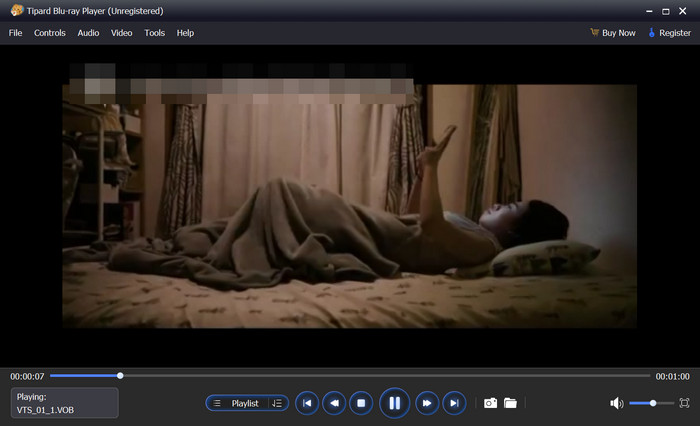
Tipard Blu-ray Player is one of the most versatile media players for all formats out there. It can play MP4, MKV, AVI, MOV, and many other video formats, including HEVC, AV1, H.264, MPEG, H.266, and more. It also supports a wide range of popular and rare audio formats and codecs, ensuring your videos play with perfect sound every time.
Regardless of the format or resolution (even 4K and 8K!), or whether it is an ISO file, folder, or Blu-ray disk, this all-format video player for PC and Mac can function smoothly and without the need for external codecs.
Moreover, it supports full hardware decoding, allowing you to play large videos, such as 2K and 4K content, smoothly, while using only about 4% to 7% of your CPU.

- Support MP4, MKV, AVI, WMV, MOV, 4K, UHD, and even 8K.
- Natively support HEVC/AV1 without extra payment for extensions.
- Play Blu-ray discs, folders, ISOs, and DVDs.
- Deliver high-quality audio with Dolby, DTS, and 7.1 surround.
- Let you adjust brightness, contrast, hue, saturation, gamma, and use deinterlacing.
- Offer snapshots, playlists, and easy audio/subtitle switching with shortcuts.
- Blu-ray and high-bitrate videos stream effortlessly.
- Performance remains stable and smooth, even with larger files.
- No external codecs required.
- Customizable with multiple interfaces to choose from.
- Trusted and frequently maintained.
- Start-up is simply overwhelming for some players.
Best For: Users who want a premium, stable all-format player that handles Blu-ray and high-resolution files smoothly while offering powerful playback without needing codec packs.Those who prioritize reliable service and playback support and who wish to avoid external codec packs.
Why We Select It
Among the six all-format video players, we chose Tipard Blu-ray Player as our top pick due to its extensive format and codec support, as well as excellent hardware acceleration. This is how we tested it: our test computer is equipped with a 12th Gen Intel(R) Core(TM) i5-12400 and integrated Intel(R) UHD Graphics 730, so it's not a high-end PC. Even when playing a 45 GB 4K HEVC MP4 movie, CPU usage remained at only 6%. The video playback is seamless without lag or stutter.
You May Also Like:
Top 2. VLC Media Player
Users accustomed to media players will almost certainly be familiar with VLC: one of the most popular video players for all video and audio formats. Cross compatible with Windows, Mac, and Linux as well as mobile (it is totally free!), VLC Media Player is almost unlimited in streaming ability. This ranges from home videos to DVDs and streamed content.
From our test, VLC Media Player also support wonderful GPU decoding. When we play a 45 GB 4K video, the CPU usage is only about 12%. We've also tested all our sample videos, and VLC can play them without any issue.

- No cost, and zero adware or spyware.
- Some of the greatest formats and codecs support without additional requirements.
- Can stream media across several devices and/or serve as a media server.
- Interface is a bit dated compared to the competition
- Occasional performance or stuttering issues with very high-res or exotic formats.
Best For: Customers looking for a steady, free, cross-platform media player with no Blu-ray menu access that works with almost every format and includes enhanced streaming and media management.
Top 3. SMPlayer
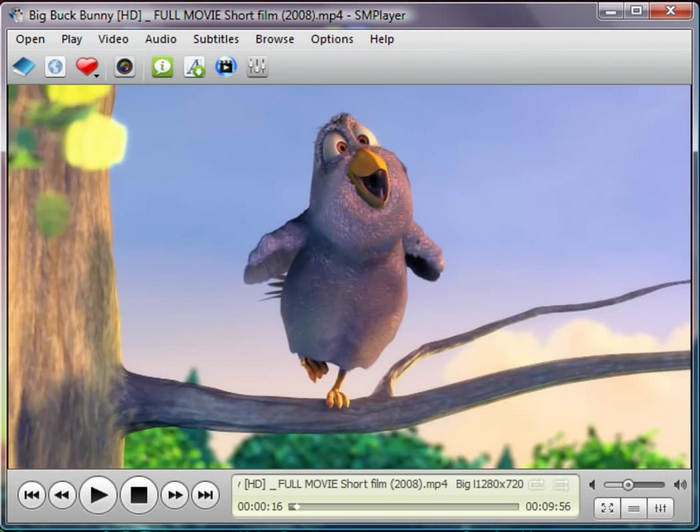
SMPlayer is a free, open-source front end for MPlayer that comes with a variety of built-in codecs, so there's no need to install additional codec packs. According to its official website, it supports many common formats and codecs, including MP4, AVI, MKV, MPEG, DVD, H.264, DivX, RealVideo, and more. While it does not support H.265 or AV1, we still consider it an excellent all-format video player because it can handle older video and audio formats that many other players no longer support.
Of course, SMPlayer supports GPU decoding. We tested a 47 GB 4K video (H.264 codec), and the CPU usage was 16%. The playback is also smooth without lag.
- Remember the position and settings of each file for future playback.
- Supports a wide range of formats and can be downloaded from opensubtitles.org.
- You can search for and even play YouTube videos via a URL from the interface.
- A bit of an older style interface is apparent, and the UI is not very modern.
- A few customers might find the abundance of settings to be a little overwhelming.
Best For: Customers looking to have a lightweight but powerful video player with plenty of deep control of playback features such as auto-resume, built-in codecs, and streaming access to sites like YouTube.
Top 4. KMPlayer
KMPlayer, developed by PandoraTV, is a free media player available on Windows, Mac, iOS, and Android. It supports a wide range of formats, including MP4, MKV, MOV, AVI, and codecs such as H.264, H.265, AV1, VP9, and more. This all-format video player also allows you to install third-party codec packages if you need support for rarer formats.
In terms of playback quality, this high-end all-format multimedia player also supports full hardware acceleration. During our test with a 45 GB 4K video, CPU usage remained at just 8%, demonstrating excellent performance.
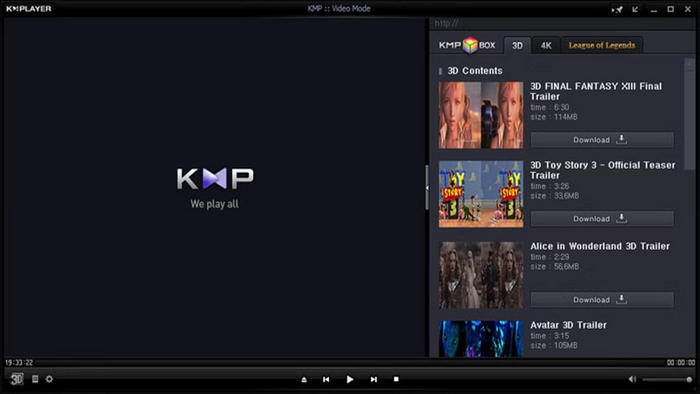
- Provides exceptional support for a range of video formats.
- Built-in codecs, minimal need for manual pack installations.
- Interface can be modified: skins, hotkeys, UI alterations.
- Additional playback options: can play broken or incomplete files.
- Lightweight and quick for various scenarios when optimally configured, with video correction features.
- Advertisements can be intrusive or annoying with the free version.
- The designs may be complex or cluttered for amateur users.
Best For: Users looking for a highly customizable, feature-rich player with great high-resolution support, who do not mind the ads and frequently deal with atypical or slightly faulty video files.
Best All-Format Video Players for Android & iPhone
Top 1. MX Player
MX Player is one of the most popular and powerful mobile video players, available for both Android and iOS. It supports a wide range of media formats, including common ones like MP4, MKV, AVI, MOV, WMV, FLV, and 3GP, as well as advanced formats such as VOB, RMVB, WebM, TS, M4V, and F4V. Thanks to its seamless playback quality and broad format support, MX Player is a reliable choice for users who want to quickly open and watch videos on their mobile devices.
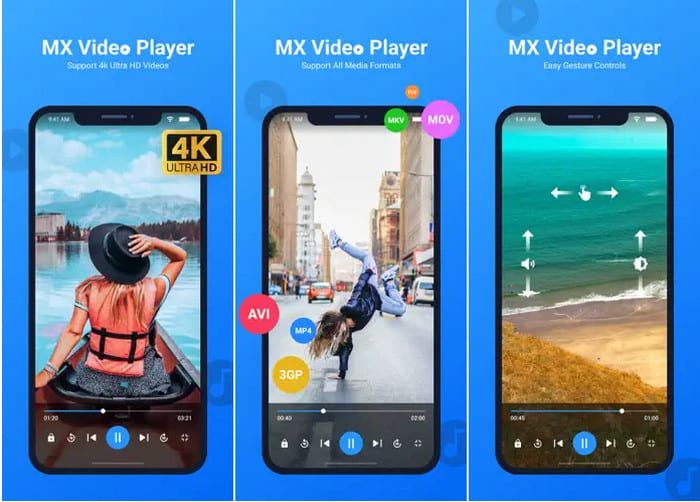
- Almost all video formats are supported: MKV, MP4, AVI, MOV, and others.
- There is smooth and stable playback due to hardware acceleration.
- Subtitles can be adjusted effectively.
- Video can be played offline or streamed online.
- In the free version, there are ads.
Best For: Customers who seek a feature-rich and smooth video player, with great subtitle and gesture controls.
Top 2. Video Player All Format (InShot Inc.)
InShot Inc. Video Player All Format is an excellent all-format media player for both iOS and Android. It is versatile, modern, and responsive, capable of playing nearly any video format, including MP4, MKV, AVI, MOV, M4V, 3GP, FLV, WMV, RMVB, and TS. It supports 4K/2160p video playback with full hardware acceleration and offers high compatibility with subtitles and audio tracks. This all-format video player also features a private video mode and even allows videos to be played in a floating window.
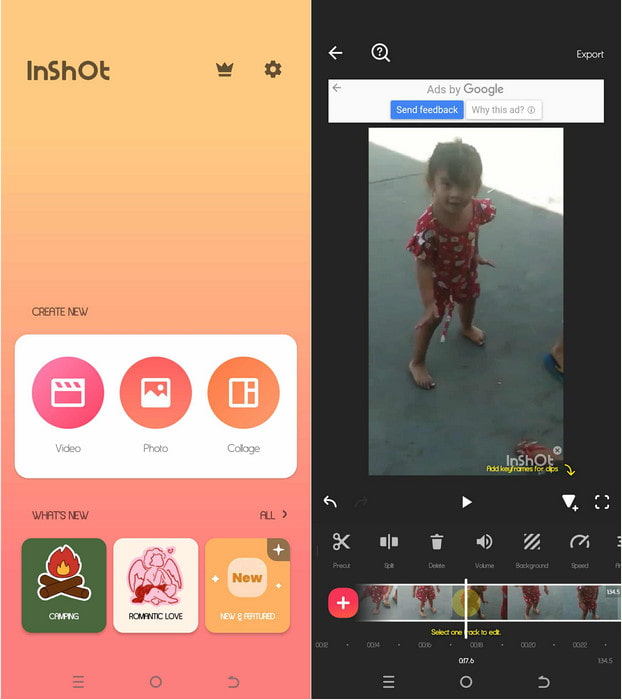
- Plays nearly all video formats, including MP4, MKV, AVI, MOV, and FLV.
- Able to play 4K videos with hardware acceleration.
- Ability to create a private folder to secure sensitive videos.
- Pop-up window to play videos, speed up video, and do other things at the same time.
- A simple and clean video player that allows you to scan videos.
- You will see ads unless you pay a premium.
Best For: This is a good video player for people looking to improve their video-playing experience.
Conclusion
With these six excellent all-format video players, you can play virtually any video, regardless of format or codec. They also support multiple audio tracks and subtitle formats, ensuring smooth playback without issues. Our top pick, Tipard Blu-ray Player, goes a step further by offering full hardware decoding, allowing you to watch large 4K and even 8K videos without consuming excessive CPU resources. Videos play seamlessly, with no stutter or lag.
More Reading




About the Author

 Click here to join the discussion and share your comments
 Tipard Blu-ray Player